
Somewhere around late January, an email from Shopify lands in your inbox. Your Form 1099-K is ready. You open it, scan down to the total, and the number looks wrong. It is bigger than your bank balance. Sometimes a lot bigger.
If that is you right now, take a breath. In almost every store we reconcile, the form is supposed to look like that. The 1099-K reports every dollar that ran through Shopify Payments, not what you kept, and the gap between the two is normal.
One note before we get into it: this is general information, not tax advice. Thresholds and rules change, and your situation is your own, so confirm the details with a CPA before you file.
What a 1099-K from Shopify actually reports
Form 1099-K is a payment processing report. Shopify Payments files a copy with the IRS and sends you one, so the IRS can compare the income you report against what actually moved through payment processors.
The key word is what moved. The form reports your gross payment volume: every card transaction Shopify Payments processed for your store during the year, before anything comes out. It does not subtract refunds, chargebacks, or Shopify Payments fees. None of those reduce the number.
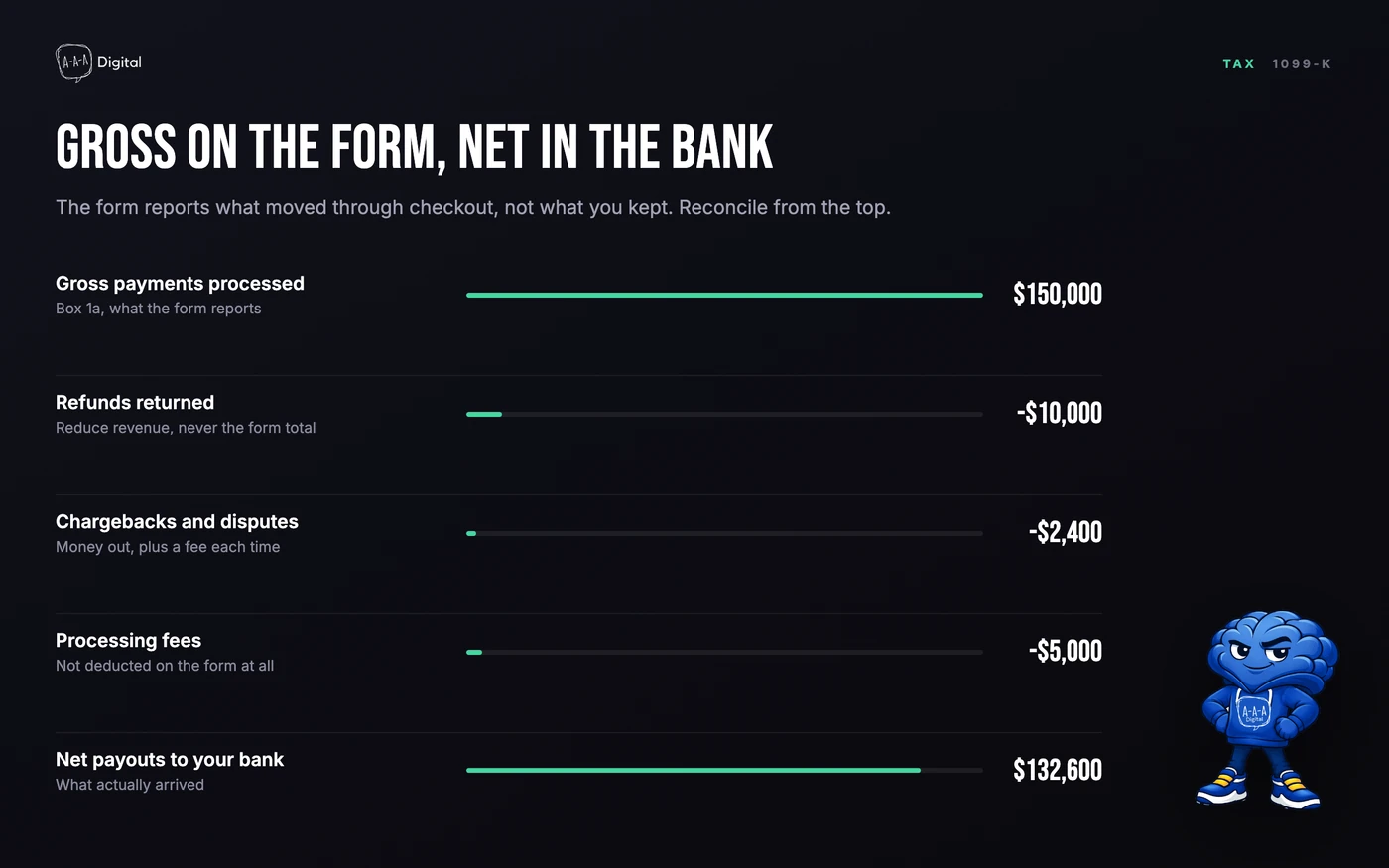
So the 1099-K is not a profit statement and it is not a bill. Think of it as a tally of checkout activity. If you processed $150,000 in sales, refunded $10,000, and paid $5,000 in processing fees, the form still says $150,000.
Two details merchants miss. Shopify only reports payments processed through Shopify Payments, so if you run a second gateway like PayPal, those transactions live on a separate form from a different processor. And Shopify does not withhold income tax on any of this. What you owe gets settled when you file, which is why the January surprise stings.
If you cannot state your margin after fees off the top of your head, that is the real problem this form exposes. Our free Shopify ROI calculator will give you a starting number in a few minutes.
Will you get one? The 2025 threshold
For tax year 2025, Shopify states in its Help Center that US merchants receive a 1099-K when they processed more than $20,000 USD and more than 200 transactions through Shopify Payments during the year. Both conditions have to be true.
If that sounds familiar, it should. The threshold was scheduled to drop to $600, and then Congress reversed course through the One Big Beautiful Bill Act in July 2025, putting the $20,000 and 200-transaction test back in place. We have watched this threshold bounce around for three straight years, so check the IRS website and the Shopify Help Center for the current number before you rely on any blog post, including this one.
Three other things worth knowing:
- US merchants only. Stores outside the United States do not receive a US 1099-K.
- Some platforms send forms below the threshold anyway. If you processed less and still got one, that is a platform decision, not an error.
- No form does not mean no tax. More on that below.
How to download your 1099-K from Shopify
Shopify delivers the form by email and in your admin by January 31 for the prior year. To grab the copy from your admin:
- Log in to your Shopify admin.
- Go to Settings > Taxes and duties. In current admin versions, the United States section sits on that page. If your menus have moved around, type "1099" into the admin search bar and it will surface the right page.
- Open the United States section.
- Find the form for the right tax year and download the PDF.
If you cleared both threshold conditions and nothing has arrived by early February, check your spam folder, then contact Shopify Support. The copy in your admin is the authoritative one.
Why the number looks too big
Here is the walk we do with clients. The 1099-K stops at line one of this waterfall:
Gross processed (the form's number), minus refunds, minus chargebacks, minus Shopify Payments fees, minus chargeback fees, equals net payouts. That final line is what actually landed in your bank account.
Refunds count in gross even though the money went back. Chargebacks count even though the bank pulled the funds. Fees never touch your account at all, because Shopify deducts them before paying out. Add it up and a store can easily see a 1099-K that runs 10 to 15% above its deposits. That is not an error. That is how the form is designed to work.
How to reconcile it with your books
You do not need to line-item hundreds of transactions by hand. You need four exports and one quiet afternoon.
- Payouts report. In Shopify admin, go to Finance > Payouts and export the full tax year as CSV. The total should land near your net payouts line, and each payout should match your bank statement.
- Fees. Pull the Shopify Payments cost report for the same period, so your accountant can book processing fees as an expense.
- Refunds and chargebacks. Export both for the year. These tie back to the deductions and prove the gross-to-net walk.
- Your accounting export. Whatever lives in QuickBooks, Xero, or a spreadsheet: income, cost of goods sold, expenses.
Hand the packet to your accountant with the 1099-K on top. They need the gross figure from the form plus the records that explain it. The form alone is not enough to file, and the payouts report alone is not enough either.

If the payouts total and your bank deposits disagree, do not guess at why. That is the moment to bring in a bookkeeper who knows ecommerce, because the gap usually sits in a gateway you forgot you used or a refund issued in a different year.
Shopify does not do your taxes
Worth saying plainly, because the App Store can make all of this look more automatic than it is. Shopify does not withhold income tax, does not file your return, and does not reconcile the 1099-K for you.
Sales tax is a separate lane entirely. Anything Shopify collected and remitted on your behalf is not your income, so make sure it never lands in your revenue line.
Bookkeeping apps help with the plumbing. Xero and QuickBooks connectors sync payouts and fees daily, and tax apps handle the sales tax side. They still need a human to review the numbers, and the reconciliation above is exactly the review your accountant does once a year.
What not to do with your 1099-K
- Do not ignore it. The IRS received a copy too. A mismatch between what you report and what the form says is how audit letters start.
- Do not report the gross as pure profit. You would overstate your income by the cost of goods, fees, and refunds, and overpay by thousands. The gross is the starting point, not the finish line.
- Do not panic-amend last year. A big number on its own is not a red flag. High gross with thin profit is normal in commerce.
- Do not assume no form means no tax. Income is taxable whether or not a 1099-K arrives. Plenty of stores under the threshold owe real tax and never see a form.
Shopify 1099-K FAQ
Does Shopify send a 1099-K? Yes. Shopify Payments issues Form 1099-K to US merchants who processed more than $20,000 and more than 200 transactions in the tax year. Check the Shopify Help Center for the current threshold before you assume.
How do I get my 1099-K from Shopify? In your Shopify admin, go to Settings > Taxes and duties and open the United States section, or search "1099" in the admin search bar. You can download the PDF there, and Shopify also emails it by January 31.
Is the 1099-K amount my income? No. The 1099-K reports gross payment volume, meaning everything processed before refunds, chargebacks, and fees come out. Your taxable income is what remains after costs, and it is much lower.
What if I never got a 1099-K from Shopify? If you were under the threshold, that is expected and you likely will not receive one. You still owe tax on your profit. If you cleared the threshold and no form arrived by early February, contact Shopify Support.
Does Shopify report to the IRS? Yes. Shopify Payments files the 1099-K with the IRS for every eligible US merchant. The IRS sees your gross processing volume whether or not you downloaded the form.
Is a Shopify 1099 K the same as a 1099-NEC? No. The 1099-K reports payment processing volume from Shopify Payments. A 1099-NEC covers payments to independent contractors, so a store owner would only see one for work done for the platform, not for ordinary store sales.
The bottom line
A 1099-K that dwarfs your bank balance is a bookkeeping problem before it is a tax problem, and it is a solvable one. If you would rather hand the reconciliation, the apps, and the store behind the numbers to a team that does this every week, book a free strategy call and we will walk through it together. See how we work on our Shopify experts page.
