Every custom Shopify project starts with the same wrong question: "Can we build it with the API?" The right question is which API, because Shopify does not have one API. It has several, each with a different user, a different authentication model, and a different blast radius when you misuse it.
This guide is about the one used to build buyer-facing experiences: the Storefront API. If you are evaluating a custom storefront, a mobile app, or a headless build, this is the documentation-level tour, minus the parts you will not need until month three.
Which Shopify API do you actually need?
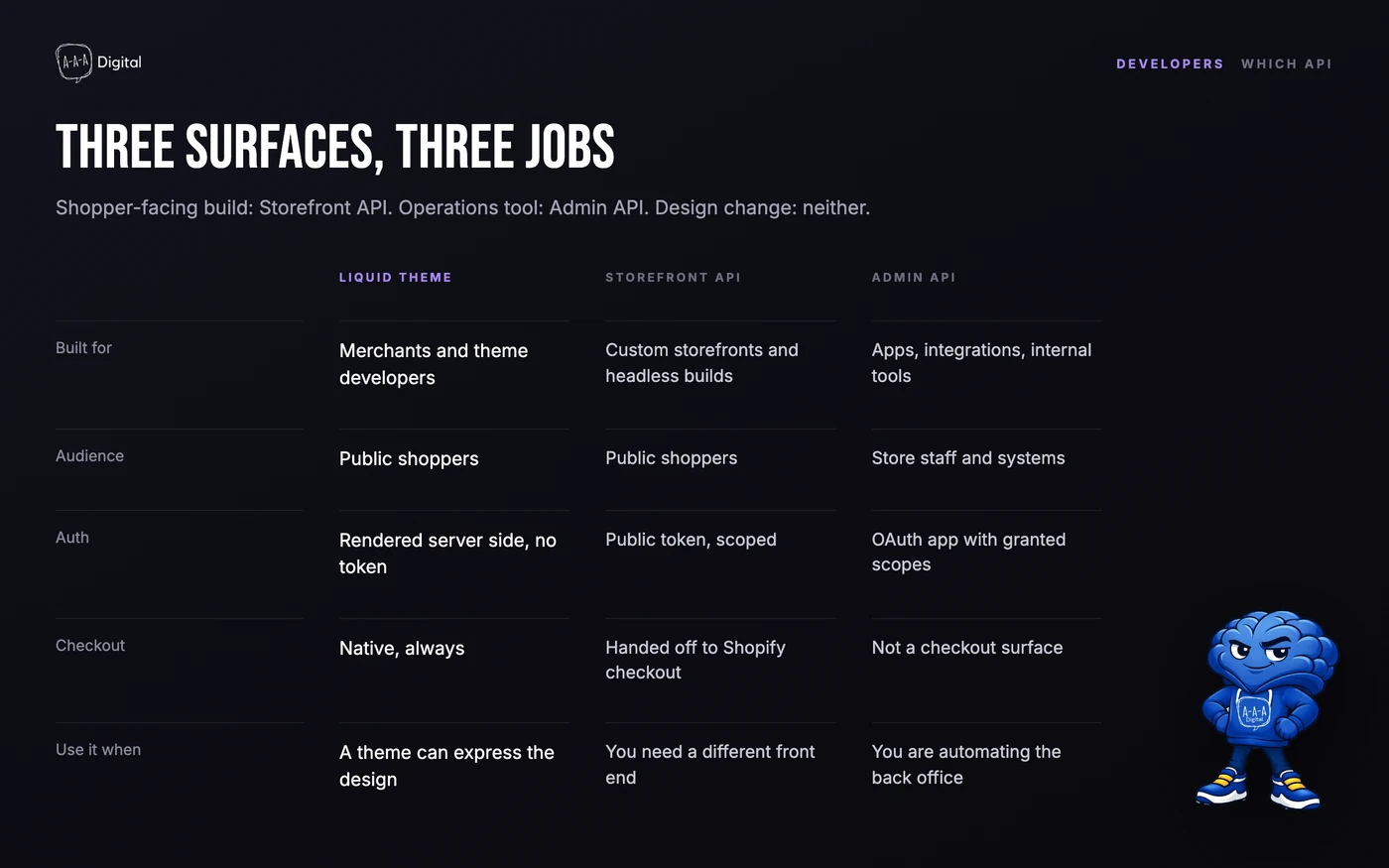
Three interfaces cover almost every project:
- Liquid themes change how a Shopify-hosted storefront looks and behave. No API, no separate hosting, no token management. If your goal is a different design on the normal store, this is the whole answer.
- The Storefront API serves shoppers. It exposes products, collections, search, carts, and a checkout handoff through GraphQL, using a public access token that ships in client-side code by design.
- The Admin API serves the business. Orders, customers, analytics, product management: anything your team or an app does behind a login, authenticated with OAuth and scoped per app.
The expensive mistake is using the Admin API where the Storefront API belongs. Serving catalog pages with the Admin API wastes rate limits, exposes far more data than the visitor needs, and breaks the moment Shopify audits your app.
What the Storefront API is
The Storefront API is Shopify's buyer-facing GraphQL API. You call a single endpoint at https://your-store.myshopify.com/api/graphql.json, identify yourself with a Storefront access token, and ask for exactly the fields you need. Because it is GraphQL, one request can carry a product grid, its images, prices, and availability in one round trip.
Two properties define it:
It is public on purpose. The Storefront access token is embedded in your storefront's code, visible to anyone who views source. That is safe because the API only returns what a shopper is allowed to see: published products, public collections, cart state. No order history, no customer list, no margins.
It is scoped to selling. The API exists to show merchandise and move a buyer toward checkout. Anything outside that job, such as updating a product or reading an order, belongs to the Admin API.
Getting access: the five-minute version
You do not apply for Storefront API access. You create it inside your own store:
- In Shopify admin, go to Settings > Apps and sales channels > Develop apps (or Custom apps, depending on your plan era).
- Create an app, name it after your project.
- In Configuration > Storefront API, enable the scopes you need.
unauthenticated_read_product_listingsandunauthenticated_write_checkoutscover most storefront builds; add cart and search scopes as needed. - Install the app on your store.
- Copy the Storefront API public access token from the API credentials tab.
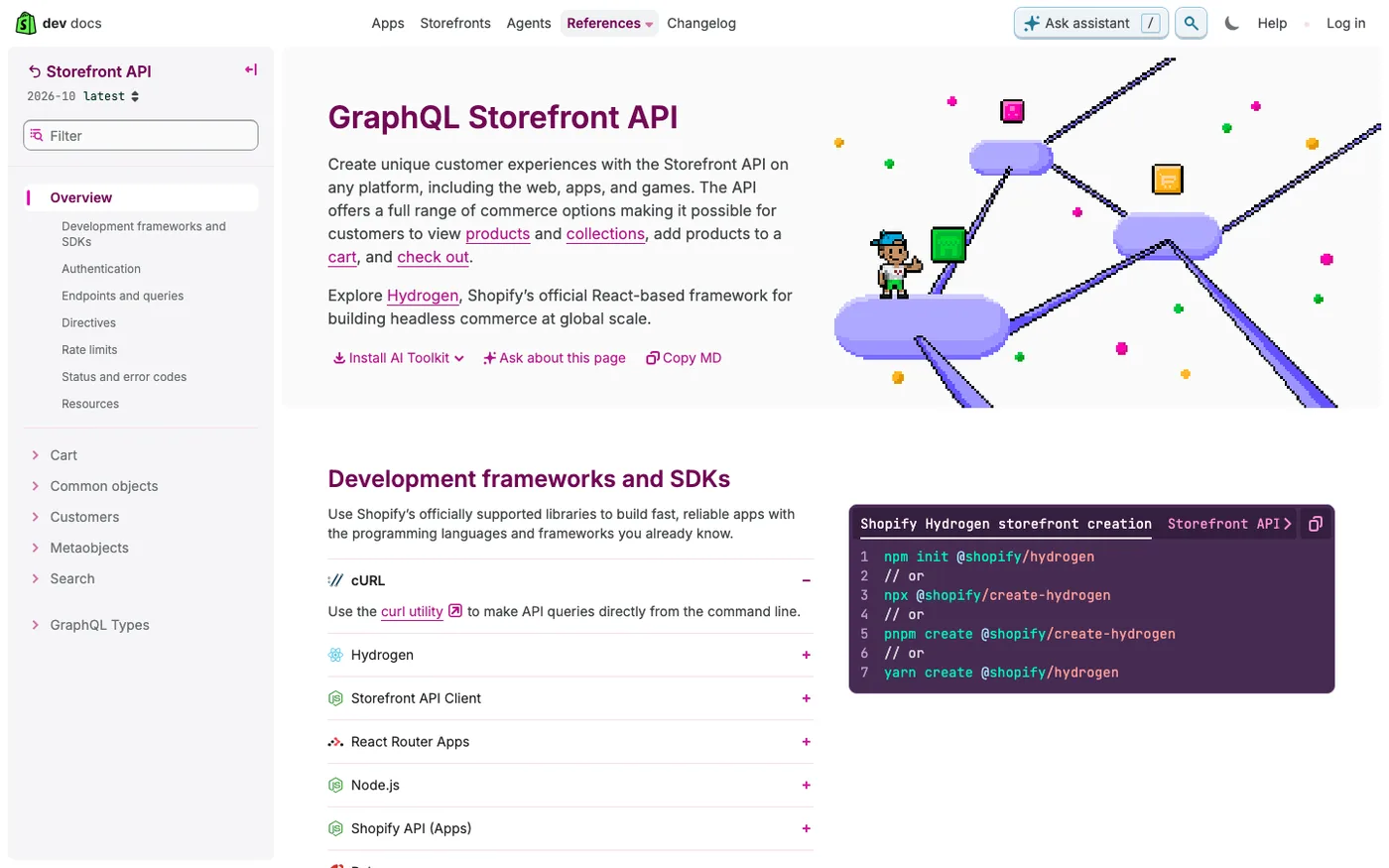
That token goes in your storefront's environment, prefixed calls only. If you are building with Hydrogen, Shopify's React framework, the token is wired automatically when you connect the project to your store, and much of the GraphQL above is generated for you.
What it can and cannot do
The capability list is shorter than most teams expect, and that is a feature.
It can: query products, variants, collections, and search results; create and update carts; apply discount codes; estimate checkout costs; create a checkout and hand the buyer to it; read a customer's own profile when they log in through Shopify's customer authentication; read public metafields.
It cannot: place or modify orders directly (orders are created by checkout, not by API call); read other customers' data; manage products, inventory counts, or prices; access draft orders; run admin reports. Any requirement on this second list is an Admin API job or, more often, a reason to stay on a Liquid theme.
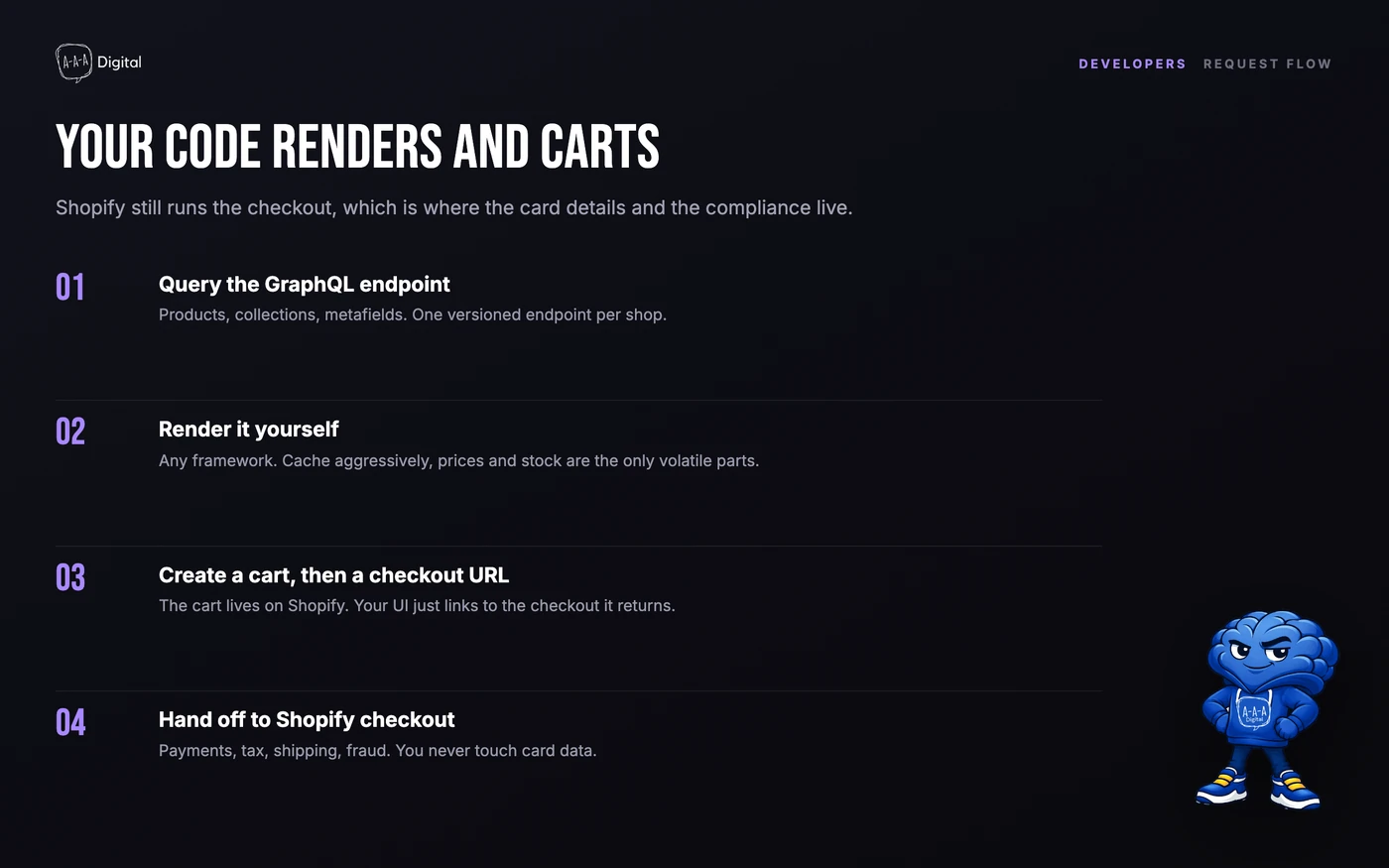
The cart-versus-checkout split trips up every new build. Your code owns the cart: add, remove, persist across sessions. Shopify owns the checkout: payment, tax, shipping, fraud screening. Your cart eventually asks Shopify for a checkout URL, and the buyer finishes there.
A minimal request
A first working call looks like this:
curl -X POST \
  https://your-store.myshopify.com/api/graphql.json \
  -H "Content-Type: application/json" \
  -H "X-Shopify-Storefront-Access-Token: your_public_token" \
  -d '{"query":"{ products(first: 5) { edges { node { title handle } } } }"}'
The response shape mirrors the query exactly, which is the point of GraphQL. In production you will batch queries, paginate with cursors, and cache aggressively, because the rate limit is calculated per IP against the token's cost budget, and heavy pages burn it fast. Shopify's own docs and the reference explorer at shopify.dev cover the full schema.
Storefront API vs Admin API
| Storefront API | Admin API | |
|---|---|---|
| Audience | Shoppers on a custom storefront | Your team and apps |
| Protocol | GraphQL only | GraphQL and REST |
| Auth | Public access token, visible in code | OAuth access token, private |
| Data scope | Published products, carts, checkout handoff | Full store: orders, customers, analytics, products |
| Rate limit basis | Per IP, cost-based | Per app, tiered by plan |
| Typical build | Hydrogen, Next.js storefront, mobile app | Integrations, ERP sync, automation |
When a custom storefront is worth it
A Storefront API build is justified when the storefront itself is the product: a brand experience Liquid cannot express, a shoppable mobile app, an in-store kiosk, a multi-brand headless setup. It is not justified when the goal is a nicer product page. Theme customization, sections, and checkout extensibility cover most of that at a tenth of the cost.
Do the math before committing. A headless build carries hosting, a separate CMS or content workflow, your own A/B testing and analytics plumbing, and a team that knows GraphQL. What you get back is full control over performance and design, and a checkout Shopify still owns. For high-volume brands the trade is often right. For stores under roughly $5M in annual revenue, it usually is not, and the budget is better spent on conversion work inside the theme. Our checkout customization guide covers what the standard checkout allows before you go custom.
Costs and limits
The API itself costs nothing beyond your Shopify plan. The real costs are hosting your storefront (Oxygen, Shopify's hosting for Hydrogen, is free on eligible plans), developer time, and the operational load of a second codebase. Rate limits are generous for well-cached catalog pages and tight for uncached per-user calls, so architecture decisions made in week one determine whether launch week is boring.
FAQ
What is the Shopify Storefront API? Shopify's buyer-facing GraphQL API. Custom storefronts and apps use it to show products, manage carts, and hand buyers to Shopify's checkout, using a public access token that is safe to expose in client code.
Is the Storefront API free? Yes. The API is included with every Shopify plan. You pay for your Shopify subscription and for hosting your custom storefront, not per API call.
What is the difference between the Storefront API and the Admin API? The Storefront API serves shoppers with read-only product data and cart functionality. The Admin API serves the business, with full read-write access to orders, customers, and products, authenticated privately via OAuth.
Can the Storefront API create orders? No. It creates carts and checkouts; the order is created when the buyer completes Shopify's checkout. If you need to create orders programmatically, that is an Admin API job.
Do I need Hydrogen to use the Storefront API? No. Any stack that can make HTTPS calls works: Next.js, Nuxt, a mobile app. Hydrogen is Shopify's official React framework and removes boilerplate, but the API itself is stack-agnostic.
Where is the Storefront API documented? The full reference lives at shopify.dev under the Storefront API section, with a queryable explorer for the GraphQL schema.
If you are weighing a headless build against staying on a theme, that scoping conversation is worth having before any code is written. Book a free strategy call or see how our Shopify development service scopes custom storefront work.
