Every new store that comes through our door gets the same treatment before we touch a single line of marketing. We run our Shopify CRO checklist. Not because we're robots, but because after rebuilding more than 200 Shopify stores, we've learned that the same twenty things are almost always broken.
The pattern is almost boring. Slow product images. A checkout buried under three popups. Reviews that don't show up above the fold. A mobile buy button that requires a thumb workout to reach. Individually, each issue costs you maybe 2% of your conversions. Stacked together, they're the difference between a store that converts at 0.8% and one that converts at 1.5%.
That gap matters more than most merchants realize. Double your conversion rate and you've effectively doubled the value of every dollar you spend on ads, without spending a cent more on traffic. Across the stores we've worked on, this Shopify CRO checklist (plus deeper work where needed) has produced an average conversion lift of +58%. This post walks you through it, item by item, so you can run it on your own store.
Before You Start: Measure the Baseline
Don't optimize blind. Before changing anything, record your current numbers in Shopify Analytics and Google Analytics 4: overall conversion rate, conversion rate by device (mobile vs. desktop), average order value, add-to-cart rate, and cart-to-checkout rate. These five numbers tell you where the leaks are. If mobile converts at half your desktop rate, you have a mobile problem. If add-to-cart is strong but checkout is weak, you have a checkout problem. The checklist below is roughly ordered in the sequence we check things, from technical speed through to checkout trust.
Also set up a proper testing habit. We use Shopify's built-in A/B tools where available, and Google Analytics 4 explorations for everything else. Change one thing at a time where you can. Merchants who redesign ten things at once and see a lift never learn which change did the work.
Technical and Speed Checks
Speed is the silent killer. Google has been explicit that Core Web Vitals feed into rankings, but the conversion impact is what we care about more, because every extra second of load time shaves a measurable slice off your conversion rate. We audit every store with Google PageSpeed Insights, and we cross-check with Screaming Frog on larger catalogs to catch template-level issues the homepage score hides.
The recurring speed fixes we apply:
- Compress and resize images. Shopify serves WebP automatically, but merchants still upload 4,000-pixel photos for 600-pixel slots. We resize hero images to their rendered dimensions and keep product images under 200 KB where quality allows. TinyIMG and similar apps help if you have thousands of SKUs.
- Audit your apps. This is the number one speed problem on Shopify, and nobody wants to talk about it. Every app you install injects JavaScript into your theme. We've pulled apps off stores that were adding 1.5+ seconds of load time, apps the merchant had forgotten they installed. Go to Online Store → Themes → Customize, check your app embeds, and uninstall anything you don't actively use.
- Limit sliders and carousels. Auto-rotating hero sliders almost never pay for their weight. Pick one strong message and one image.
- Use a system font or a single variable font. Google Fonts are fine, but loading six weights of three typefaces is not.
- Lazy-load everything below the fold. Shopify handles this natively for product images; check any custom sections.
A note on tradeoffs: some of the highest-converting apps are also the slowest (reviews, personalization, quizzes). Don't rip them out blindly. Test the load time with the app on vs. off, and keep the app only if the conversion value clearly exceeds the speed cost.
Product Page Fundamentals
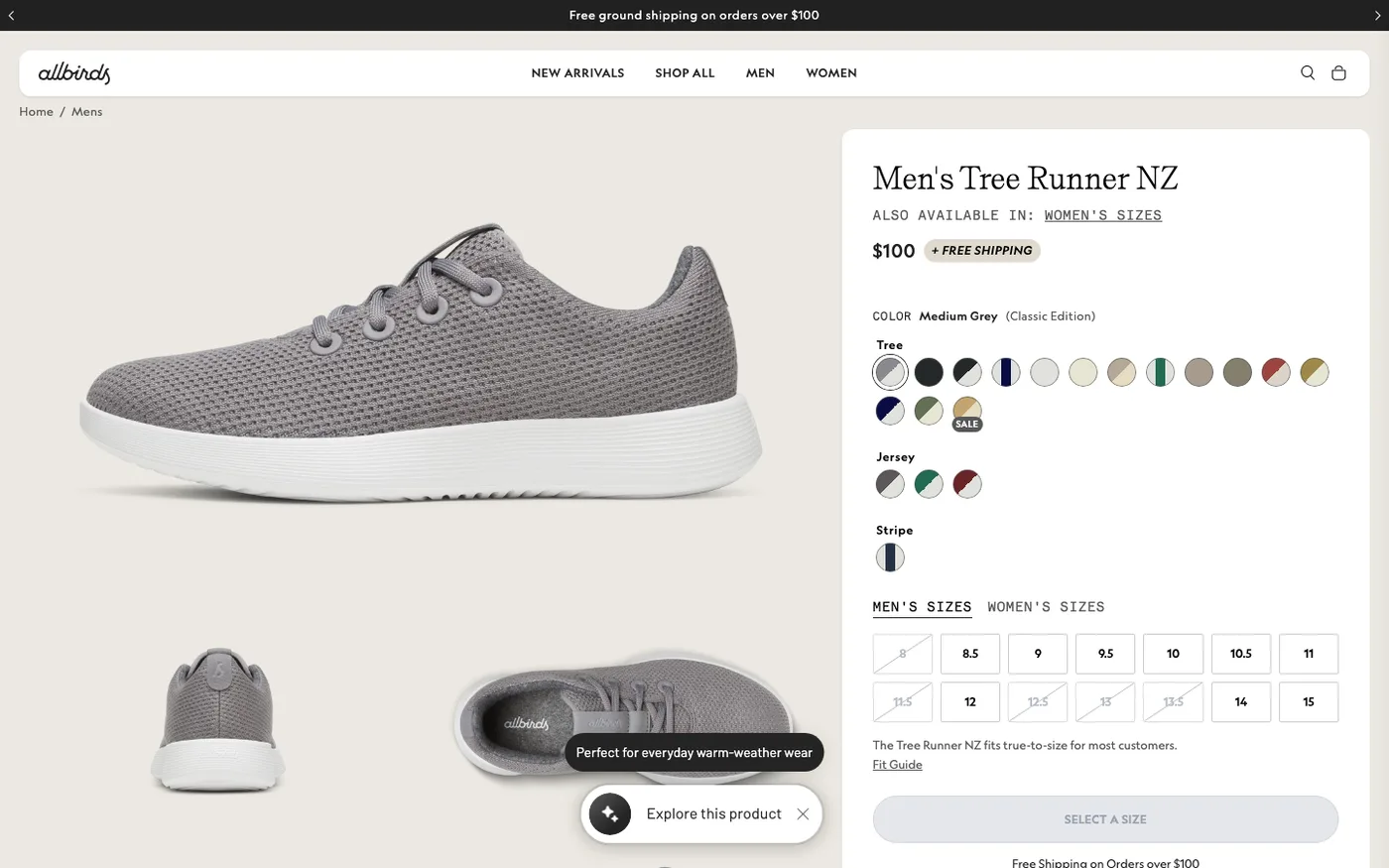
The product page does the heavy lifting on any Shopify store. These are the items we check on every one:
Above-the-fold completeness. A visitor should see the product title, price, variant selector, buy button, shipping expectations, and at least a snippet of reviews without scrolling. On mobile, that means a compressed image gallery (we use three images, not eight, above the fold), a sticky add-to-cart button, and review stars next to the title. If your theme doesn't support a sticky buy button, most modern themes like Dawn do, or it's a two-hour job for a developer.
One primary image that answers the "what is it" question in two seconds. Lifestyle shots are lovely, but the first image has to be the product, clearly lit, on a clean background. We fight clients on this one regularly. They want the moody editorial shot. Test it. The clear product shot almost always wins the click-to-cart battle.
Reviews, and where they sit. Install a reviews app (we default to Judge.me or Loox depending on the category and budget), collect reviews aggressively with post-purchase emails through Klaviyo, and make sure the star rating renders near the title, not buried in a tab at the bottom of the page. Review widgets that load via heavy iframes also slow your page down, so weigh the app choice.
Variant selection that's idiot-proof. If a customer has to click three dropdowns to find their size, some will bounce. Use Shopify's Search & Discovery app to surface variant availability, show size guides inline, and mark out-of-stock variants clearly instead of letting people hit dead ends at the cart.
Shipping and returns expectations on the page. "Free shipping over $50, ships in 2 business days, 30-day returns" should live within a few pixels of the buy button. Ambiguity at this point is a conversion tax.
Collection Pages and Navigation
Collection pages are your category pages, and on most stores they're criminally underworked. Our standard checks:
- Filtering that actually filters. Use Shopify Search & Discovery to build out filters for size, color, price, and whatever attributes matter in your category. Default Shopify filtering is weak; the app fixes it for free.
- Sorting that defaults to something sensible. Usually "Best selling" beats "Newest" and definitely beats alphabetical.
- Badges on key products. A small "Best seller" or "New" badge on one or two products guides indecisive browsers. Don't badge everything or it becomes wallpaper.
- Quick add where it makes sense. For replenishment-type products (consumables, basics), a quick-add button on the collection page shortens the path to purchase dramatically. For considered purchases like furniture, skip it; those buyers want the full product page.
Search is the other half of navigation. On stores with 500+ SKUs, we check Shopify's native search analytics monthly (Analytics → Shopify search) to see what people type and what returns zero results. Zero-result searches are free product ideas and free keyword research.
Cart and Checkout
The cart is where good stores quietly lose 60–70% of would-be buyers. Baymard Institute's long-running checkout research puts the average cart abandonment rate around 70%, and a big chunk of that is fixable friction.
Our cart checks:
- A cart drawer, not a cart page. When someone adds to cart, show a slide-out drawer with a checkout button, recommended products, and a free-shipping progress bar. Full cart page redirects break momentum.
- Express payment buttons everywhere they're eligible. Shop Pay, Apple Pay, PayPal, Google Pay: enable them all in Settings → Payments → Shopify Payments → Manage. Customers use whichever wallet they already trust.
- The free-shipping threshold set with intent. Not a round number pulled from the air. We set it at roughly 15–30% above the average order value to pull orders up. Display the progress bar in the cart drawer.
- No surprise costs. Shipping, taxes, and fees must appear before the final step. The single biggest abandonment driver is a cost revealed at the last step.
- Guest checkout on. Always. Forced account creation is a top-five abandonment reason. You can offer account creation after purchase.
At checkout itself, keep it minimal. We audit the checkout flow in a private browser window on both a phone and a laptop every quarter. If anything asks for information you don't need (company name on B2C orders, phone numbers you never use), remove it in Settings → Checkout.
Trust, Messaging, and Mobile
Trust elements get eye-rolled by designers, but they work. A visible return policy, a contact email that isn't a black hole, and, for newer brands, a short "why us" block near the buy button. We don't bury returns in the footer; we link them right under the buy button.
Mobile deserves its own paragraph because it's where most of your traffic is and the least tested experience on most stores. Thumb-friendly buy buttons, readable font sizes (no 12px body text), no hover-dependent interactions (hover doesn't exist on touch), and popups that don't cover the entire screen on load. Check your store on a real mid-range Android over hotel wifi, not your office iPhone on fiber. That experience is closer to what your customers actually get.
On messaging: your headline should say what you sell and who it's for within five seconds. Cleverness loses to clarity almost every time we test it. The merchants who resist this are usually the ones attached to a tagline their cousin wrote. We get it. Change it anyway and let the data decide.
What to Skip in Your Shopify CRO Efforts
Honesty matters here. Not every CRO tactic deserves your time. We routinely talk clients out of things: countdown timers and fake scarcity (short-term lift, long-term trust damage, and a compliance risk under FTC rules), animated confetti when someone adds to cart (distracting), chat widgets on stores with two support staff (creates response expectations you can't meet), and full site redesigns when the data says the product page is the problem. Fix the boring stuff first. It compounds.
Frequently Asked Questions
What is a good conversion rate for a Shopify store?
Broadly, 1–2% is average, 2–3% is good, and 3%+ is strong for most DTC categories. Fashion tends to convert lower, consumables and essentials higher. More useful than benchmarks is your own trend line: a store moving from 0.9% to 1.4% is a bigger win than hitting some industry average. Also segment by device, because a 2.5% desktop rate paired with a 0.7% mobile rate tells you exactly where to work.
How long does CRO take to show results?
Individual fixes can show movement within a week or two if your traffic is decent. Meaningful, statistically confident results from A/B tests typically need 2–6 weeks depending on traffic volume. Low-traffic stores (under a few thousand sessions a month) should skip formal A/B testing and make changes based on user research, session recordings, and plain judgment, because you won't reach significance anyway.
Do I need paid apps to do CRO on Shopify?
No. Shopify Search & Discovery, Shopify Analytics, PageSpeed Insights, and Google Search Console are all free and cover a large share of this checklist. Paid apps (reviews, personalization, testing) make sense once you've fixed the free stuff and want to go further. Spending $300/month on apps while your images are unoptimized is backwards.
Should I A/B test everything on my store?
No. Test things you genuinely can't predict: headlines, offers, pricing presentation, page layouts. Don't test things with obvious right answers, like whether the buy button should work or whether checkout should load. And don't test if you lack the traffic, inconclusive tests waste time and teach you nothing.
When should I hire a CRO agency instead of doing it myself?
DIY works well if your store is early, your catalog is small, and you have time to work through a checklist like this honestly. Hire when revenue is meaningful enough that a 20% lift pays for the engagement in weeks, when you're too close to your own store to see the friction, or when technical work (speed, theme changes, app conflicts) is beyond your team. Our rule of thumb: if monthly revenue is above $30K, professional CRO usually pays for itself quickly.
Get Help With This
Run the checklist yourself first, most stores can knock out half of it in a weekend. If you'd rather have a team that's done this on 200+ stores audit yours and fix what's broken, our Shopify CRO service starts with a full conversion audit and ends with a prioritized roadmap built around your data, not guesswork.
