A theme demo is a controlled experiment. Twelve products, one currency, no apps, a hero photograph commissioned for the launch. Your store is the opposite: 400 SKUs, four markets, a warehouse feed that renames variants every Tuesday.
So the demo tells you almost nothing useful.
We have rebuilt enough Shopify storefronts to know where themes fail. Not the homepage. The collection page at 600 products, the product template with nine metafield-driven tabs, the Core Web Vitals report three months after launch when nobody remembers which section ships 300KB of JavaScript.
That is why we treat a theme as three decisions at once, and design is the third one.
Speed. Does it ship what you need, or everything the vendor could imagine?
Merchandising. Can you build the pages your catalog demands without five apps faking sections?
Maintenance. When Shopify ships a new feature, does the theme keep up, and can your developer find the file to change?
How we evaluate a theme
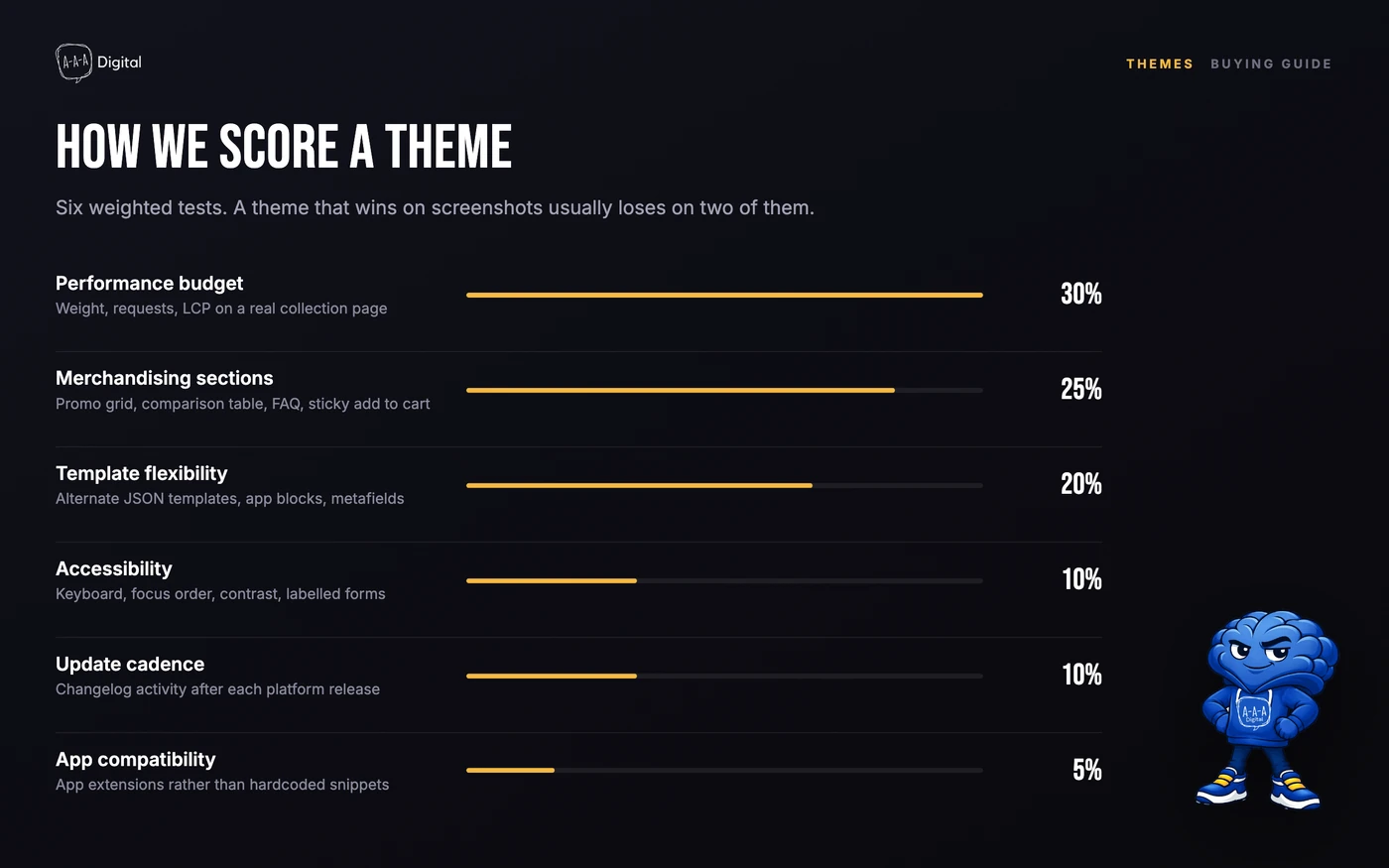
Six tests, run on a real catalog, never the vendor's demo.
-
Performance budget. Page weight, request count, LCP on a mid-range Android over 4G, measured on a collection template with 24 products and three app embeds. Themes that look minimal often are not, because unused sections still ship CSS. Our Shopify page speed breakdown covers what moves those numbers.
-
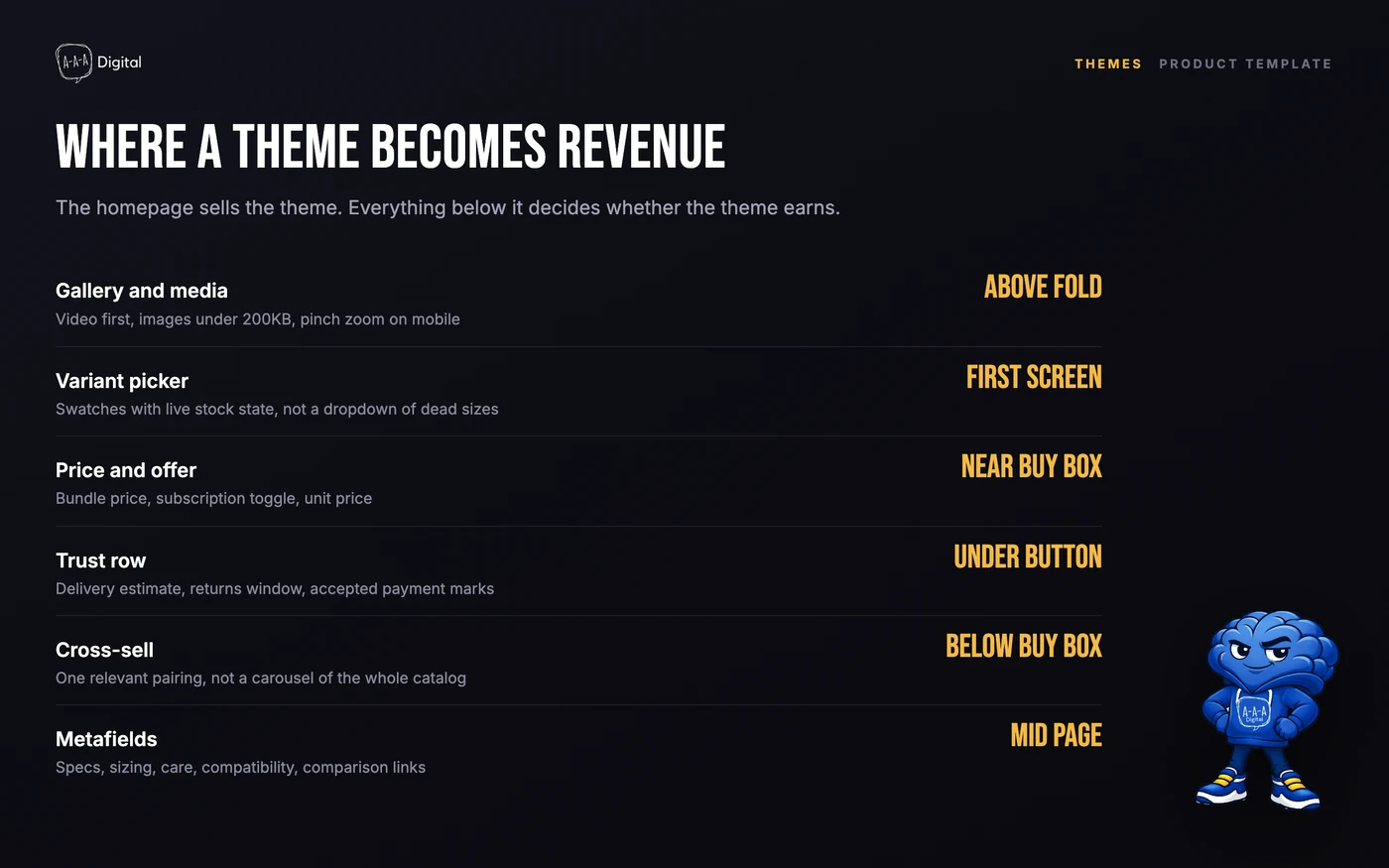
Section coverage. The sections the real site needs, not the demo's: promo grid, editorial split, comparison table, FAQ, collection banner with metafield copy, sticky add-to-cart. Covering 85% natively saves months.
-
Template flexibility. Alternate templates, JSON templates you can duplicate per product type, sections that accept blocks. One product template forces you to hack a single file for every category.
-
Accessibility. Keyboard navigation through the mobile menu and variant picker, visible focus states, contrast on ghost buttons, real form labels. Most themes ship accessible markup until a designer makes the text light grey on white.
-
Update cadence. We read the changelog before the screenshots. A theme with no update since a Shopify platform change is a liability.
-
App compatibility. Theme app extensions and app blocks, not hardcoded snippets. If the install guide says paste code into a section file, every app you add costs developer time.
One honest note before the list: some of these themes are sold by studios that also do agency work, and agencies in our position sometimes resell themes or take referral fees. We recommend on fit. At the time of writing, none of the links here carry a commission for us, and if that changes we will say so on the card.
What a theme actually costs
The license is the smallest number in the budget. We price four buckets on every project:
| Cost bucket | What it covers | Typical shape |
|---|---|---|
| License | Theme purchase, one-time | Smallest line item |
| Customization | Sections, templates, branding, metafield wiring | Often several times the license |
| Migration | Redirects, apps, metafield mapping, tracking | One to three weeks |
| Maintenance | Updates, platform changes, new sections | Recurring, easy to forget |
A cheap theme that needs 60 hours of customization is not cheap. A paid theme whose sections match your catalog can pay for itself by deleting two apps and a month of developer time.
Free vs paid
Free themes are not a compromise anymore. Dawn and Horizon are Shopify's own, maintained by the company shipping the platform underneath them. For a store doing a few hundred orders a month with a simple catalog, a free theme plus good photography beats a paid theme plus a rushed build.
Paid themes buy a head start on merchandising: dozens of sections a merchant can rearrange without a developer. They also buy someone else's opinions. A paid theme encodes one studio's idea of a product page, a collection filter, and a cart. If your brand disagrees, you are paying to delete things.
Dawn and Horizon: Shopify's own free themes
We start almost every build on one of these two, even when we know the client will end up on a paid theme. They are the cleanest baselines we have and the easiest to hand to an in-house team later.
Dawn is Shopify's reference theme: open source, deliberately plain, the lightest starting point you can install for free. It is also the theme every Shopify tutorial assumes, which matters when you hire.
Horizon, Shopify's newer free theme, goes further on blocks and section composition, so you can build more page variety without a developer. At the time of writing it is newer than Dawn, so there are fewer third-party guides and fewer people who have already solved your problem.
The nine themes
Every theme below is one we have installed, reviewed, or rebuilt on a client store. Order is not a ranking: free first, then merchandising-heavy, then catalog-heavy.
Dawn
Clean templates, a small section library, nothing to unlearn. The safe answer, and usually the right one.
Who it fits: new stores, lean catalogs, brands with strong photography and no patience for theme bloat.
Where it breaks: editorial layouts and promotional merchandising. You will build custom sections or buy an app, and both are maintenance Dawn never had.
Best for: A fast, clean baseline you can hand to any Shopify developer
The fastest thing you can install for nothing, but a starting point rather than a finished brand. Budget design separately.
See current pricingHorizon
The free theme we reach for when a merchant wants to build campaign pages themselves.
Who it fits: stores that run their own promotions, small teams without a developer on call, brands that change the homepage monthly.
Where it breaks: anything unusual. The moment you need a template the blocks do not anticipate, you are back in Liquid, and fewer developers have Horizon experience.
Best for: Merchants who want to build campaign pages without touching code
More room to compose than Dawn, less battle-testing behind it. Confirm your apps support its block structure first.
See current pricingImpulse
A merchandising machine. A large library of promotional sections lets a store running constant sales and seasonal campaigns build most of a homepage without custom code.
Who it fits: high-volume DTC stores with a marketing calendar and someone whose job is updating the storefront weekly.
Where it breaks: restraint. All those sections want to be used, and a homepage with eleven of them is slow and incoherent. We cut to four or five.
Best for: Stores running frequent promotions and seasonal campaigns
A big section library is an asset only if someone edits it down. Untouched, it is a page-weight problem.
See current pricingPrestige
Built for premium positioning: large imagery, press and social proof blocks, lookbooks, typography that assumes you have a brand guide.
Who it fits: beauty, fashion, jewelry, high-ticket categories where the product page must justify the price before the copy does.
Where it breaks: it is heavy, and premium layouts eat vertical space on mobile. At a low average order value you are paying for atmosphere you cannot afford.
Best for: Premium and luxury catalogs that need proof and atmosphere
One of the better-looking paid themes, with the page weight to match. Test it with your real images first.
See current pricingImpact
Bold type, full-bleed imagery, editorial rhythm. For brands whose photography is the product and whose copy is short.
Who it fits: DTC brands with a creative team, lifestyle categories, launches where the art direction already exists.
Where it breaks: catalogs with dense specs or long comparison copy. Bold layouts leave little room for the boring information shoppers need before checkout.
Best for: Image-led brands with strong art direction
A great frame that is unforgiving of weak assets. Without campaign photography, the design exposes it.
See current pricingFocal
Built around one product or a very small catalog: video-forward heroes, long product storytelling, less navigation. It behaves like a landing page that happens to have a cart.
Who it fits: single-product launches, hero-SKU brands, crowdfunding-to-Shopify moves, stores where one item is 70% of revenue.
Where it breaks: the day you add 200 SKUs. Focal assumes a small catalog, and collection browsing is not where it spends its design budget.
Best for: Single-product and small-catalog stores
The right theme for a launch, the wrong one for a catalog. Only buy if the SKU count stays small.
See current pricingSymmetry
Clean, corporate, structured. It handles deep navigation, multi-category menus, and large collections without falling apart, which is more than most premium themes manage.
Who it fits: multi-category retailers, B2B-adjacent catalogs, brands selling to procurement teams and consumers.
Where it breaks: personality. It is a very tidy theme, and tidy reads as generic in lifestyle categories full of editorial layouts.
Best for: Large multi-category catalogs with deep navigation
Holds a big catalog together without drama. Bring your own brand, because the theme will not supply one.
See current pricingMotion
Motion leans on video and animation: looping media, transitions, movement through the page. It is the theme clients ask for after they see a competitor's site.
Who it fits: lifestyle and apparel brands with video assets, campaigns built on short-form content, stores where the homepage is a brand statement.
Where it breaks: performance and accessibility. Autoplaying media costs LCP and battery, and it needs a reduced-motion fallback most installs never configure.
Warehouse
For catalogs that behave like warehouses: hundreds of variants, dense grids, bulk ordering, wholesale pricing. Most themes treat a large SKU count as an edge case. This one treats it as the job.
Who it fits: wholesale and B2B sellers, parts and industrial catalogs, stores where a single product has 40 variants.
Where it breaks: brand storytelling. The product page is efficient rather than evocative, so consumer launches feel like a spreadsheet with a hero image.
Best for: Wholesale and high-variant catalogs
The most catalog-literate theme on this list. If you sell to businesses, consumer themes waste your time.
See current pricingComparison
| Theme | Price model | Best for | Speed profile | Standout feature |
|---|---|---|---|---|
| Dawn | Free | New stores, lean catalogs | Lightest baseline | Shopify's own reference theme |
| Horizon | Free | Merchant-built campaign pages | Light, grows with blocks | Block-based composition |
| Impulse | One-time license | Promotion-heavy DTC | Mid, large section library | Promotional section depth |
| Prestige | One-time license | Premium and luxury | Heavy | Social proof and lookbooks |
| Impact | One-time license | Image-led brands | Mid | Editorial type and layout |
| Focal | One-time license | Single-product launches | Mid | Product storytelling sections |
| Symmetry | One-time license | Multi-category retailers | Mid | Deep navigation and large menus |
| Motion | One-time license | Video-led lifestyle brands | Heaviest | Motion and media treatment |
| Warehouse | One-time license | Wholesale, high-variant catalogs | Mid | Dense grids and variant handling |
Speed profile is our editorial read from building on these themes, not a lab score. The same theme is fast or slow depending on how many sections you enable and what your apps inject. To see what a competitor runs before you pick, our Shopify theme detector will tell you.
When to skip a paid theme
- Your catalog is under 50 SKUs and the pages are simple. Dawn plus a designer beats a theme you have to strip.
- No one on your team can maintain it. 70 sections and nobody to edit them is a slower Dawn with a receipt.
- You are pre-revenue. Spend the money on product photography.
- You are about to replatform. Buy the theme once, after the decision.
- Your brand needs a layout no theme has. Custom design on Dawn is cheaper than fighting a theme's opinions for six months.
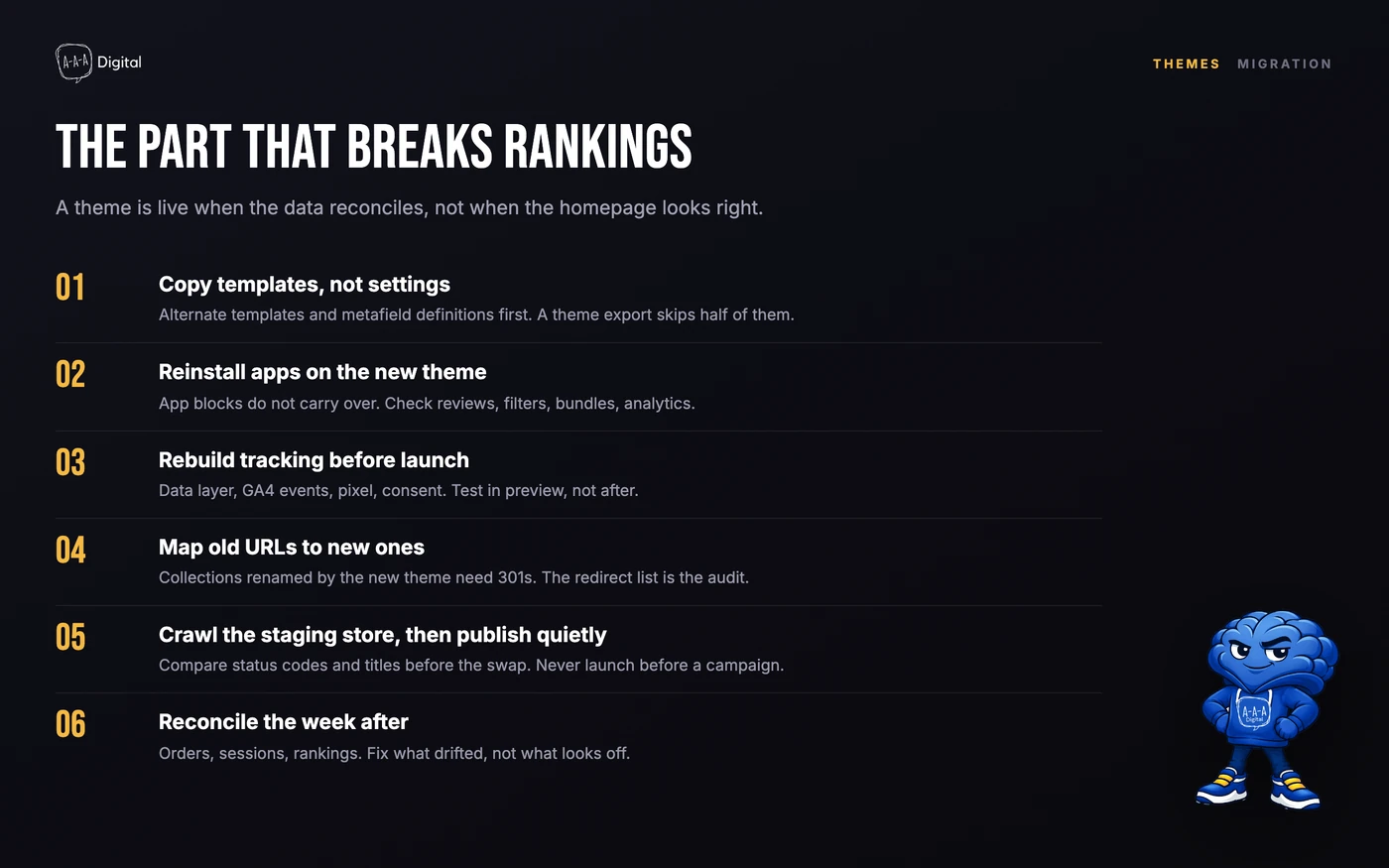
Theme migration checklist
A theme change is a small migration, not a settings switch. We run this on every swap.
- Redirects. Theme changes rarely break URLs, but they do break redirects stored in the old theme's settings and any collection you renamed during the redesign. Our Shopify redirects guide has the audit pattern we use.
- App blocks and embeds. Inventory, reviews, subscriptions, and pre-order apps install differently in a new theme. Re-enable theme app extensions, then test each app on product, collection, and cart templates before launch.
- Metafields. Custom sections often read fields created for the old theme. Map every field to a new section or you launch with empty tabs and blank spec tables.
- Templates. Alternate product and collection templates do not travel. Rebuild each one, then confirm the right products still point at the right template.
- Analytics and pixels. Conversion tracking hides in theme code more often than merchants realize. Confirm your dataLayer pushes still fire, then reconcile a week of orders against analytics. Our Shopify Google Tag Manager setup guide covers the theme-level tags that break most.
We keep a password-protected staging theme for the build and run this list on a real order before the domain moves. If the store runs an app-heavy stack and you are unsure what depends on the theme, our Shopify development team maps it first.
One more case worth planning: stores built on an AI storefront generator arrive with their own template assumptions, and moving onto a standard theme is its own project. We cover that in Shopify AI store builders.
FAQ
Is a paid Shopify theme worth it?
For a store with a real catalog and a marketing calendar, usually yes, because the section library saves customization hours. For a small catalog or a pre-revenue brand, no.
Can I use Dawn for a large store?
Yes, and some do. The limit is merchandising: once you need per-category layouts and promo modules, you either build custom sections or move to a theme that ships them. Both work; custom sections cost developer time every time you change them.
Will changing themes hurt my SEO?
Not if URLs, titles, and structured data survive. The usual damage comes from lost redirects, deleted collection copy, and templates that drop headings. Crawl staging against live before launch.
How long does a theme migration take?
For a 200-SKU store with five apps, we plan one to three weeks including testing. Simple swaps take days. The variance is metafields, alternate templates, and how much custom code the old theme accumulated.
Can I customize a theme without breaking updates?
Yes, if customizations live in your own sections and snippets rather than vendor files, and the theme is version-controlled. Every direct edit to a vendor file is a merge conflict you meet later.
If you are choosing a theme and want the decision made on your catalog rather than a demo, book a free strategy call. We will pressure-test speed, sections, and migration cost before you buy anything, and our Shopify CRO service handles the part that matters after launch: turning the traffic into orders.
