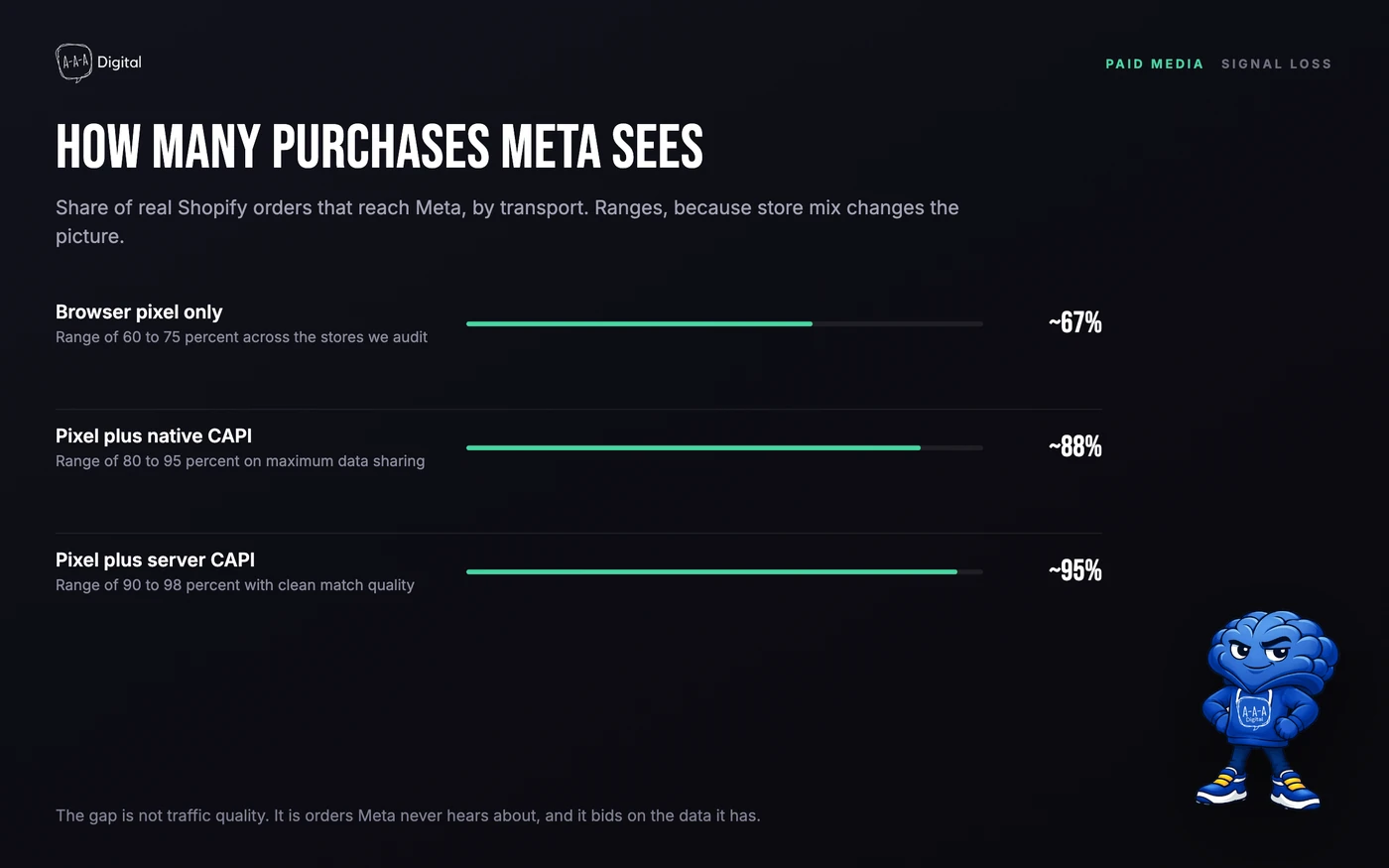
A browser-only Meta pixel on a Shopify store typically reports 60 to 75 percent of the orders Shopify actually recorded, and the shortfall is worst on iOS. The Conversions API closes most of that gap by sending the same Purchase event from a server and deduplicating it against the browser event with an event_id, so Meta counts one order rather than two, or none.
That gap is not a reporting nuisance. Meta bids on the data it receives. If a quarter of your purchases never arrive, the algorithm learns that your ads produce fewer orders than they do, and it goes looking for cheaper, lower-intent traffic to make the numbers work. Stores spend months blaming creative for a problem that lives in the data layer, while their real cost per acquisition drifts up.
Why the pixel alone under-reports
The pixel is JavaScript running in the customer's browser. Every hop between your store and Meta is a place where the event can disappear.
The first is the browser itself. Ad blocking extensions are commonly measured at 20 to 30 percent of desktop users, depending on the survey and the audience, and many of those users never fire a pixel. The second is cookie storage. Safari's Intelligent Tracking Prevention caps the lifetime of script-set cookies, and the _fbp cookie that carries your click identifier is a script-set cookie. The third is App Tracking Transparency, introduced with iOS 14.5 in April 2021, which requires explicit consent before an app or a site can use the identifier for tracking. Opt-in studies typically land between 25 and 35 percent, so most iOS users are invisible to the pixel.
Meta knows the data is incomplete, so it models. Modelled conversions appear in Ads Manager after a delay, attributed without a click your pixel recorded. That is better than nothing and worse than real data, because modelling fills gaps with averages, and averages do not tell Meta which of your products are actually selling.
What the Conversions API sends that the pixel cannot
The Conversions API is a server to server endpoint. Your server posts an event to Meta directly, with no browser involved. The payload carries three things the pixel often loses.
Event identity. The event name, the event time, and an event_id you generate. That ID is what lets Meta match a server purchase to a browser purchase and count it once.
Customer data. Email, phone, first name, last name, city, state, postcode, country, and an external ID, hashed with SHA-256 before they leave your server. Plus fbp and fbc, the cookie values that carry the browser's click identity. fbc is built from the fbclid parameter Meta appends to your ad URLs. Without fbp and fbc, the server event has no link to the ad click, and match quality drops.
Order context. Value, currency, content IDs, quantity, and order ID. This is what makes value-based bidding possible, and it is also where a lot of setups quietly break, because a content ID that does not match your catalogue turns a profitable product into an anonymous order.
The result is not a replacement for the pixel. It is a second copy of the same event, sent by a route that survives blockers and consent prompts. Meta's own documentation calls the paired setup the recommended configuration, and the recommendation has not changed.
Three ways to run it on Shopify
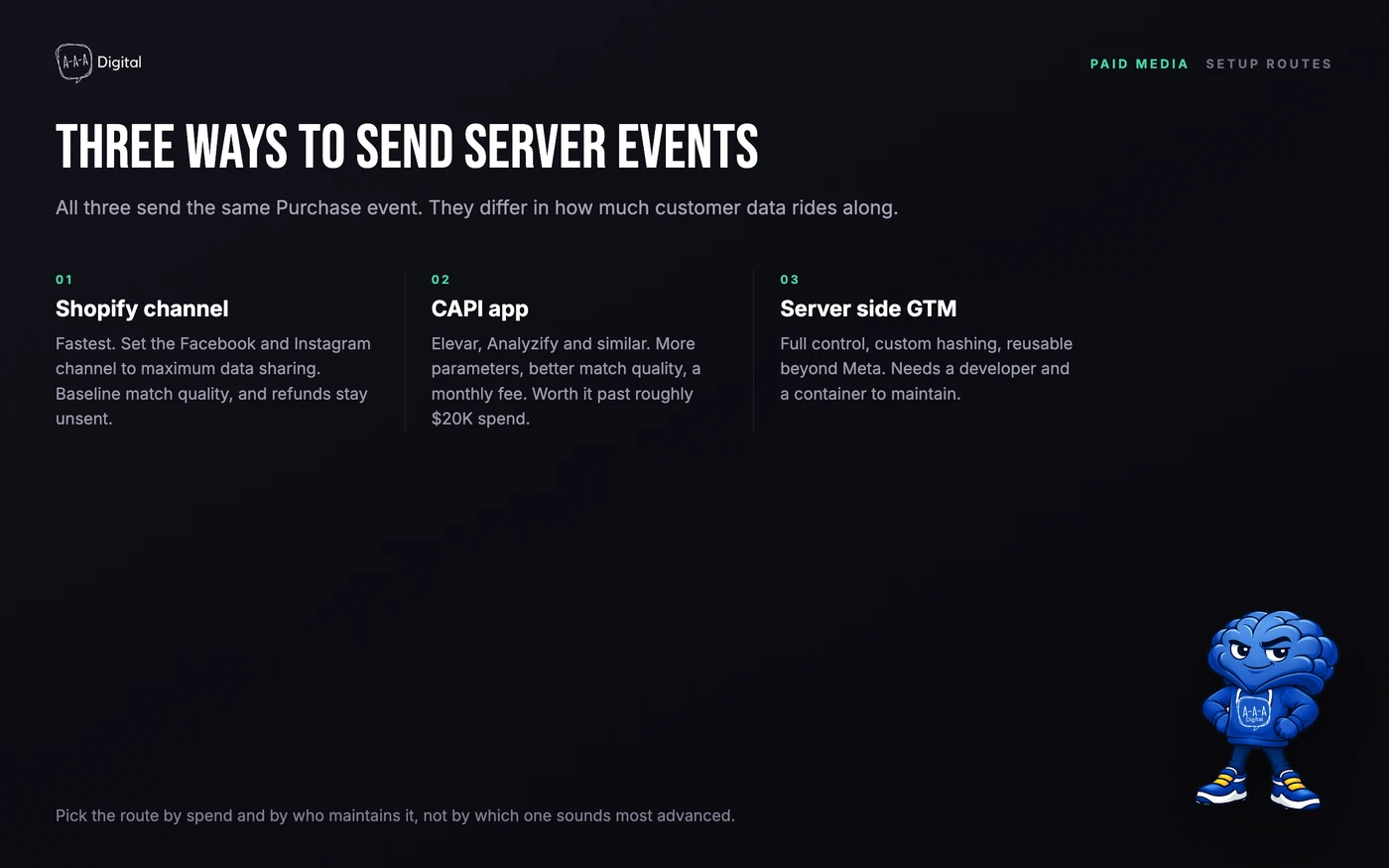
Route one: the native Facebook and Instagram channel. Inside Shopify admin, open Sales Channels, then Facebook and Instagram. During setup you choose a data sharing level: Standard, Enhanced, or Maximum. Maximum enables Shopify's own server events alongside the pixel. It takes about ten minutes and covers the standard events. Its limits are worth knowing: refunds and order edits are not sent back to Meta, custom parameters are limited, and match quality is baseline because Shopify sends a fixed set of customer fields.
Route two: a dedicated CAPI app. Elevar, Analyzify, TrackBee and similar apps sit on top of Shopify's web pixel and order webhooks. They send more customer parameters, handle consent, map content IDs to your catalogue, and send refunds. They cost money, usually a monthly fee that scales with order volume. Our rule of thumb is that the app pays for itself once you are spending roughly $20,000 a month on Meta, because the attribution gap costs more than the subscription.
Route three: server side Google Tag Manager. A Shopify custom pixel in Customer Events pushes the event to your own endpoint, and a server container forwards it to Meta. This gives you full control over hashing, consent, and which parameters go where, and the same container can feed other platforms. It also needs a developer, a hosting setup, and ongoing maintenance. Choose it when you have the engineering time or a partner who does.
One boundary to know: Shopify retired checkout.liquid, so custom tracking code now runs through the Web Pixels API in Customer Events, inside a sandbox. Any guide that tells you to paste a script into the checkout template is out of date.
Deduplication: the event_id is the whole game
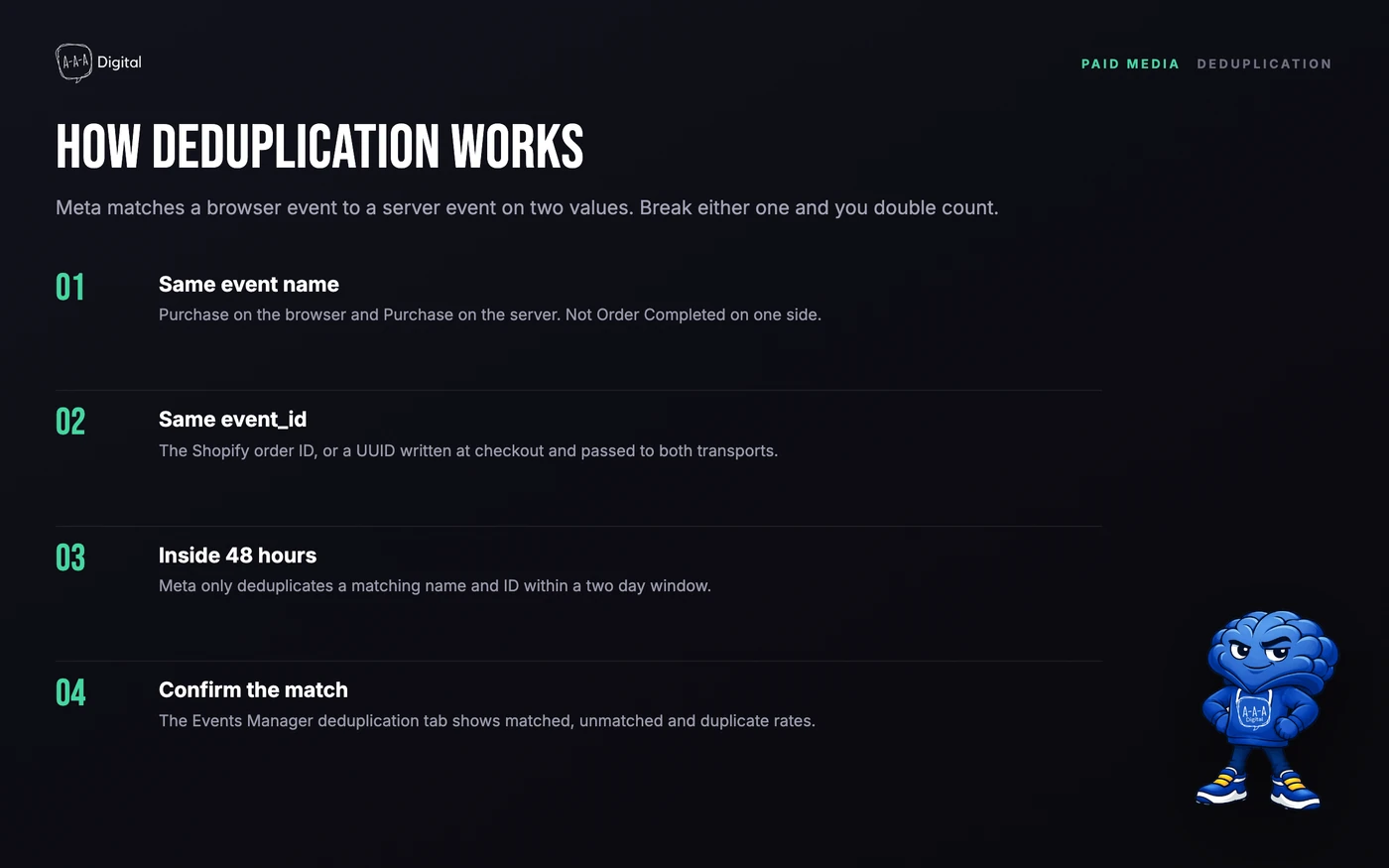
Meta deduplicates on two values: the event name and the event_id. If both match, and the two events arrive within 48 hours of each other, Meta keeps one and discards the duplicate. If either value differs, you get two purchases for one order, which inflates reported ROAS and teaches the algorithm something false.
Shopify's native integration handles this for you, using the order ID as the shared identifier. Custom setups are where it goes wrong. Three patterns account for most of the failures we fix:
- The browser sends
Purchaseand the server sendsOrder Complete. Different names, no deduplication, double counting. - The browser generates a UUID on the thank-you page and the server generates a different one from the order webhook. Two IDs, two purchases.
- The server fires on
orders/paidand the browser fires 90 seconds later on the thank-you page, and a retry pushes the server event past the window. Rare, but it happens on high-volume stores.
The fix is boring: pick one source of truth for the ID, usually the Shopify order ID or the checkout token, write it to the cart as an attribute, and read it from both transports. Then confirm in Events Manager that the deduplication rate sits where it should.
What changed after iOS
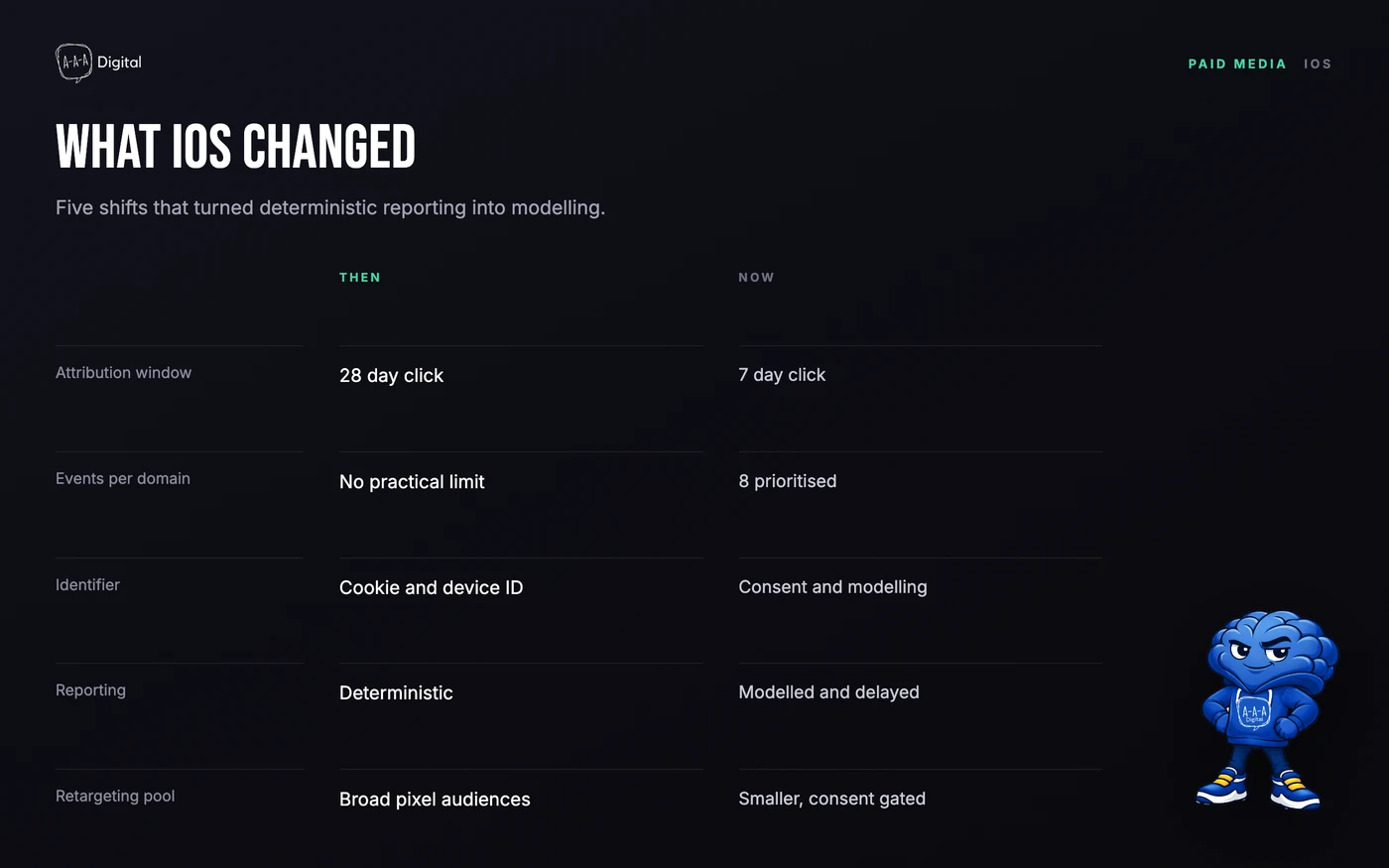
The attribution window is the change most merchants feel first. Meta's default is now a 7 day click and 1 day view window, down from 28 day click, so purchases that happen late in a long consideration cycle are attributed to nothing, or to the wrong channel. If your product has a two week decision cycle, your Meta numbers will look worse than your bank account, and your Google numbers will look better than they are.
Aggregated Event Measurement limits you to eight prioritised conversion events per domain. If you track fifteen micro-conversions, Meta only optimises on the top eight, and the rest are reported with less fidelity. Audit your event list and prioritise purchases, add to cart, initiate checkout, and the two or three events that actually predict revenue.
Retargeting pools shrank. A pixel audience built on all site visitors now excludes people who declined tracking, so a 30 day retargeting audience is smaller and more modelled than it was in 2020. That is why cost per acquisition on retargeting has crept up across the industry, and why owned channels such as email carry more of the repeat purchase load than they used to.
None of this makes Meta unusable. It makes reconciliation necessary. Compare Meta purchases against Shopify orders every week, and treat the platform number as a directional signal rather than a ledger.
How to check it in Events Manager
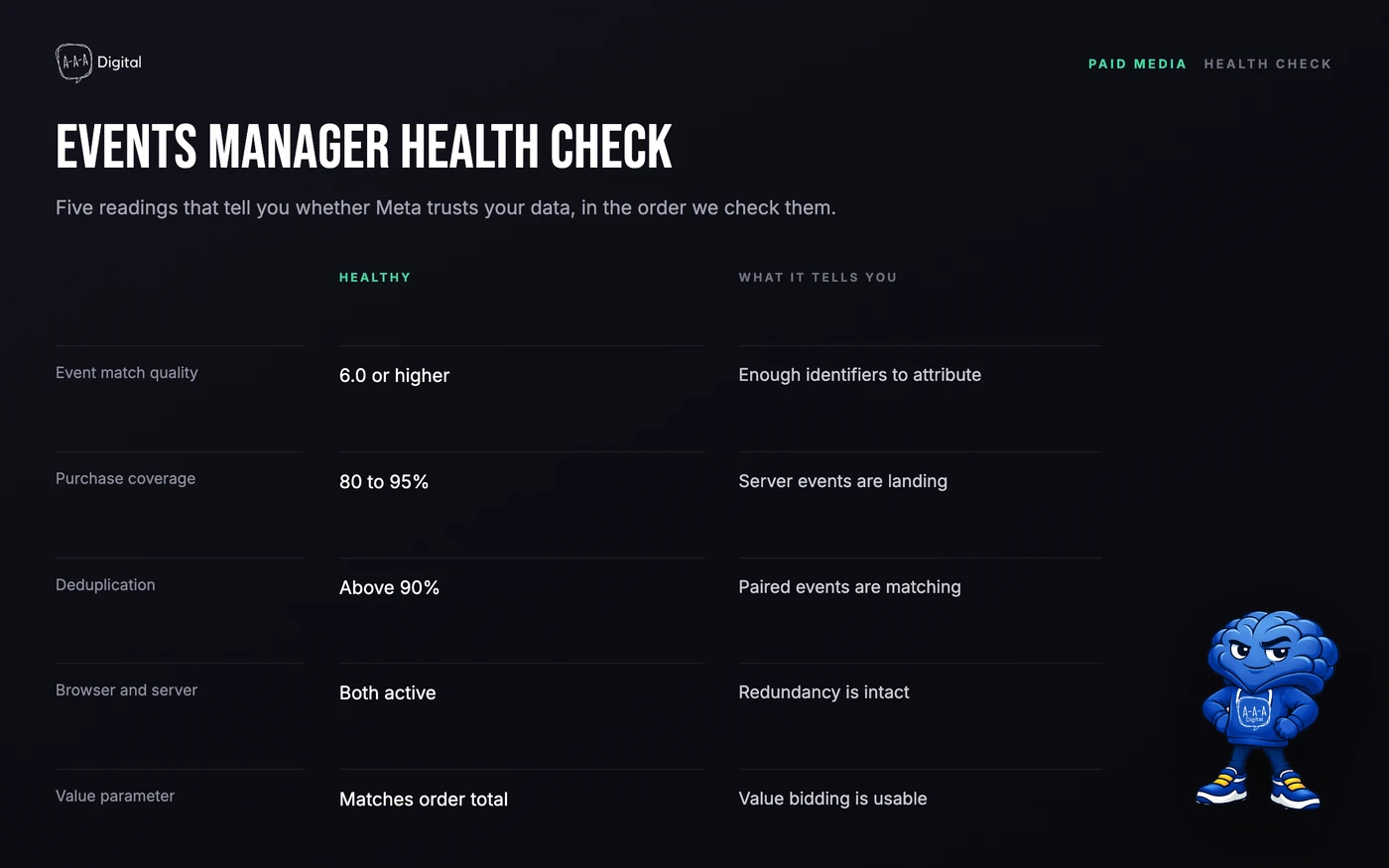
Start in Events Manager, Data Sources, your pixel, Test Events. Place a real order on your store with a test payment method or a 100 percent discount code. You should see the Purchase event twice, once from the browser and once from the server, with the same event ID and the same value. If you only see one, one of your transports is not firing.
Then open the Diagnostics tab. Warnings about missing parameters, unmatched event IDs, or a pixel that has not fired recently show up there before they show up in your cost per acquisition.
The Deduplication tab shows matched events, unmatched events, and the duplicate rate. A healthy setup runs above 90 percent matched. Near zero means your IDs do not line up. A rate that drops suddenly usually means an app was installed, removed, or updated.
Event match quality scores each event from 0 to 10 based on how much customer data it carries. Purchases should sit at 6.0 or higher. Below that, add parameters: email and phone are the biggest levers, then name, city, and state. If you are on the native integration and the score is stuck at Fair, a CAPI app is the usual fix.
Finally, compare counts. Pull the last seven days of Purchase events in Events Manager and compare them with Shopify orders for the same period. Meta should land between 80 and 95 percent of Shopify's count. Below 70 percent, something is broken. Above 100 percent, you are double counting, and a deduplication problem is the first suspect.
The mistakes we see most
The single most common is leaving data sharing on Standard. It is the default in some setups, it looks harmless, and it silently disables server events.
The second is running two pixels, or the native channel plus a CAPI app that sends its own browser events. Both fire, IDs do not match, and every purchase is counted twice. If you install an app, turn the native server events off or confirm the app is deduplicating against them.
Third is testing with an order that never reaches the server because the store is in test mode, then concluding CAPI is broken. Use a real order through a bogus gateway, and check that the order appears in Shopify before you check Meta.
Fourth is ignoring refunds. Shopify's native integration does not send them, so a fashion store with a 20 percent return rate reports revenue it did not keep. If returns are material to your margin, that alone justifies an app or a custom setup.
A short checklist
- Data sharing set to Maximum, or an app with matching server events.
- One
event_idsource, shared by both transports. fbpandfbcpresent on server events.- Purchase value and currency sent every time.
- Deduplication above 90 percent, checked monthly.
- Meta purchases between 80 and 95 percent of Shopify orders.
If the setup is right, the numbers still will not match to the order, and they are not supposed to. What matters is that the gap is stable and known, because a stable gap is a number you can plan against. Our performance marketing team builds this into every account it manages, and the DTC metrics dashboard shows how to reconcile platform numbers with Shopify on a weekly cadence. If you want the version of this for the browser pixel itself, the Meta pixel setup guide walks through the install step by step, and clean UTM tagging keeps the rest of your attribution from drifting.
