A merchant came to us last year with a familiar complaint: solid traffic, decent ad campaigns, and a product page conversion rate stuck under 1%. Their ads were working. Their products were good. Their product pages were quietly convincing every visitor to leave.
We see this constantly. The store gets plenty right (branding, photography, ads), but the product page, the one page every buyer has to pass through, is doing everything wrong. Images in the wrong order. Reviews hidden in a tab. A buy button that scrolls out of sight. Shipping costs revealed at checkout like a jump scare.
We rebuilt their product pages, and within two months their conversion rate had more than doubled. Nothing magical happened. We applied the same twelve fixes we apply to every store. This post is those twelve fixes, in the order we'd prioritize them, with the reasoning behind each one. Work through them honestly and most stores will see movement within weeks.
Fix 1: Lead With the Image That Answers "What Is It?"
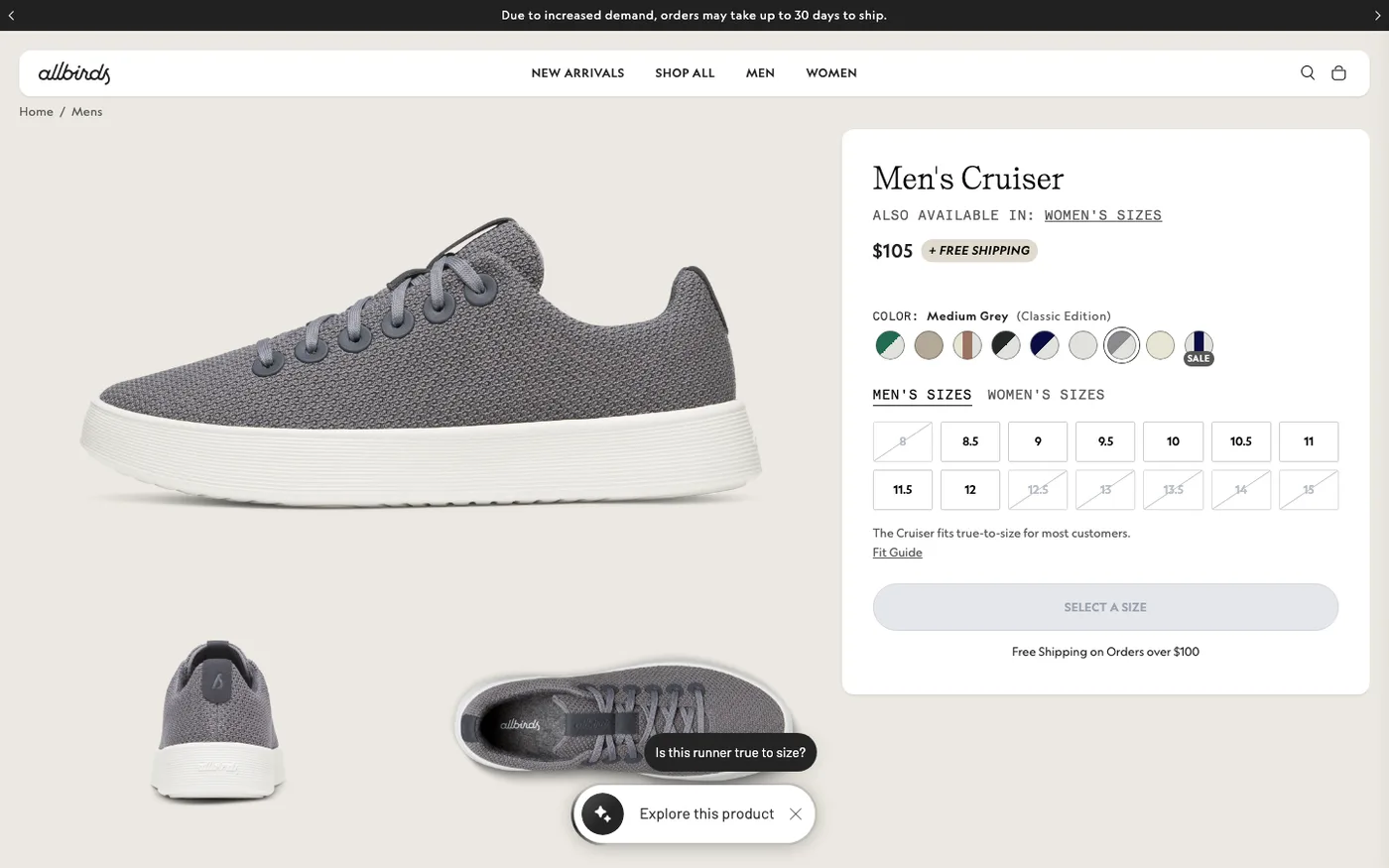
Your first image has one job: tell a first-time visitor what the product is, in under two seconds. That means the product itself, well lit, on a clean background, filling most of the frame. Not a lifestyle shot of a model laughing in a field. Not your packaging. The product.
This is the fix clients resist most. They fell in love with the editorial shot, and their designer backs them up. We let the data settle it: swap the clear product shot in for two weeks and compare add-to-cart rate. In our experience the clear shot wins the large majority of the time. Lifestyle images belong second, third, and fourth, where they do real work showing scale, texture, and use.
Also compress everything. Upload images at the size they'll actually render, and let Shopify's WebP serving do the rest. Heavy galleries are the top speed problem we find on product pages, and PageSpeed Insights will show you exactly which images are the offenders.
Fix 2: Put Reviews Where Eyes Actually Go
Reviews are the single highest-leverage trust element on a product page, and most stores hide them in a tab at the bottom. If a visitor has to click a tab to find out whether other people liked the product, a chunk of them won't. They'll leave instead.
The setup we default to: a reviews app (Judge.me for most stores, Loox when the category is visual, like beauty, fashion, or home goods), star rating rendered directly under or next to the product title, and the full review widget loaded below the description. Collect reviews with an automated post-purchase email through Klaviyo, and incentivize the first fifty with a small discount code. Zero reviews is a conversion problem of its own; fifty reviews with a 4.6 average is an asset that sells for you every day.
One caution: review widgets can be heavy. We test page speed with and without the widget and pick the lightest app that does the job.
Fix 3: Make the Buy Button Impossible to Miss
On desktop, this means a full-width, high-contrast add-to-cart button right under the variant selector. On mobile, where most of your traffic is, it means a sticky add-to-cart bar that follows the scroll. When a customer has scrolled through your images and read half your description, the button should be one thumb-tap away, not a scroll back to the top.
Most current Shopify themes (Dawn and its descendants) support sticky add-to-cart natively; check Online Store → Themes → Customize and your theme's product page settings. If your theme doesn't have it, it's a small development job, and it routinely lifts mobile add-to-cart rates. If the product is not ready to ship, our pre-order setup guide covers how to sell it without damaging trust.
Fix 4: Kill Ambiguity Around Shipping and Returns
"How long will it take?" and "What if I hate it?" are running through every buyer's head. Answer both next to the buy button: a one-line shipping promise ("Ships in 1–2 business days, free over $60") and a returns line ("30-day free returns").
This is also, quietly, an SEO and ad-spend issue. Unclear shipping policies generate support tickets, cancellations, and chargebacks. Put the answers where the buying decision happens, not in a footer page nobody reads. Baymard's checkout research has shown for years that unexpected costs and unclear policies are leading abandonment drivers, and the same psychology applies on the product page itself.
Fix 5: Write Descriptions That Sell the Outcome, Then the Specs
The single most common product page copy mistake is leading with specs. Buyers don't want a list of materials first; they want to know what the product does for them. Lead with the outcome ("keeps coffee hot for 6 hours, fits in a car cup holder, survives being dropped"), then follow with specs for the detail-oriented.
Structure that works: two or three sentences of outcome-focused copy, a scannable bulleted list of key features, then a collapsible specs section. Write the bullets the way a customer would describe the product to a friend. If you sell B2B or technical products, flip it: specs first, because that's the buying criteria. Match the page to how your customers actually decide.
Fix 6: Fix Variant Selection Before It Kills Sales
Dropdowns chained three deep (color → size → style) are where mobile buyers give up. Our rules: show variant options as visible buttons/swatches rather than dropdowns where the option count allows, mark out-of-stock variants as unavailable instead of letting people select dead ends, and surface the size guide one click from the selector, not in a separate page.
Use Shopify Search & Discovery to make sure variant-level inventory is reflected accurately in selection, and if your catalog is big, check your search analytics monthly for size and color terms that return zero results. Those zero-result searches are lost sales you can see.
Fix 7: Answer Objections With One Strong FAQ Block
Pull your last three months of support tickets and pre-sale emails. The five questions that keep repeating are your FAQ block. Size and fit, compatibility, care instructions, ingredients or materials, delivery time, whatever your category's questions are, answer them on the page.
This does two jobs. It removes the last objection for hesitant buyers, and it cuts your support volume, which your team will thank you for. Keep it to five to eight questions, genuinely answered, not keyword-stuffed. A small FAQ section with proper structured data can also earn you rich result real estate in Google, so it's worth doing cleanly.
Fix 8: Cross-Sell Like a Human, Not an Algorithm
"Customers also bought" widgets work when they're curated. Random algorithmic suggestions ("you viewed a candle, here's a phone case") just add clutter and load time. We pick one or two genuinely complementary products per bestseller (the filter for the coffee maker, the case for the headphones) and show them in a compact upsell block after the buy button or in the cart drawer.
Keep it to a maximum of three suggestions. More is noise. And skip the upsell block entirely on products where cross-sells don't make sense; forcing one in hurts more than it helps.
Fix 9: Show the Product in Use
Static photos answer "what is it." Photos or short clips of the product in use answer "is it for me." Show the backpack on an actual person's back, the pan mid-flip, the lamp lit in a real room. If you can manage a 15–30 second video, even better, but a good in-context photo does most of the work.
UGC belongs here too. Customer photos in reviews (Loox handles this well) outperform polished studio shots for certain categories, particularly fashion and beauty, because buyers trust "worn by a person like me" more than "styled by a photographer." We didn't expect that gap to be as wide as it is. It is.
Fix 10: Speed Up the Page Until It's Boring
We've covered image compression, but product pages carry other weight: review widgets, upsell apps, heatmap scripts, popup apps, personalization apps. Each one adds JavaScript. We've audited product pages carrying four seconds of script load from apps the merchant barely used.
Every quarter, go through Online Store → Themes → Customize → App embeds and uninstall what you're not actively getting value from. Then test with PageSpeed Insights, filtering by mobile. If an app is costing you a second of load time and you can't point to revenue it generates, it's not an app, it's a liability. If you want the full framework for this, we published our complete Shopify CRO checklist separately.
Fix 11: Match the Page to Where the Visitor Came From
If your ad says "50% off this week," the product page had better mention that offer above the fold. Message mismatch between ads and landing pages is one of the most expensive silent problems in ecommerce: you paid for the click, then confused the visitor.
For stores running paid traffic to specific products, we build dedicated landing sections or pages per campaign when the offer differs from the site-wide experience. At minimum, use UTM parameters and your ad platform's data to audit which campaigns send traffic that bounces hardest, then check the message match on those product pages first.
Fix 12: Set Up the Follow-Up Before You Fix Anything Else
Some visitors won't buy today no matter how good the page is. That's fine, as long as you have a way to bring them back. Before we do anything else on a new store, we confirm the capture and follow-up loop works: Klaviyo installed, browse-abandonment and cart-abandonment flows live, and a welcome offer for first-time visitors who aren't ready yet.
This fix doesn't raise your product page conversion rate directly. It raises the effective value of every visitor the page doesn't convert, which makes every other fix cheaper. If your traffic is under a few thousand sessions a month, prioritize this one early; you can't A/B test your way to significance on low traffic, but you can recover the people you already attracted.
Product Page Conversion Rate: Order Matters Less Than Honesty
Any of these twelve fixes alone might buy you a few percent. All of them together routinely buy 30–60%, because conversion problems compound. The mistake we see most isn't picking the wrong fix; it's fixing one thing, getting impatient after ten days, and abandoning the process. Give each change two to four weeks, measure against your baseline, and keep a simple log of what changed and when. That log becomes your playbook, and it's worth more than any single tactic in this post.
Frequently Asked Questions
What is a good product page conversion rate?
There's no universal number, because "conversion" gets measured differently (some count add-to-cart, some count purchase). For completed purchases, most DTC product pages convert between 1% and 3% of sessions. Rather than chasing a benchmark, track your own add-to-cart rate and cart-to-purchase rate separately. They'll tell you whether the problem is on the product page or downstream in cart and checkout.
Why do visitors add to cart but not buy?
This is usually a checkout problem, not a product page problem. Run through your own checkout in a private window on your phone. Common culprits: surprise shipping costs, forced account creation, too many form fields, a payment method the customer doesn't trust or use, and slow checkout pages. Start with costs and guest checkout. Baymard's research consistently ranks unexpected costs as the top abandonment driver.
How many product images should a product page have?
Enough to remove uncertainty, no more. For most products that's 5–8 images: the clear hero shot, two or three in-context or lifestyle shots, a scale reference, a detail or texture close-up, and the packaging. More than ten images tends to slow the page and dilute attention rather than help. Let your return reasons guide you. If "not as expected" dominates, you need better images, not more.
Do videos on product pages actually help?
Often, yes, especially for products where use or assembly isn't obvious. A 20-second clip of the product in action can outsell three paragraphs of copy. But videos must be compressed and lazy-loaded, or the speed cost eats the conversion gain. Skip video for simple products where photos already answer everything; it's effort and page weight with no payoff.
Should I redesign my whole product page or optimize the current one?
Optimize first, almost always. Full redesigns take months, cost thousands, and reset all your learning. We've seen more redesigns lose conversions than gain them, because they change ten variables at once and nobody knows what worked. Only consider a redesign when the underlying theme is technically limiting (no sticky buy button, no proper variant display) or when the brand itself has genuinely outgrown the current look.
Get Help With This
All twelve fixes are DIY-able if you have the time and a bit of technical comfort. If you'd rather have a team that has run this exact process across hundreds of stores do it for you, see how our Shopify CRO service works: we audit, prioritize, and fix, with your data as the scoreboard.
