A pre-order is a promise with a payment attached. That is the whole thing.
Most stores treat it as a button swap: replace "Sold out" with "Pre-order", take the money, sort out the shipping later. Then the container slips three weeks, the customer emails for the fourth time, and the order that felt like revenue in March becomes a chargeback in May.
Done properly, pre-orders fund production and measure demand before you commit to a purchase order. Done badly, they cost more than the sales were worth. This guide covers the three models, what Shopify does natively, the setup decisions that decide the outcome, and five apps we would install.
The three pre-order models
Every pre-order app sells one of these, sometimes all three. Pick the model before the tool.
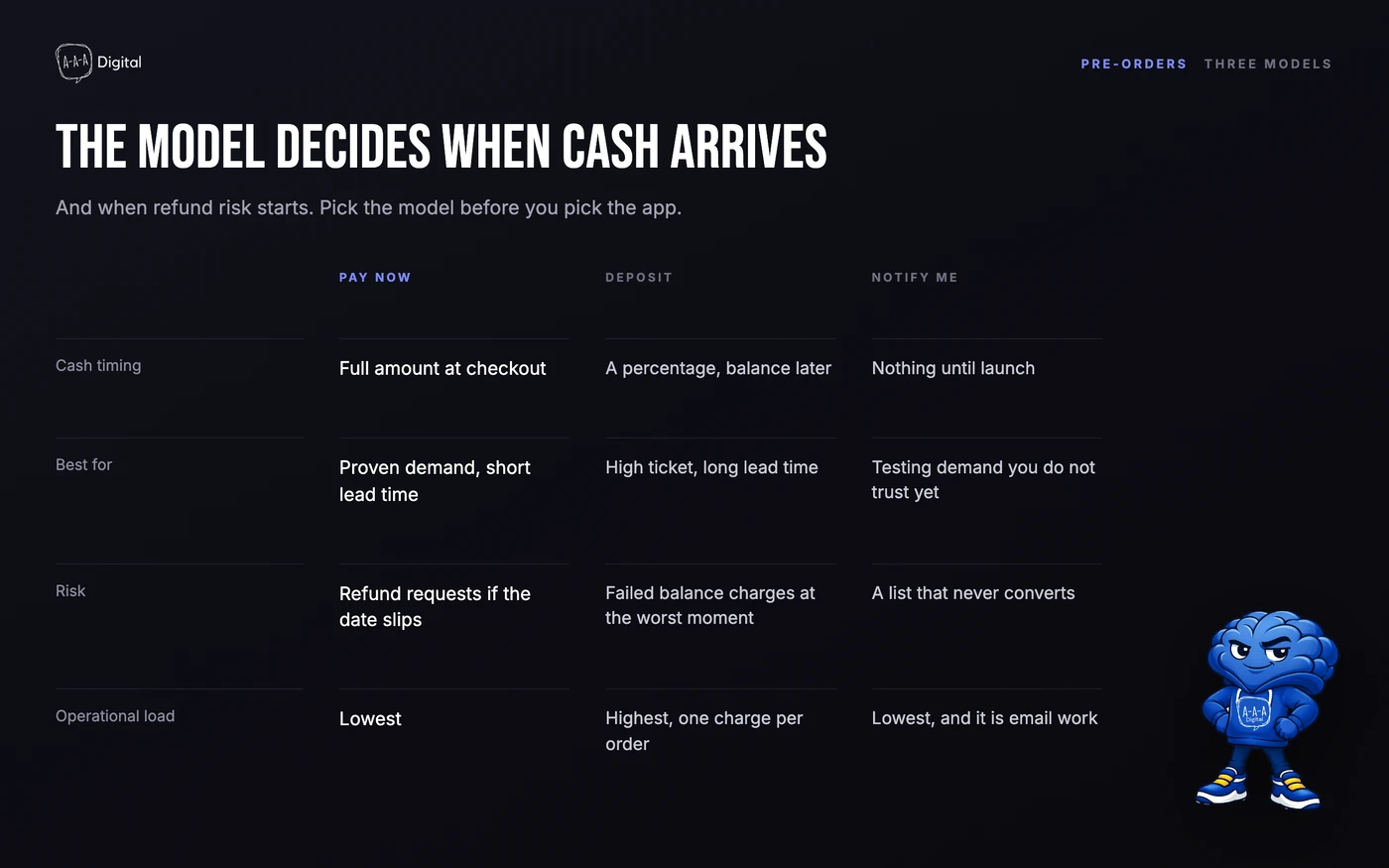
Partial payment. A deposit now, the balance before shipping. Right for high-ticket goods, made-to-order items, and long production runs, because it filters out tire-kickers and covers part of your cost. The catch is the second charge: you need a payment method on file or a reliable way to collect the balance, and some gateways make that easier than others.
Pay later. The customer commits at full price now and the card is charged later. This sounds friendliest and is usually the most fragile. Card authorizations expire in days, not months, so a real "charge the card in eight weeks" flow depends on the gateway and the app storing payment details. When that breaks, you are chasing payment by email.
Backorder or notify-me. Two different things sold as one. A backorder takes the order and the money for something out of stock, with a stated ship window. A notify-me captures an email and takes nothing. Both are useful. Only one is a pre-order, and customers notice which one they got when the confirmation email arrives.
Most stores pick the wrong one
The default mistake is using pay-later for a long lead time because it converts best on the product page. It does convert best. It also produces the worst outcome when the date moves, because the customer has nothing at risk and every reason to walk.
The second mistake is taking full payment for an indefinite wait. That works for a two-week restock with confirmed inbound stock. It does not work for a first production run with a factory you have not used before.
The rule we use:
- Ship date under three weeks, stock confirmed inbound: full payment, backorder model.
- Three to twelve weeks, production not started: deposit, with a stated balance date.
- Product does not exist and the date is a guess: notify-me, or a deposit with a generous cancellation path. Not full price.
If you are unsure which category you are in, you are in the third one. That is not a planning failure; it is an honest read of your supplier.
What Shopify does natively
Shopify has a setting called "Continue selling when out of stock". Turn it on for a variant and the store keeps taking orders after inventory hits zero, sending the count negative.
That is not a pre-order system. It is permission to oversell.
What it does not do:
- No payment timing. The order is charged in full at checkout, with no deposit option.
- No ship date. There is nowhere in the native flow to tell the customer when the item ships, apart from text you write into the description.
- No mixed-cart handling. A cart with one in-stock item and one pre-order item becomes one order that ships when the slowest item is ready, unless you split the fulfillment yourself.
- No customer communication. The confirmation reads like a normal order. Nothing tells the buyer they are waiting.
- No guardrails. Negative inventory becomes indistinguishable from a stock error, so buying reports drift.
You can fake a version with a variant option, a shipping note, and a manual tag. It breaks past a handful of products, because the work is manual and the messaging is improvised.
Setup, in the order that matters
The app is the easy part. These decisions determine whether pre-orders help or hurt.
1. Make the unit of pre-order the variant. One size on pre-order while the rest ship now is normal in apparel. An app that only works at product level forces bad merchandising, so test variant rules before launch.
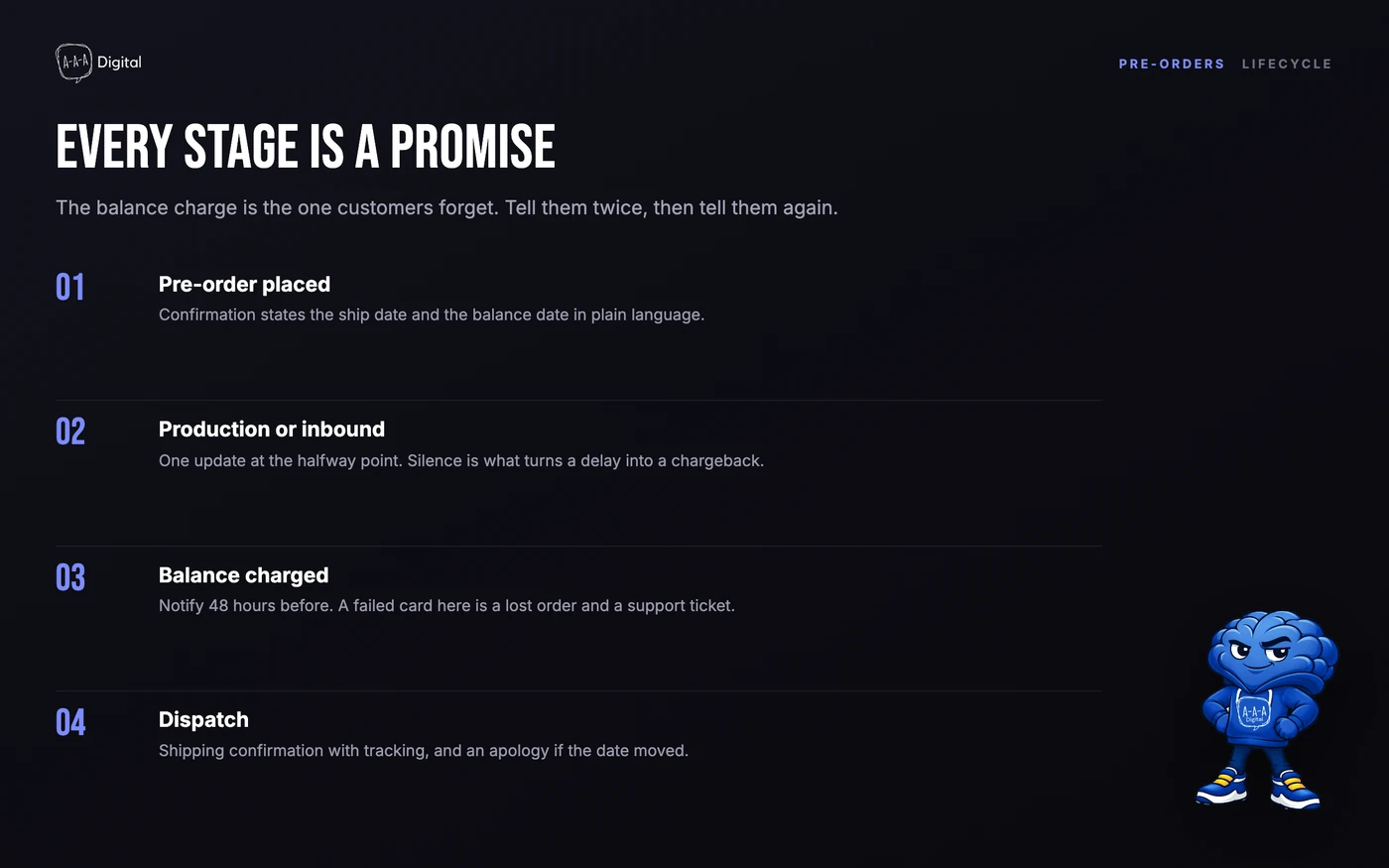
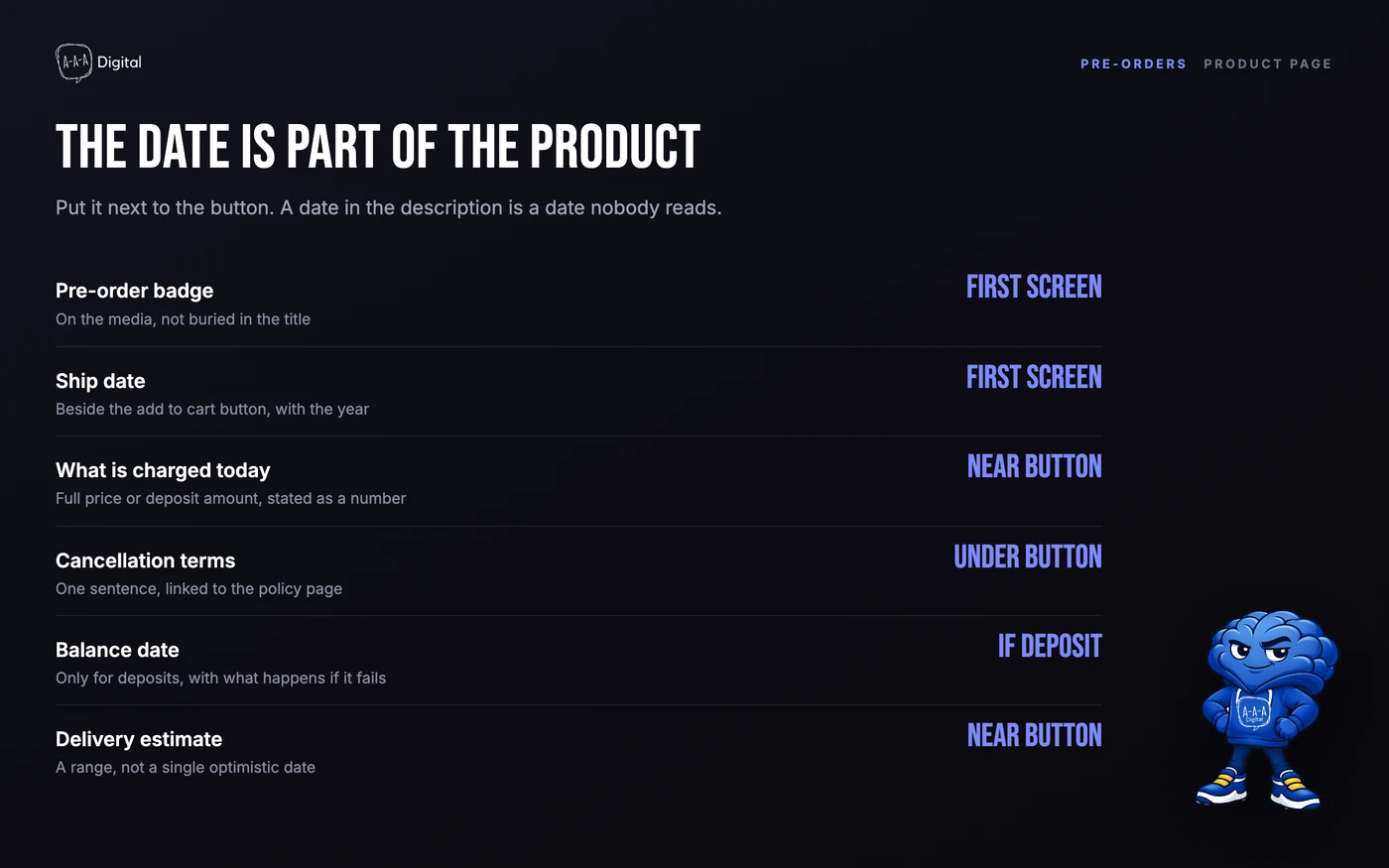
2. Put the ship date in the buy box. Not in a tab, not in the description. A date range is fine ("ships the week of 14 November"); a season is not. That is where the decision happens, and our notes on product page conversions cover where the messaging belongs.
3. Set payment timing on purpose. Base the deposit on cost of goods, not on a round number. If 20% does not cover materials, it is filtering, not protecting. Write down what happens if the balance is never paid, and put that in the terms.
4. Keep pre-order stock out of available stock. Otherwise your buying reports and warehouse team disagree, and your forecasting starts counting goods that do not exist. Check how your planning tool treats incoming units: our roundup of Shopify inventory management apps covers which ones handle it properly.
5. Build the email sequence before launch. Three messages minimum: a confirmation that says "this is a pre-order, it ships in X", a reminder before the ship date, and a shipping confirmation. If the app cannot send the first two, tag the orders and send them from your email platform. Silence is what turns a patient customer into a chargeback.
6. Treat fraud as a delay problem. Pre-orders pair card-not-present payments with long fulfillment gaps, which is exactly the pattern fraud screening flags, and they sit inside dispute windows longer than a normal order. Keep the terms, refund policy, and ship date consistent, answer support quickly, and offer cancellation freely. A refund you process is cheaper than a chargeback you fight.
7. Run one real order end to end. Mobile, with a discount code, with a mixed cart, then refund it. Read the confirmation email. Most pre-order failures we see were visible in that test and nobody ran it.
The five apps worth installing
All five are on the Shopify App Store. We have installed four; the fifth we evaluated without deploying, and we say which below.
1. Timesact
Timesact handles pre-order, coming-soon, low-stock, and back-in-stock states per variant, without a theme rebuild. Deposits and balances are Shopify purchase options, so checkout handles the money rather than the app.
The verdict: the most complete option for a store that needs several stock states, not just one button. Deposit, full payment, or nothing today, plus a cart-note mode for stores that need gift cards and automatic discounts to keep working.
Where it falls short: the settings surface is large, and a first setup takes an afternoon of reading. Its back-in-stock features overlap with email apps you may already pay for.
Best for: Stores that need deposits, per-variant rules, and back-in-stock in one app
Deposits handled as Shopify purchase options, so checkout does the money. Broad feature set; the settings take an afternoon.
See current pricing2. Purple Dot
Purple Dot is the enterprise-shaped option: pre-orders that run alongside your existing warehouse process, with units staying outside your 3PL's counts until stock lands.
The verdict: what brands with long lead times and real volume use. It includes a documented ship-or-refund commitment, which is the part most stores improvise.
Where it falls short: it is sold as a platform, not a cheap add-on, so a first launch does not justify it. Expect a scoped setup and a commercial conversation rather than a self-serve install.
Best for: Apparel and high-ticket brands running long pre-order windows
The most complete pre-order platform, including ship-or-refund handling. Built for volume, not a first launch.
See current pricing3. PreProduct
PreProduct charges upfront, later, or by deposit inside native Shopify checkout rather than a separate flow.
The verdict: a focused app that does the money side well. If your model is deposit now, balance before dispatch, and you want the customer to stay in Shopify checkout, this is the cleanest of the five.
Where it falls short: it is narrower than Timesact on surrounding states. If you also want low-stock badges and waitlists in one tool, check the current feature list first. We evaluated it without deploying it.
Best for: Stores that want deposits and pay-later on native Shopify checkout
Deposits and pay-later inside native checkout. Narrower on messaging and stock states than the leaders.
See current pricing4. Kaktus PreOrder Manager
Kaktus is the budget option that still handles partial payments. Set rules per product, choose full or split payment, and it swaps the sold-out button automatically.
The verdict: a working pre-order flow this week without a subscription review. Stock rules are usable (only when out of stock, always, or a limited quantity), and it can send a shipping-delay email.
Where it falls short: communication is basic, so you will likely run reminders from your email platform. It is also part of a large app suite, so the UI is generalist rather than specialized.
Best for: Budget-conscious stores that need a pre-order button and split payments
Cheap and quick, with full or partial payment and stock rules. Communication tools are thin.
See current pricing5. Appikon Pre-Order Today
Appikon replaces Add to cart with Pre-order on sold-out and coming-soon products, captures emails, and needs no theme editing.
The verdict: the fastest install of the five, and enough for a store that only wants to stop losing demand on sold-out sizes. It also gives you demand data before you place a purchase order, which is the cheapest forecasting available.
Where it falls short: it is button-level. No deposits, no payment timing, no balance collection. If your window is longer than a restock cycle, you have outgrown it before you start.
Best for: Stores that mainly want to replace the sold-out button and build a waitlist
Installs in minutes and needs no theme work. Button-level only, so no deposits or payment timing.
See current pricingHow the five compare
| App | Best for | Price model | Partial payments | Checkout extensibility |
|---|---|---|---|---|
| Timesact | Deposits plus per-variant stock states | Free tier, then usage-based | Yes | Yes, via Shopify purchase options |
| Purple Dot | Long pre-order windows at volume | Paid, quoted by volume | Yes | Yes, with a scoped setup |
| PreProduct | Deposits inside native checkout | Paid, subscription | Yes | Yes, built around it |
| Kaktus | A working pre-order flow on a budget | Free plan, then paid | Yes | Varies by plan |
| Appikon | Waitlists on sold-out products | Free plan, then paid | No | No, theme-level button swap |
Payment features change with app versions, so confirm the current listing before you install rather than trusting a table written in October. And checkout extensibility means different things at different price points: what an app can add inside checkout depends on your plan and the extension points it uses. Our guide to Shopify checkout customization covers the limits, and the same constraint applies to wallets like Shop Pay when a deposit is involved.
Pre-orders that damage trust
The failure pattern is consistent, and it is rarely the app's fault.
Vague ship dates. "Coming soon", "Q4", "ships when available". A customer will accept "ships the week of 14 November, and we will email you if that moves" far more readily than a promise with no date. Give a date you can miss by two weeks and still be honest about.
No cancellation path. If the only way out is an email to support and a wait, customers dispute instead of cancelling. Put a cancel link in the confirmation, or at minimum honor a one-click refund policy. A cancellation is a saved relationship; a chargeback is a closed account.
Full price for an indefinite wait. Taking 100% upfront for a product with no confirmed production date is not a pre-order, it is an interest-free loan with a marketing page. It works until the date slips, and then it is the most expensive revenue you ever booked.
Two smaller ones: charging a deposit without stating the balance and its due date, and letting a mixed cart promise one ship date when an item is months out. Both are communication problems, and both generate support tickets you pay for twice.
If you are running paid traffic to a pre-order page, be stricter than feels necessary. Paid visitors did not choose to wait; they clicked an ad. Our notes on Shopify CRO cover how expectation-setting fits the page, and the Shopify ROI calculator is a quick check on whether the volume justifies the support cost.
FAQ
Can I take pre-orders on Shopify for free? Roughly. "Continue selling when out of stock" accepts orders past zero inventory at no cost, but gives you no deposit, no ship date field, and no pre-order messaging. A free app plan is the better version of free.
Should I take a deposit or the full amount? Deposit when the ship date is more than a few weeks out or production has not started. Full payment when you have confirmed inbound stock and a date you trust. If you cannot state the ship date without hedging, do not take full price.
How do I stop pre-order items holding up in-stock items? Split the order into two fulfillments, which means charging shipping twice, or block mixed carts so pre-order items check out separately. Test it, because the default ships everything when the slowest item is ready.
What happens if the ship date slips? Tell the customer before they ask, offer a refund without argument, and keep the option open. Stores that communicate a delay keep most of the orders; stores that go quiet get disputes.
Do pre-orders hurt conversion? Not if the expectation is set in the buy box. They hurt when the badge says "Pre-order" and nothing else, and when the confirmation email reads like a normal order. Tag pre-order orders separately so the revenue does not hide inside normal sales; our Google Tag Manager setup guide covers how to do that without duplicating events.
Pre-orders work when the promise is specific and the payment matches the risk. If you want a second pair of eyes on the flow before a launch, book a call or see how our Shopify development team builds and tests this kind of setup.
