The first sign is usually a refund email. A customer bought the last unit of something that was already gone, because a supplier feed, a retail till, and a spreadsheet all believed they had it.
The second sign is cash sitting still. Stock you cannot sell, stock you cannot count, and a purchase order sent from a sheet nobody has opened since March.
The third sign is the reconciliation ritual: export orders, export stock, match them by hand, fix the numbers before the shop reopens. That works at forty orders a week. At four hundred it is a full-time job that still produces errors.
An inventory app fixes one of those problems, not all three. Most stores buy the biggest tool they can find and then discover it needs a consultant to run. This guide matches the tool to the job.
Is Shopify an inventory management system on its own?
Partly, and it is worth knowing exactly where the line sits before you spend anything.
Every Shopify plan includes a native inventory system. It tracks stock counts per product and variant, supports multiple locations, handles transfers between them, and sends low-stock alerts. On POS Pro plans you also get Stocky, which adds demand forecasting, purchase orders, and supplier management. For a single store with a few hundred SKUs and one warehouse, that is a real inventory management system, not a toy.
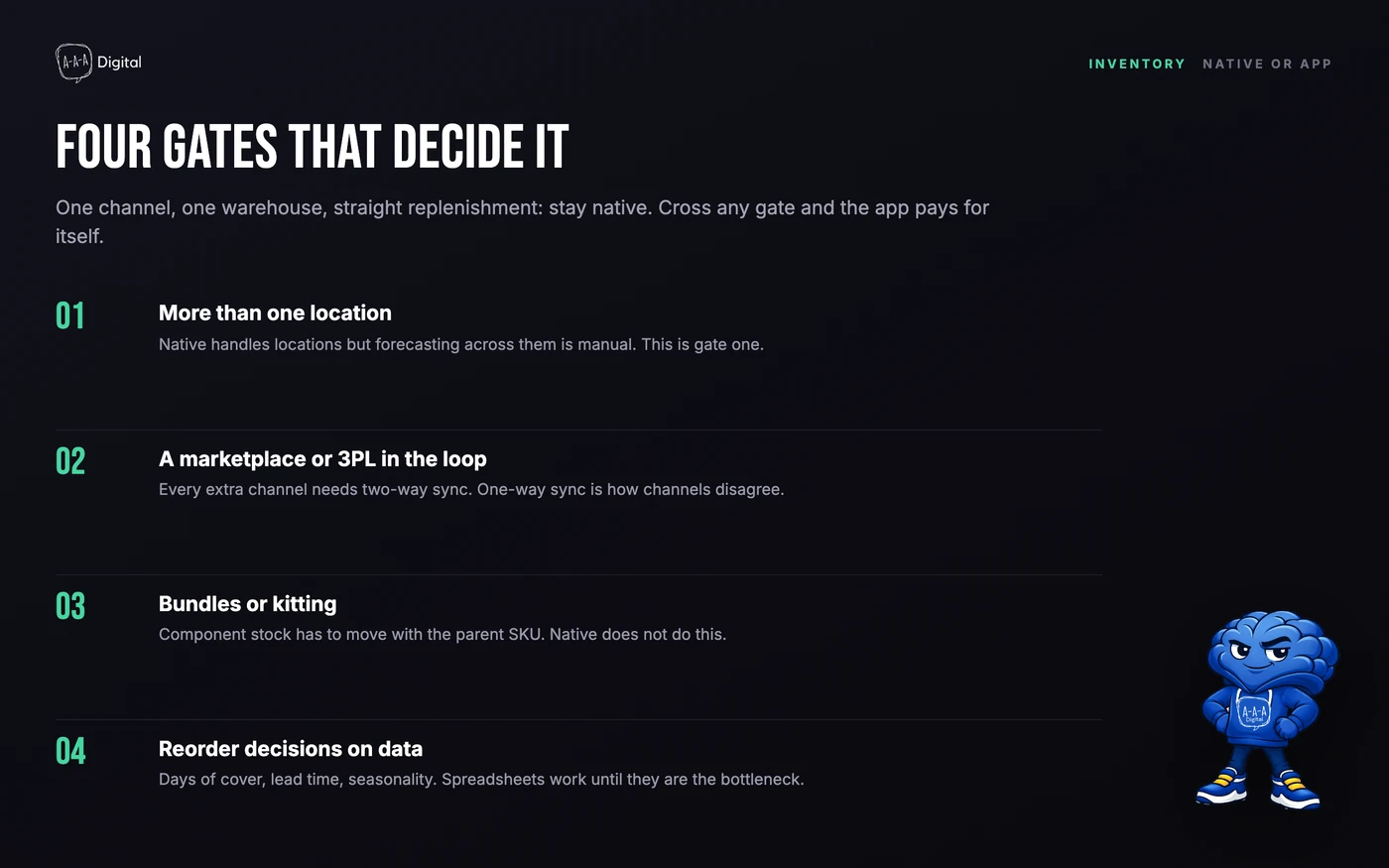
Four things push you past it:
- A second sales channel. The moment Amazon, eBay, or a wholesale portal sells the same units, native inventory cannot keep the counts honest on its own. You need a sync layer.
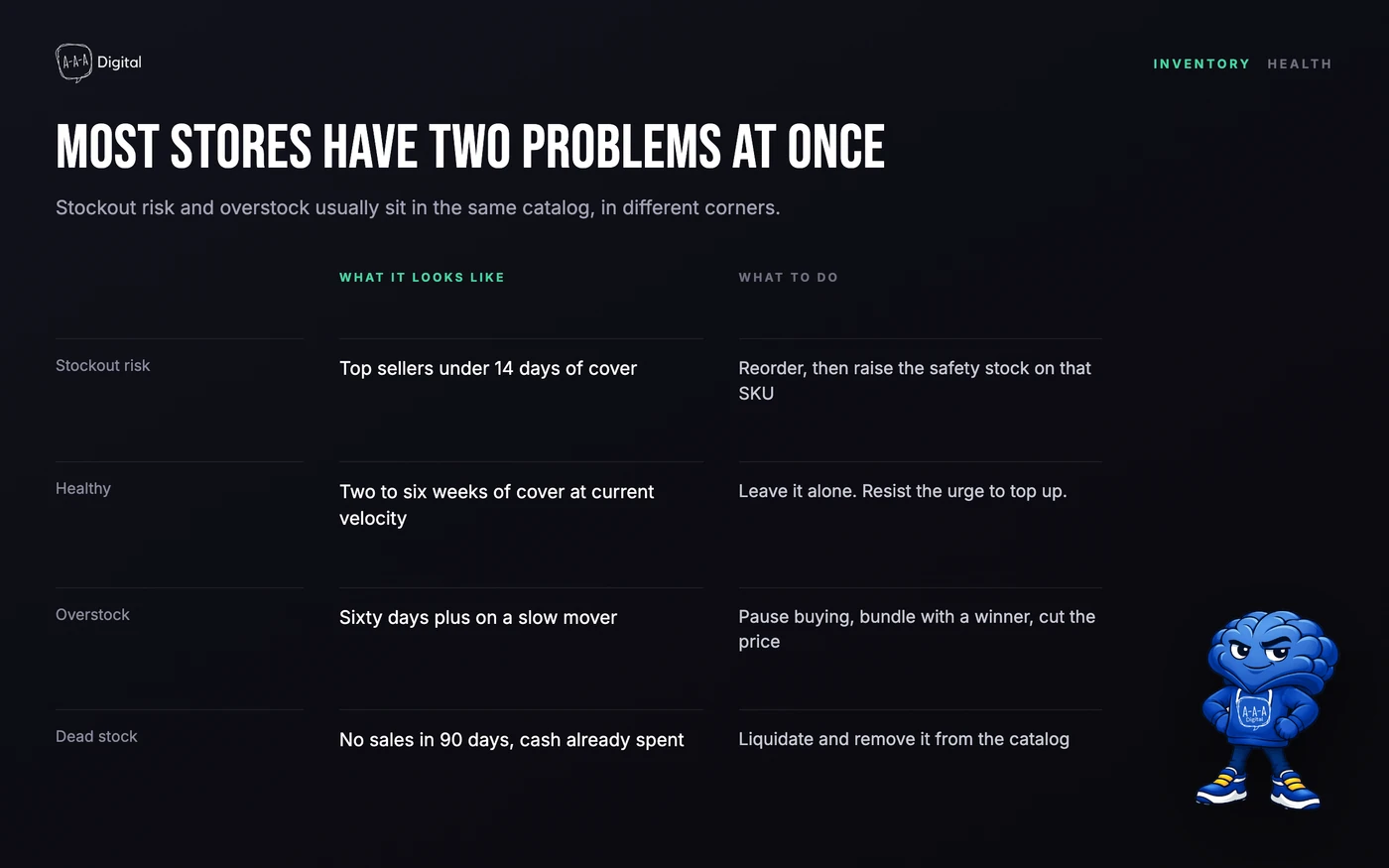
- Supplier lead times. Native tools know what is on hand, not what is on the water. Reorder points based on gut feel produce the two failure modes above: stockouts and dead stock.
- Assembly or manufacturing. If you buy components and build finished goods, you need bills of materials and production orders, which native inventory does not do.
- Forecasts that survive a promotion. Native Stocky forecasts on history. It cannot weight a planned sale, a TikTok spike, or a seasonal curve you know is coming.
Below those lines, stay native and spend the money elsewhere. Above them, the apps below are the ones we actually install.
The comparison, up front
| Tool | Best for | Price model | Multi-location | Multichannel sync |
|---|---|---|---|---|
| Shopify Stocky | Shopify POS retail | Free with POS Pro | Yes, POS locations | Shopify only |
| Inventory Planner by Sage | Forecasting across 1,000+ SKUs | Paid, scaled by SKU volume | Yes | Shopify, Amazon, others via integrations |
| Prediko | Forecasting without an ERP | Paid, usage-based | Yes | Shopify and Amazon |
| Stock Sync | Supplier, spreadsheet, and second-store feeds | Free tier, then paid by sync volume | Yes | Suppliers, ERPs, 3PLs, other storefronts |
| SKULabs | Picking and shipping across channels | Paid, tiered by order volume | Yes, warehouse locations | Shopify, Amazon, eBay, other marketplaces |
| Cin7 Core | Wholesale and DTC on one catalog | Paid, tiers by users and order volume | Yes | Shopify, marketplaces, accounting systems |
| Katana | Brands that assemble what they sell | Paid, tiered by plan | Yes | Shopify and accounting |
Those are price models, not prices. Everything in this category reprices by SKU count, order volume, or users, and any number printed today is wrong by the time you read it. Check the app listing before you budget.
How we picked
We install these apps on client stores, which is a different activity from reviewing them.
Every app here has run on at least one store we work with, at catalog sizes from a few hundred SKUs to several thousand, across multiple Shopify locations and connected supplier feeds. We have also removed several, which teaches you more than installing them.
What we judged:
- Setup time on a real catalog. Variants, weights, and messy supplier SKUs, not a demo store with twelve products.
- Behavior on bad data. Every catalog has duplicate SKUs, missing cost prices, and variants called "Default Title". An app that breaks on those is an app you abandon.
- Whether it owns a job end to end. Forecasting, purchase orders, and stocktakes in one place beat three tools doing a third each.
- Cost at your next size. SKU-based pricing triples a bill quietly.
- What breaks first. A sync that stalls, a forecast that ignores a promo, an integration that dies after a platform update. The failure mode matters more than the feature list.
Shopify's native inventory: enough until it is not
Shopify ships with real inventory management. Free, every plan, no app.
Stock counts per variant, multiple locations on higher plans, inventory states like committed and incoming, purchase orders, low-stock reports, and stock synced between your online store and POS.
For one location doing a few hundred orders a month, that is enough. The common mistake is installing an app before hitting the ceiling, then blaming the app for the extra admin.
The ceiling looks like this:
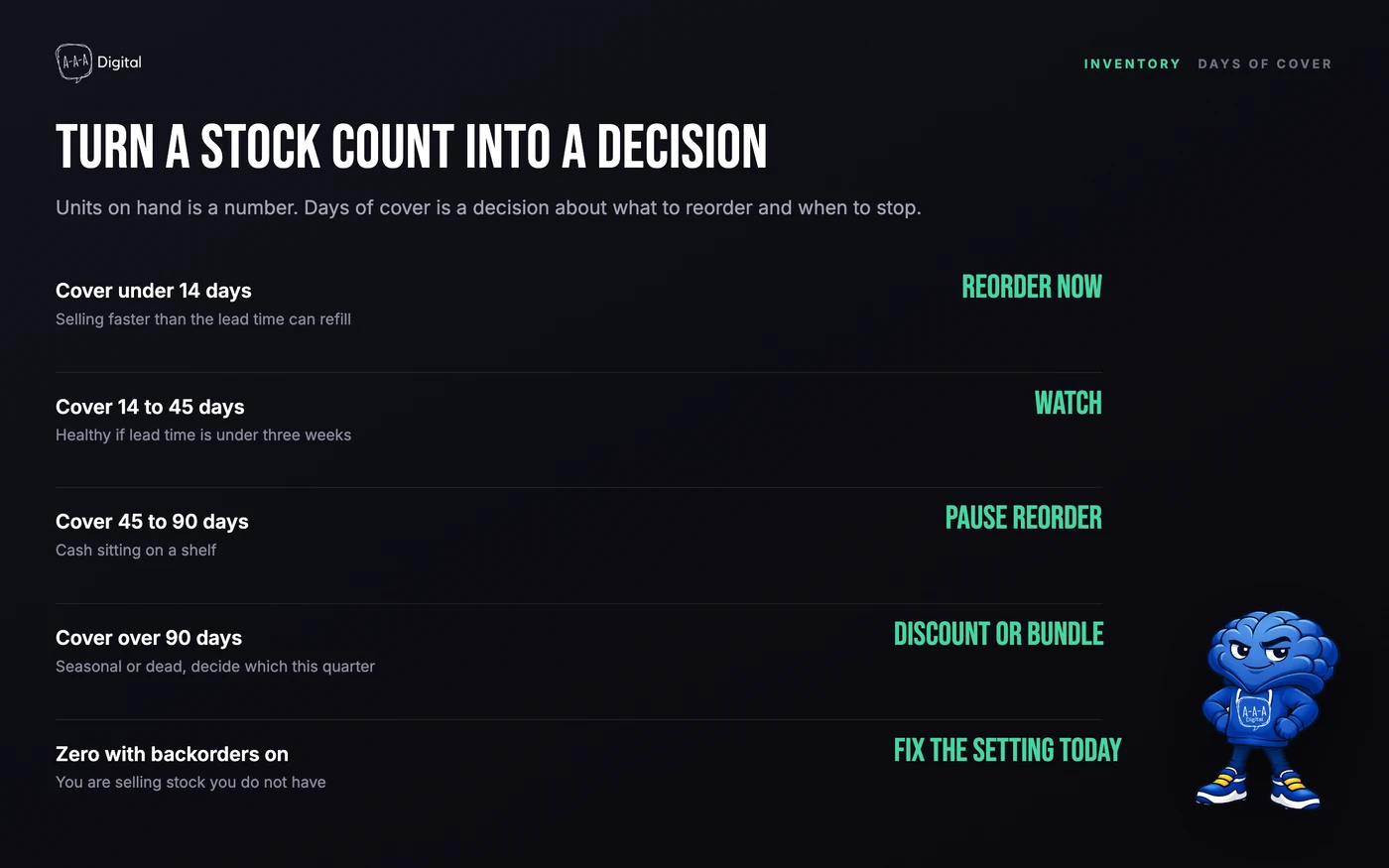
- You need to know what to buy, not what you have. Shopify reports stock levels. It does not tell you to order 340 units of the size that sells out every March and 12 of the one that does not.
- Your suppliers have lead times. Native inventory has no concept of a 45-day production run or a factory shutdown.
- You sell on more than one channel. Native Shopify only knows about Shopify.
- You build what you sell. A bundle is not a bill of materials. If a component is short, Shopify will still sell the bundle.
If none of that applies, stop here and fix something else. If two of them do, read on. Stores heading toward wholesale should start with how Shopify B2B setup changes the rules, because net terms and price lists put different demands on your stock data.
The seven tools, and where each one breaks
1. Shopify Stocky
Stocky is Shopify's own inventory app, built for stores running Shopify POS. Demand forecasting, purchase orders, stocktakes, supplier records, all inside the admin you already use.
The verdict: if you run retail on POS Pro, this is the best value on the list, because it costs nothing on top of a plan you already pay for. Forecasting is adequate for retail replenishment and there is no second login to forget.
Where it falls short: it is a retail forecasting tool, not an operations platform. No manufacturing lead times, no bill of materials, no connection to non-Shopify channels, and reporting that thins out once you want to plan by supplier or season. If your real problem is "we also sell on Amazon", Stocky is not the answer.
Best for: POS retailers who want forecasting and purchase orders inside Shopify admin
The best value here if you already pay for POS Pro. Retail-shaped, so it struggles with manufacturing and mixed channels.
See current pricing2. Inventory Planner by Sage
Inventory Planner is what we reach for when a catalog gets big. It reads sales history, builds forecasts with seasonality, and turns them into purchase orders you can send to suppliers.
The verdict: it does the job most stores actually fail at, which is deciding how much to buy and when. The planning screen is dense in a way that rewards an operator who sits with it weekly, and the purchasing side is properly built.
Where it falls short: it assumes clean stock data and maintained supplier records, both of which are rarer than vendors admit. There is a real learning curve, and the subscription scales with SKU count, so a store that adds variants casually will feel it. Under roughly 500 SKUs you are paying for forecasting sophistication your data cannot support yet.
Best for: Stores with 1,000+ SKUs and a real buying calendar
Forecasting and replenishment that survives a messy supplier base. Dense, and priced for catalogs that need it.
See current pricing3. Prediko
Prediko is the newer entrant that has taken a lot of the DTC forecasting work. It connects to Shopify, builds forecasts and replenishment plans, and handles multiple locations without an ERP underneath. Amazon is supported and there is a public API.
The verdict: strong forecasting without the ERP baggage. Setup is faster than the older planning tools, and the planning view is readable by someone who is not a supply chain analyst.
Where it falls short: it is still a planning layer. It will tell you what to order; it will not run your warehouse, and it will not fix a catalog where one product exists under three SKUs. Below 200 SKUs the plan math is more tool than your data can support.
Best for: DTC brands forecasting demand across 500+ SKUs
Strong forecasting without an ERP. Overkill under 200 SKUs, and pricing follows your catalog size.
See current pricing4. Stock Sync
Stock Sync is the least glamorous app here and the one that prevents the most refund emails. It syncs stock between Shopify and an external source: a supplier feed, a Google Sheet, a CSV, another storefront, or an ERP.
The verdict: if your overselling comes from stock living in two places, this fixes it for less than the cost of the problem. Map fields once, set a schedule, stop hand-editing quantities. It imports products too, which helps when a supplier renames half a catalog.
Where it falls short: it moves numbers, it does not think about them. No forecasting, no purchase suggestions. And a broken field mapping produces confidently wrong stock, so someone has to watch the sync logs.
Best for: Stores syncing stock from suppliers, spreadsheets, or a second storefront
The cheapest fix for overselling across sources. It syncs numbers; it does not plan anything.
See current pricing5. SKULabs
SKULabs sits on the fulfillment side: inventory counts plus picking, packing, shipping, and a shared order queue across channels.
The verdict: if the problem is "the pick list is wrong", SKULabs is a better fit than a forecasting tool. Barcode-driven picking, order batching, and multi-channel stock in one place is what most stores need at the point where manual fulfillment breaks.
Where it falls short: forecasting is not its strength, and the interface assumes a warehouse process exists. If nobody has defined bin locations and picking rules, the app exposes that rather than fixing it. Confirm every channel you sell on is supported before you commit.
Best for: Merchants shipping from one warehouse across several channels
Fulfillment and inventory on one screen. Weak as a forecasting tool, and it assumes a real warehouse process.
See current pricing6. Cin7 Core
Cin7 Core is the ERP-lite option: purchasing, sales orders, assembly, multiple warehouses, wholesale pricing, and accounting integrations in one system. It is what stores move to when Shopify plus three apps stops being coherent.
The verdict: it can run wholesale and DTC on one catalog, which nothing else here does properly. If you sell to retailers on net terms while shipping direct, the wholesale order flow and stock allocation justify the overhead.
Where it falls short: it is a system, not an app. Implementation takes weeks, someone has to own it, and the cost scales with users and order volume. Stores adopt it too early, then run a thin-margin operation through an ERP because a consultant recommended it. Before you assume more platform solves this, read our notes on whether Shopify Plus is worth it.
Best for: Wholesale and DTC running on the same catalog
ERP depth without enterprise pricing. Implementation is a project, and someone has to own it afterwards.
See current pricing7. Katana Cloud Inventory
Katana is built for brands that manufacture or assemble what they sell: production planning, bills of materials, component stock, and finished goods in one place, connected back to Shopify.
The verdict: Shopify cannot plan production, and Katana can. If you assemble kits, print in batches, or build furniture, the bill-of-materials view is the difference between knowing your real cost and guessing it.
Where it falls short: if you resell finished goods, you are paying for a manufacturing layer you will never open. Products, variants, and components have to be mapped deliberately, or stock drifts between the two systems.
Best for: Brands that assemble or manufacture their own products
Production planning Shopify cannot do. The wrong category entirely if you only resell finished goods.
See current pricingWhen to skip an app
Most stores that ask us about inventory software need a cleanup first.
- Under about 300 SKUs on one channel. Native stock plus a weekly review is cheaper and less error-prone than anything here.
- Your SKU data is a mess. No app plans around duplicate products, missing cost prices, and variants named "Default Title". Clean the catalog, then buy.
- Nobody will own the weekly planning. Forecasting tools produce a plan every week. If no one reads it, you have bought a subscription and a guilt trip.
- The real problem is merchandising. Dead stock is often a product page problem. If a product gets traffic and does not convert, no forecast fixes it. Start with product page conversions.
- You are launching a first product. Use native tools and a supplier who ships fast. Buy software when a mistake costs more than the software.
Signals you have outgrown spreadsheets
Three or more of these is a real signal, not a preference.
- Someone reconciled stock by hand in the last 30 days.
- You have oversold the same SKU twice this quarter.
- You cannot answer "what is my stock worth right now" without exporting.
- Purchase orders live in a sheet only one person understands.
- You sell on a second channel and update its stock manually.
- Stock sits in two locations with no single view of it.
- Your reorder point is a number someone typed a year ago.
- You ran out of a bestseller while a slow SKU sat untouched all season.
If that reads like a description of your week, the cost of the app is not the question. The cost of the reconciliation is.
Two things to do before you install anything. Measure the current process first: hours per week, refunds per month, cash tied up in dead stock. Our Shopify ROI calculator will help with the revenue side. Then tag the events, because otherwise you cannot tell whether the fix worked. Sold-out views, back-in-stock signups, and negative-stock orders should all be visible in analytics, and our Google Tag Manager setup guide covers getting those events out of Shopify without breaking the rest of your tracking.
Last, separate two problems that look identical in a stock report. Selling out because you misjudged demand is an inventory problem. Selling out and taking orders anyway is a pre-order decision with its own rules. Our guide to Shopify pre-order apps covers the models and where each one breaks.
If the cleanup and the install have to happen in the same month, that is usually a job for someone who has done it before. Our Shopify experts page covers how we scope that work.
FAQ
Do I need a paid app if I already use Shopify's inventory? Only when you hit a ceiling native inventory cannot cross: multi-channel stock, supplier lead times, production planning, or forecasting beyond reorder points. Under that line the native tools are enough.
Which app suits a small store with one location? Stocky, if you run POS Pro, because it is included. Online-only stores should stay native until roughly 300 to 500 SKUs or a second channel. Nobody needs a forecasting subscription on day one.
Can these apps handle multiple Shopify locations? All seven do, with different depth. Stocky works within POS locations, the forecasting tools plan per location, and the ERP-style tools allocate between warehouses. Test a location transfer during the trial, because that is where integrations show their seams.
How long does setup take? A sync app is an afternoon. A forecasting tool is a week of data cleanup plus one planning cycle. An ERP is a project measured in weeks, and the mapping work can only be done by your team. Budget mapping time, not install time.
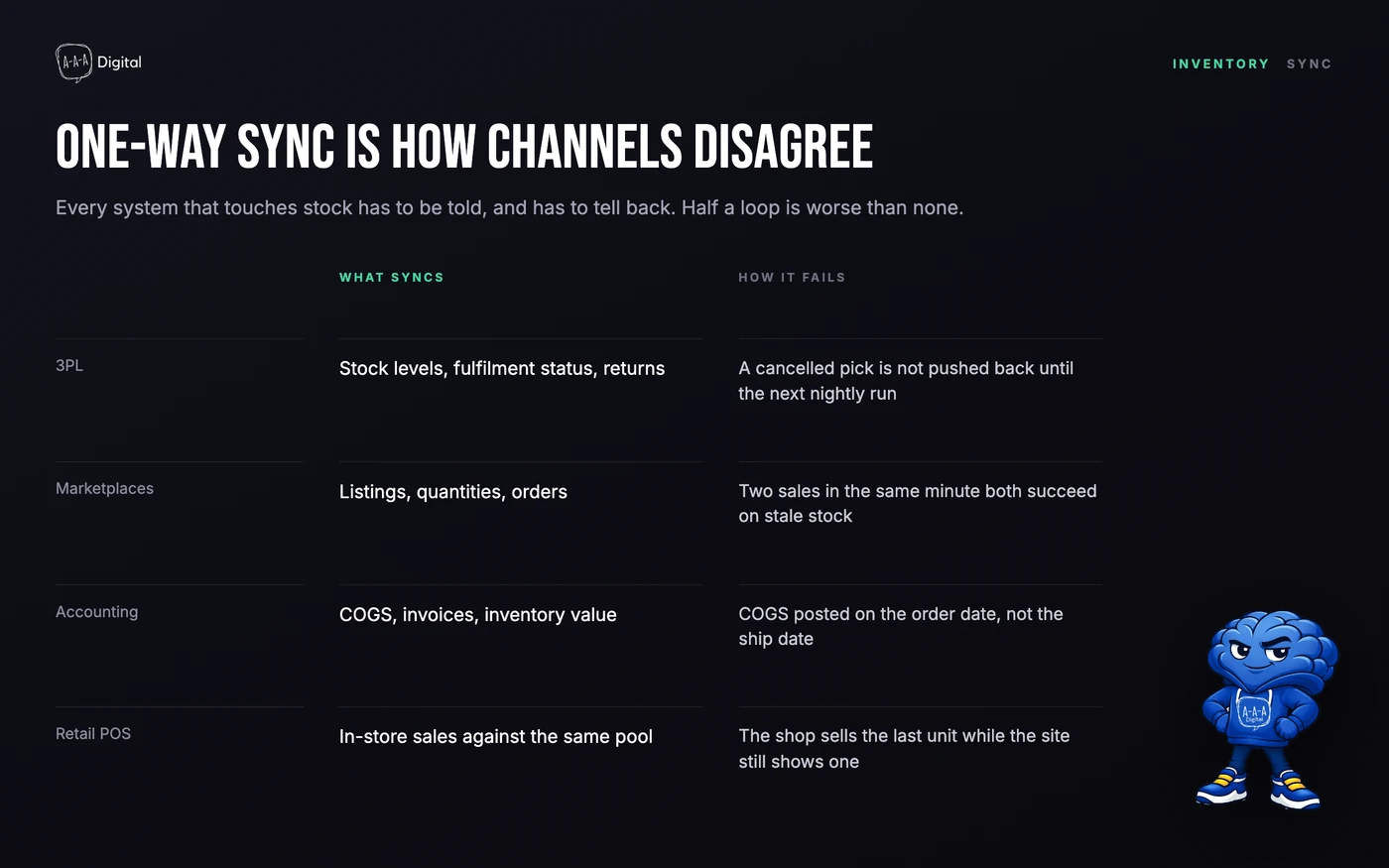
Will an app stop overselling completely? Only if every place holding stock is connected to it. An app cannot see a marketplace listing you update by hand, a till that syncs nightly, or a 3PL reporting on its own schedule. Close those gaps first; the app keeps them closed.
Inventory problems are rarely software problems. They are data problems with a software bill attached. If you want a second opinion on whether your catalog needs a tool or a cleanup, book a call or look at how our Shopify CRO service handles the merchandising side of the same problem.
