You can do everything right before checkout and still lose the sale in the last fifteen seconds.
A shopper finds the product, adds it to the cart, gets to the payment step, and then has to remember a password, type a shipping address, and re-enter a card number on a phone keyboard. Every one of those fields is a place to quit.
Shop Pay exists to remove those fields. It is Shopify's accelerated checkout: a saved wallet that lets a returning shopper confirm an order in two taps. Shopify gives it away with Shopify Payments, which is why most stores switch it on and never think about it again.
That is also why most stores never measure it. Shop Pay changes how your checkout behaves, and it changes what you can customize. Both matter.
What Shop Pay actually is
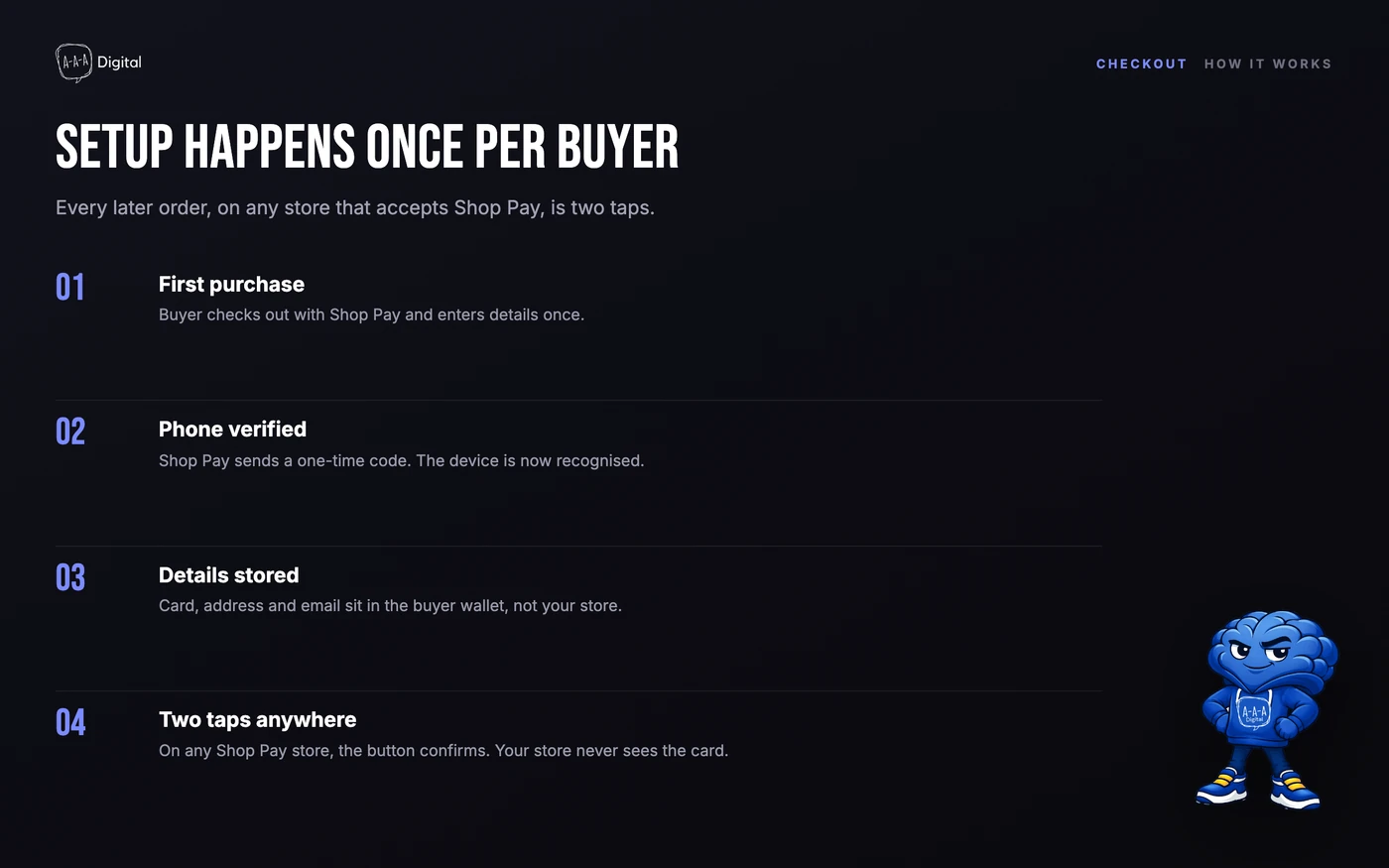
Shop Pay is a wallet, not a payment method in the traditional sense. The money still moves through Shopify Payments. Shop Pay stores the shopper's email, shipping address, and card details after their first purchase, then offers those details back at checkout on any store that accepts Shop Pay.
For the shopper, that means one code sent to their phone, or a biometric confirmation, instead of a form.
For the merchant, it means four things:
- Fewer form fields. Returning buyers skip address and card entry.
- A network effect. Shoppers who have used Shop Pay anywhere can use it on your store without creating a new account.
- Cross-channel reach. Shop Pay works on your storefront, in the Shop app, and on Facebook, Instagram, and Google surfaces.
- A checkout you do not fully control. More on that below.
Shop Pay is switched on by default when Shopify Payments is your payment gateway. There is no separate app and no monthly fee. Shopify states that it is free with Shopify Payments, and that is the version of the truth most articles stop at.
How Shop Pay works, step by step
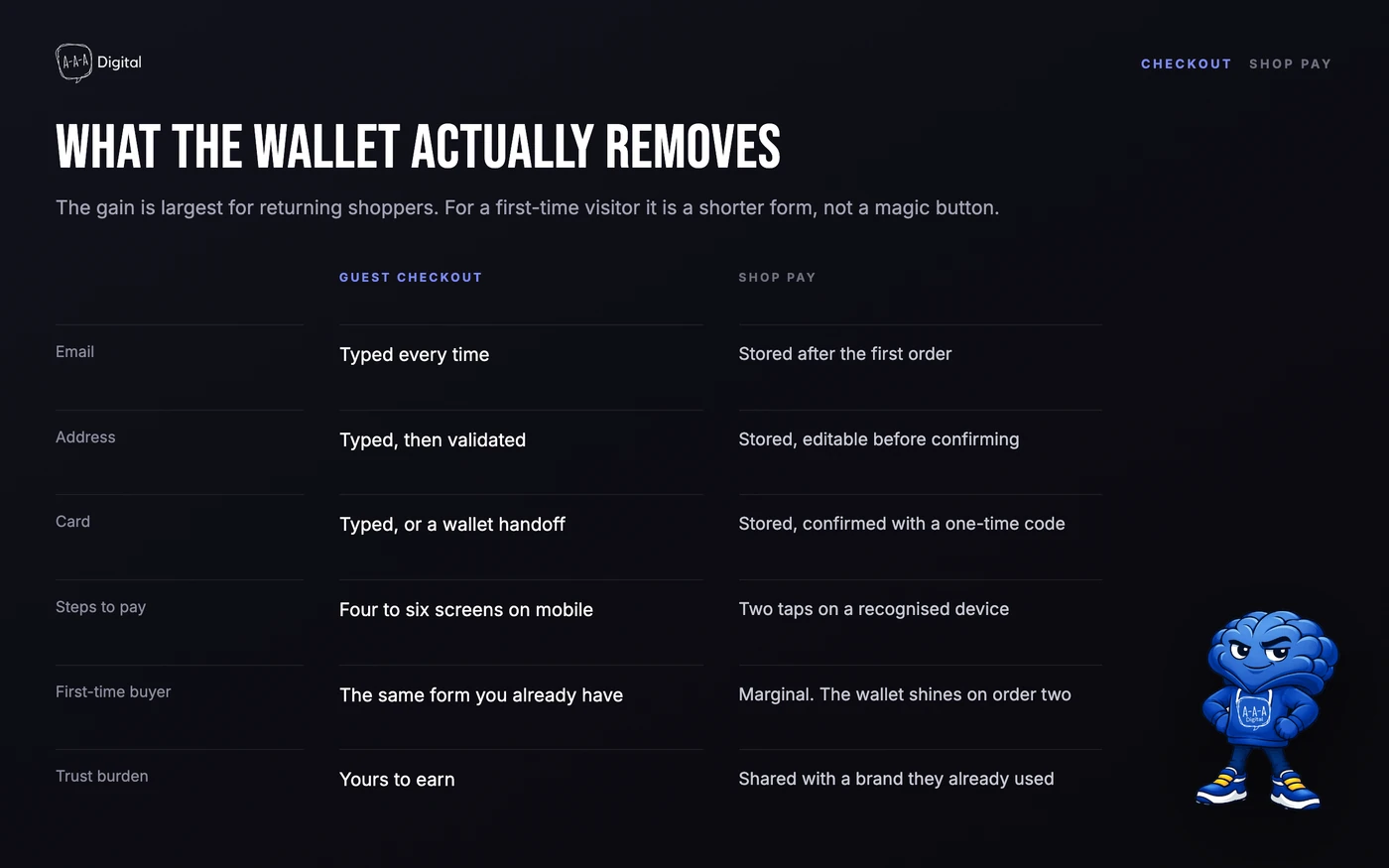
For a first-time buyer, Shop Pay looks like a normal checkout with one extra step. They enter their email, phone number, card, and shipping address, then Shopify sends a six-digit code by text message (or, on newer setups, asks them to confirm with a Shop passkey). That code is the account. There is no password to create or forget.
From the second purchase onward, the flow shrinks to this: the buyer types the email they used before, gets a code or a biometric prompt, and confirms. Address, card, and delivery preferences come back automatically, on your store and on every other store that accepts Shop Pay.
The wallet also travels. The same saved details work at checkout on your storefront, inside the Shop app, and on Facebook, Instagram, and Google shopping surfaces if you sell there. Shopify runs all of it; your store just receives a paid order with the wallet name attached.
Is Shop Pay safe?
For buyers, the short answer is yes, and the reasons are structural rather than promotional. Shop Pay runs on Shopify's PCI DSS Level 1 infrastructure, which is the same card-security standard a large bank operates under. The buyer's card number is stored as a token, not as the raw number, and it never passes to your store's systems. Account access requires the one-time code or a passkey, so a leaked password does not unlock the wallet.
For merchants, three honest caveats:
- Shop Pay filters fraud, not fulfillment. Shopify screens suspicious orders before you see them, but a store that takes money and ships nothing is a business problem, not a payment problem. If a chargeback lands, it lands on your merchant account the same as any card payment.
- The code is the weak point if the buyer is careless. A scammer who talks a buyer into reading out their Shop Pay code can place orders in their name. This is social engineering, and no wallet design fully solves it.
- Legitimacy cuts both ways. Shop Pay being everywhere helps real stores, and buyers know the logo. If your store is new and unreviewed, the wallet borrows trust from Shopify, which is useful and worth remembering when you design your own trust signals.
The Shop Pay app
Searches for "Shop Pay app" usually mean one of two products, and they are not the same thing.
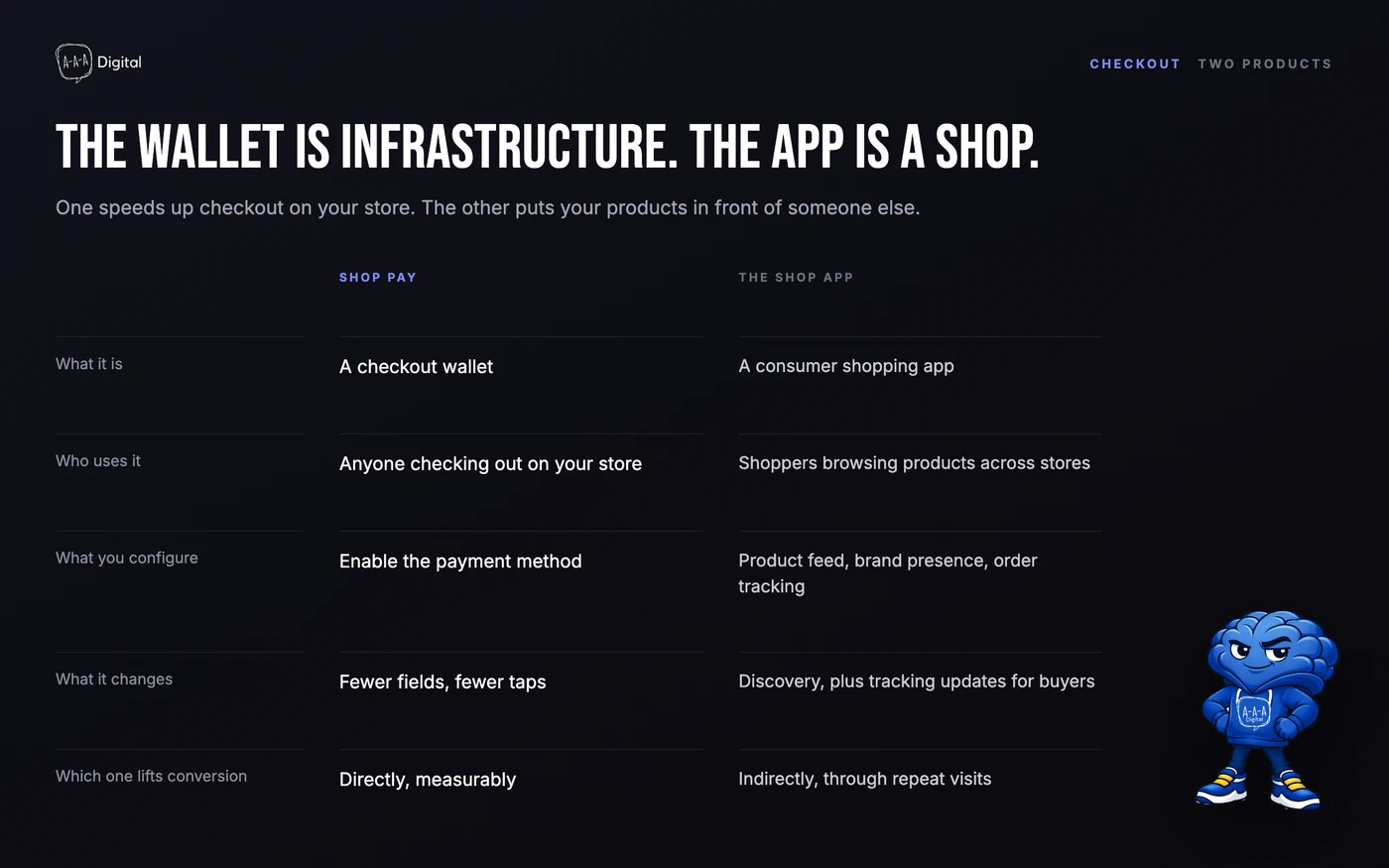
Shop Pay is the wallet described above. It is not an app anyone installs. It is a button at checkout.
The Shop app is a free consumer shopping app from Shopify, built on the bones of the old Arrive package tracker. Buyers use it to track orders, follow brands, and browse a discovery feed. When they buy something inside the Shop app, the checkout runs on Shop Pay, which is where the names collide.
For merchants, the practical bits: orders that arrive through the Shop app look like ordinary orders in your admin, with the channel attributed. You do not design the Shop app experience; Shopify does. You can influence it through the Shop channel settings, product feed quality, and your shop's branding inside the app. If a buyer says "the Shop Pay app charged me twice", the charge almost certainly came from a store order placed through the wallet, not from a subscription to an app.
Shop Pay customer service
There is no dedicated Shop Pay support line, which surprises people. Who to contact depends on the problem:
If you are the buyer: an order problem (wrong item, refund, delivery) belongs to the store that took the order, not to Shopify. Start with the store's support email or the order page in the Shop app. If the charge itself looks wrong and the store will not engage, dispute it with your card issuer the way you would any card payment; Shop Pay transactions run on the same rails. For account issues, such as a phone number you no longer have access to, Shopify maintains a separate help centre at help.shop.app.
If you are the merchant: Shop Pay support is Shopify support. The chat, email, and callback options in your admin cover it, and the Shop Pay documentation lives in the Shopify Help Center under Payments. Escalations about a specific order go through the order timeline in your admin, where Shopify can see the payment events.
Keep this distinction somewhere your support team can find it. Half of "Shop Pay complaints" stores receive are order problems wearing a payment costume.
The numbers Shopify publishes, and how to read them
Shopify's own marketing makes three claims worth knowing:
- Shop Pay converts as much as 50% better than guest checkout (based on a 2023 study Shopify commissioned with a consulting firm).
- Its presence alone drives about a 5% lift in lower-funnel conversion.
- Shoppers using the Shop app show a 9% higher repurchase rate.
Those are vendor numbers, so treat them as a ceiling, not a forecast. The 50% figure compares Shop Pay to guest checkout, which is the slowest possible path. If your store already offers Apple Pay, Google Pay, and PayPal, the incremental gain from adding Shop Pay is smaller.
The 5% figure is more useful for planning, because it isolates the presence effect rather than the full wallet experience. A 5% lift on a store doing 2,000 orders a month is 100 extra orders. At a $70 average order value, that is $7,000 in monthly revenue that costs nothing extra in ad spend.
Here is what that does to acquisition math. If you spend $20,000 to acquire those 2,000 orders, your CPA is $10. Add 100 orders from the same spend and your CPA drops to $9.52. Not dramatic on its own, but it compounds every month, and it applies to paid traffic that you are already paying for.
Why this matters more for paid traffic than organic
Organic visitors often arrive with time and intent. Paid visitors arrive with a click, a thumb, and a short attention span. The marginal cost of friction is higher on paid traffic because you paid for the click whether or not the checkout completes.
This is the part most CRO audits miss. Teams optimize the product page, then hand the visitor to a checkout that behaves differently on mobile, in a new market, or with a discount code applied. Shop Pay helps in the first case and gets complicated in the others.
If you are running Meta or Google traffic to a store, compare mobile checkout completion rate with and without Shop Pay enabled before you touch another creative. It is usually a bigger lever than a new headline.
What Shop Pay costs you
Nothing in fees, if you are on Shopify Payments. Something in control. Four trade-offs worth knowing before you build a checkout strategy around it:
Customization stops at the wallet. Shop Pay is an accelerated checkout. Shopify's checkout extensibility lets you brand and extend checkout, but the accelerated wallet flow is intentionally standardized. If your conversion theory depends on a custom field, an upsell step, or a specific post-purchase offer inside checkout, test whether it survives Shop Pay. Often it does not.
Your buyer relationship is shared. A Shop Pay shopper is a Shopify network shopper. You still get the order and the email, but the account, the saved card, and the purchase history sit with Shopify. That is the trade for the conversion lift.
Discount and subscription logic needs testing. Stacked discounts, free-gift thresholds, and subscription checkouts can behave differently when the wallet skips steps. Run a real order through each scenario, not just the happy path.
It is not available everywhere. Shop Pay depends on Shopify Payments, and Shopify Payments is not available in every country. If you sell into a market where your gateway is a local provider, Shop Pay may not be an option at all.
None of these are reasons to skip it. They are reasons to test it rather than assume it.
Shop Pay vs Apple Pay, Google Pay, and PayPal
| Shop Pay | Apple Pay | Google Pay | PayPal | |
|---|---|---|---|---|
| Works on any Shopify store | Yes | Yes, device dependent | Yes, device dependent | Yes |
| Saved address and card across stores | Yes, Shopify network | Yes, Apple Wallet | Yes, Google account | Yes, PayPal account |
| Desktop support | Yes | Limited | Yes | Yes |
| Buyer needs a specific device | No | Apple device | Android or Chrome | No |
| Merchant fee | None beyond Shopify Payments | None beyond gateway | None beyond gateway | PayPal rates |
| Checkout customization impact | High | Medium | Medium | Low |
The practical answer is not "pick one". Offer all of them. Shop Pay tends to win on returning Shopify shoppers and on mobile; Apple Pay wins on iPhone; PayPal still matters for buyers who do not want to enter a card anywhere.
The mistake is enabling them and never checking which one is actually used. Shopify's analytics break down checkout by wallet, and that report is more useful than any benchmark.
How to set up Shop Pay properly
- Confirm Shopify Payments is active. Shop Pay appears automatically when it is. If you use a third-party gateway, check whether Shop Pay is available in your region before planning around it.
- Turn on Shop Pay Installments if you sell high-ticket items. Shopify offers interest-free or monthly installments through Affirm's lending partners, with eligibility depending on order value and region. Installments are not free money; they shift cost and risk, so model the margin before you promote them.
- Brand the checkout you can brand. Logo, colors, and checkout extensions still matter. The accelerated flow is standardized, the surrounding checkout is not. Our guide to Shopify checkout customization covers what each plan actually allows.
- Test every discount path. Percentage off, free shipping, gift with purchase, and automatic discounts. Place one order per scenario on mobile.
- Check multi-currency behavior. If you sell in several currencies, confirm the wallet shows the right currency and that Shopify Markets pricing does not break the accelerated flow.
- Instrument it. Add checkout-step events to GA4 and confirm they match Shopify orders. Our Shopify GA4 setup guide covers the event names and the common mismatch.
How to measure whether Shop Pay is working
You cannot A/B test checkout the way you test a landing page. Shopify does not let you split checkout experiences for the same traffic, and doing it badly breaks attribution.
Use these three comparisons instead:
Before and after, segmented by device. Compare mobile checkout completion rate for the four weeks before and after enabling Shop Pay. Desktop will move less; mobile is where the wallet earns its keep.
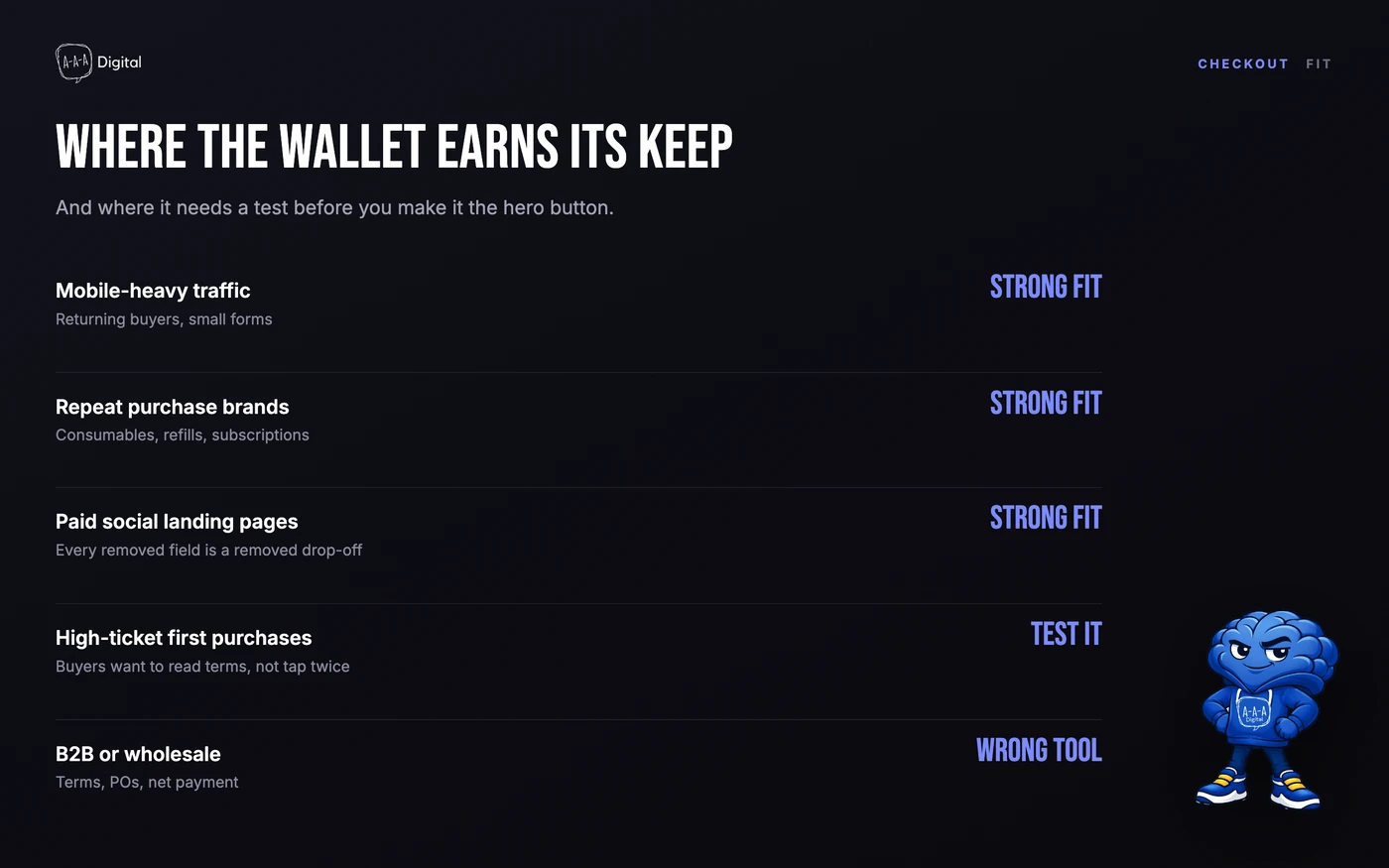
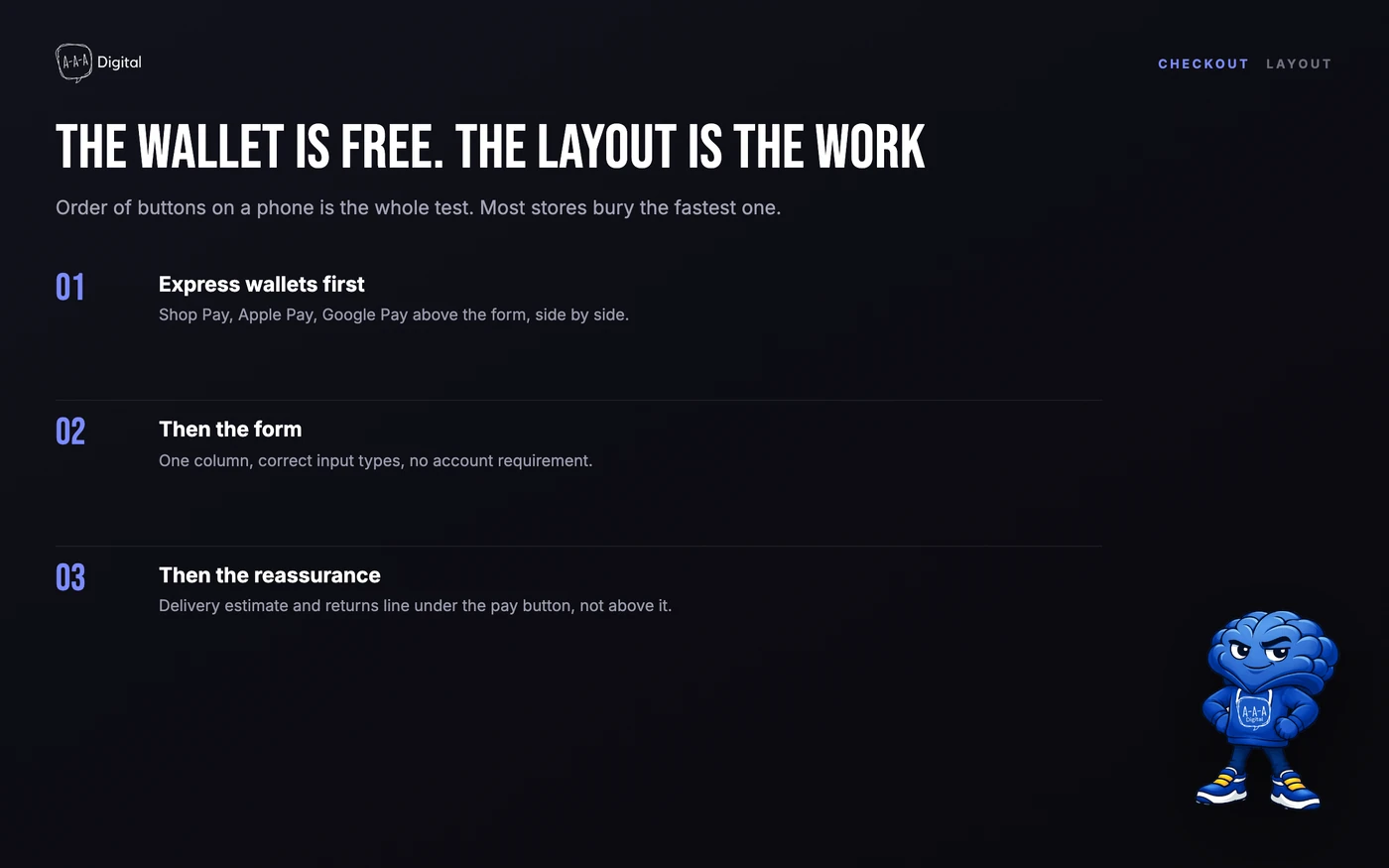
Wallet mix over time. In Shopify analytics, look at the share of orders by wallet. If Shop Pay is under 10% after a month of meaningful traffic, the problem is usually visibility, not demand. Check that the button renders above the payment form and that the store does not force account creation first.
Paid vs organic completion. Pull checkout completion by traffic source. If paid traffic completes at a much lower rate, the gap is usually friction or trust, not audience quality. Trust badges and cart abandonment fixes are the next places to look.
For a fast revenue estimate, plug your order count and average order value into our Shopify ROI calculator and model a 3–5% lift. If the number does not justify the setup work, you have your answer.
When Shop Pay is the wrong call
Shop Pay is a bad fit when:
- You sell in a market where Shopify Payments is unavailable and you cannot use it as a gateway.
- Your checkout depends on custom steps that the accelerated flow skips, and those steps carry real revenue.
- You are a B2B store with net terms, purchase orders, and approval workflows. Shop Pay is built for consumer checkout; wholesale needs a different flow. See our Shopify B2B setup guide.
- Your average order value is very low and your margin cannot absorb installment fees if you plan to promote them.
For everyone else, the default is right: leave it on, measure it, and stop treating checkout as a design problem. It is a math problem.
FAQ
Is Shop Pay free? Yes, when Shopify Payments is your gateway. Shopify charges no separate Shop Pay fee. Standard Shopify Payments processing rates still apply.
Is Shop Pay safe? For buyers, yes. Card details are tokenized and stored on Shopify's PCI DSS Level 1 infrastructure, the store never sees the raw card number, and account access requires a one-time code or passkey. The section above covers the honest caveats, including what Shop Pay does not protect.
What is the difference between Shop Pay and the Shop app? Shop Pay is a checkout wallet, not an app. The Shop app is a free consumer shopping app from Shopify for order tracking and brand discovery; its checkout uses Shop Pay. There is a diagram above that keeps them straight.
How do I contact Shop Pay customer service? Buyers with an order problem contact the store that took the order. Buyers with a wrong charge dispute it with their card issuer like any card payment. Merchants use standard Shopify support channels, since there is no separate Shop Pay support line.
Does Shop Pay check your credit? Standard Shop Pay does not. Shop Pay Installments, the buy-now-pay-later option powered by Affirm's lending partners, may run a soft check for eligibility that does not affect the buyer's credit score. Paying in four interest-free installments is different from monthly financing, and the terms show before the buyer confirms.
Does Shop Pay work without Shopify Payments? Generally no. Shop Pay is tied to Shopify Payments. Shopify has been extending Shop Pay to headless and non-Shopify storefronts, but the standard path is Shopify Payments.
Does Shop Pay hurt conversion for first-time buyers? It should not, because the wallet is optional. First-time buyers see it as one option among several. Watch the layout: if the Shop Pay button pushes card entry below the fold on mobile, you have created a new problem.
Can I customize the Shop Pay button? You can control placement and surrounding checkout branding, not the wallet's internal flow. Test the rendered button on mobile after every theme change.
Checkout is the cheapest conversion rate you will ever improve, because the traffic is already paid for. If you want us to audit the full path from ad click to order confirmation, book a free strategy call or see how our Shopify CRO service works.
