Cancelling a Shopify subscription takes four clicks: Settings, Plan, Cancel subscription, then confirm. What it does not do is refund the $39 you already paid this month, release your domain, or stop an app that bills you outside Shopify.
That gap between what people expect and what the button does is where most of the complaints come from. So the rest of this guide is about the bill, not the click.
Cancel, pause, or close: three different actions
Shopify uses these words loosely in its own help center, and stores get caught by it. Cancelling ends the subscription and leaves the store intact and reopenable. Closing is what most people mean by deleting, and it eventually takes the data with it. Pausing is a legacy feature that most stores can no longer switch on.
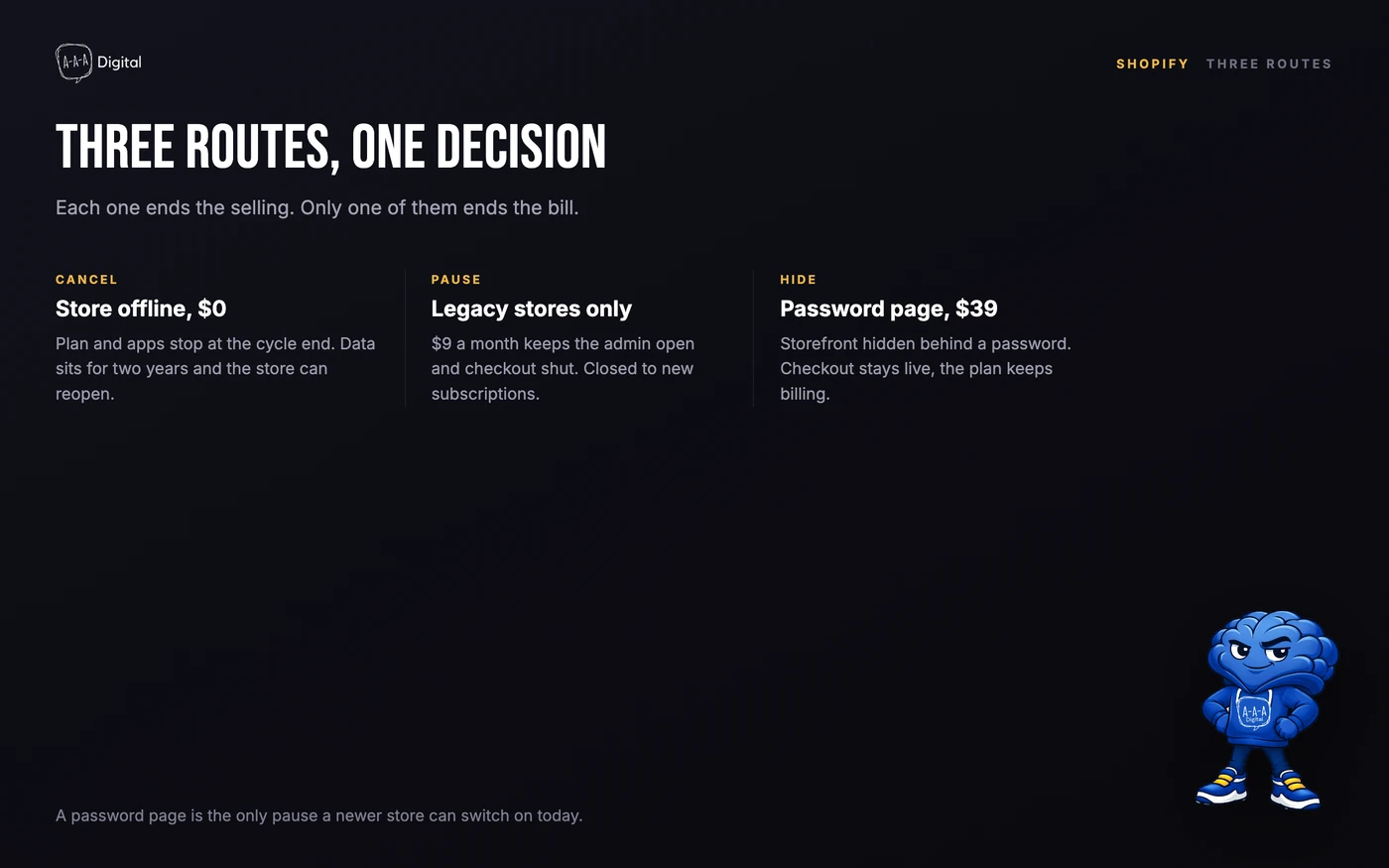
| Route | Monthly cost | Storefront | Checkout | Data | Reversible |
|---|---|---|---|---|---|
| Cancel subscription | $0 after the cycle ends | Offline | Off | Kept for two years | Yes, reactivate |
| Pause and Build (existing stores only) | $9 | Visible | Off | Kept | Yes |
| Password page on Basic | $39 | Hidden behind a password | Live but unreachable | Kept | Instant |
| Downgrade Grow or Advanced to Basic | $39 | Live | Live | Kept | Yes |
| Cancel, then erase customer data | $0 | Gone | Gone | Erased in 14 days | No |
Read the table by what you actually want. To stop paying, cancel. To keep the store online while you stop selling, a password page does that for $39 a month. To close a Shopify store for good, that is the erasure request, and it is the only row you cannot undo.
The exact cancel path
The owner has to do this. Staff accounts cannot cancel the plan, and Shopify Support will not cancel on your behalf.
- Log in as the store owner and open Settings, then Plan.
- Click Cancel subscription. On a trial, the button reads Cancel trial.
- Read the retention screen. Shopify will offer a downgrade to Basic at $39, and Pause and Build if your store is already eligible.
- Choose the reason that fits, then confirm with your password and a two-step code.
- Check the confirmation email, then check your bank statement one cycle later.
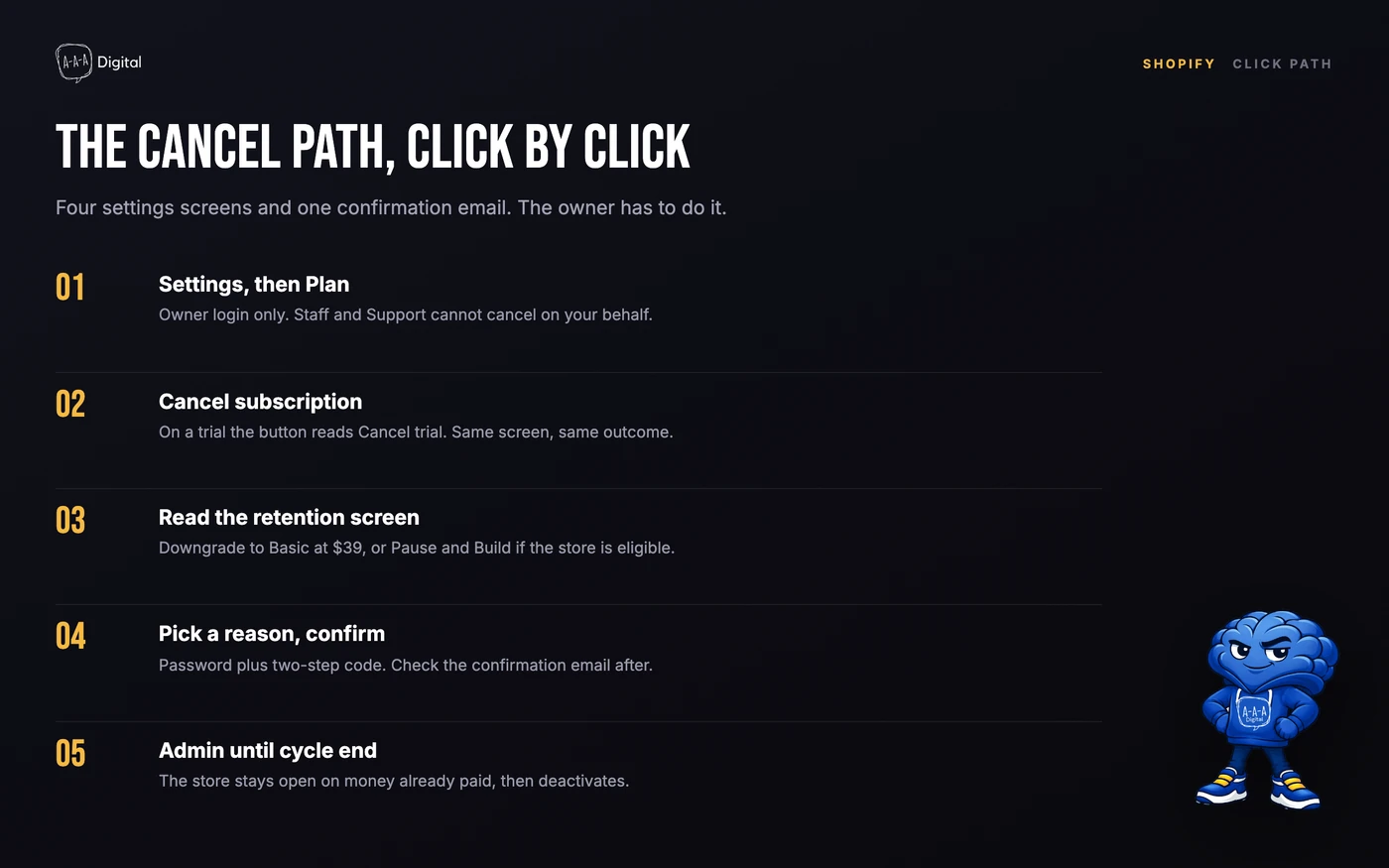
The store does not close when you confirm. It stays open until the end of the period you have paid for, so a cancellation three days into a monthly cycle leaves you selling for another four weeks. If you need it gone sooner, ask Support to move the deactivation up.
One thing worth checking: whether a staff member has the Manage plan permission. It is off by default on Grow and above, but if it was turned on, someone else can cancel the store without telling you.
What happens to your data, domain, and apps
This is the part the cancellation screen compresses into one sentence.
Data. Shopify keeps a deactivated store's products, orders, customers, themes, and settings for two years, so you can reopen by signing in and choosing a plan. Nothing is deleted at cancellation. If you want it gone, that is a separate request to Support, and it takes up to 14 days and closes the store permanently. Our guide to deleting a Shopify account walks through the erasure routes, which are not the same as cancelling.
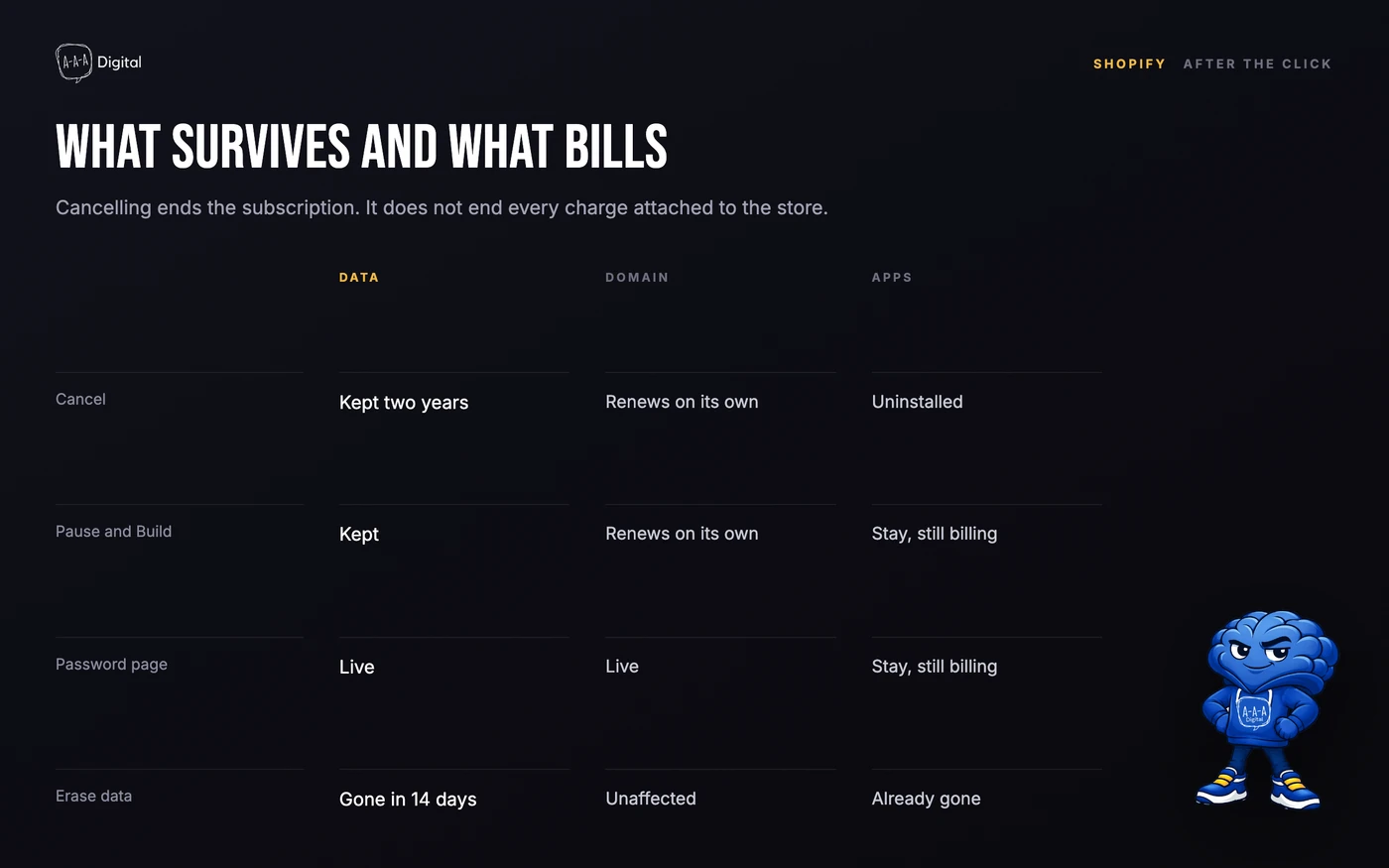
Apps. Choosing "Cancel my plan and uninstall all apps" removes them from the store. It does not cancel subscriptions that the app bills outside Shopify, which is common with email platforms, review tools, and dropshipping suppliers that run their own payment processor. Log into each one and cancel the plan, or you will keep paying for a tool with no store attached.
The domain. A Shopify-managed domain is a registration in your name, not part of the plan, so it survives cancellation and renews on its own schedule. That renewal is a real charge, usually $15 to $25 a year, and it will hit a card you may have stopped watching. Turn off auto-renew under Settings, Domains if you are not keeping the name, or transfer it out. Transfers need a 60-day gap since registration or the last transfer, and an authorization code from the same screen.
Payouts. Money already in the Shopify Payments pipeline still lands, but you lose the admin you would need to fix a failed payout or answer a chargeback. If your last month produced a negative balance, Shopify will invoice for it.
The final invoice, line by line
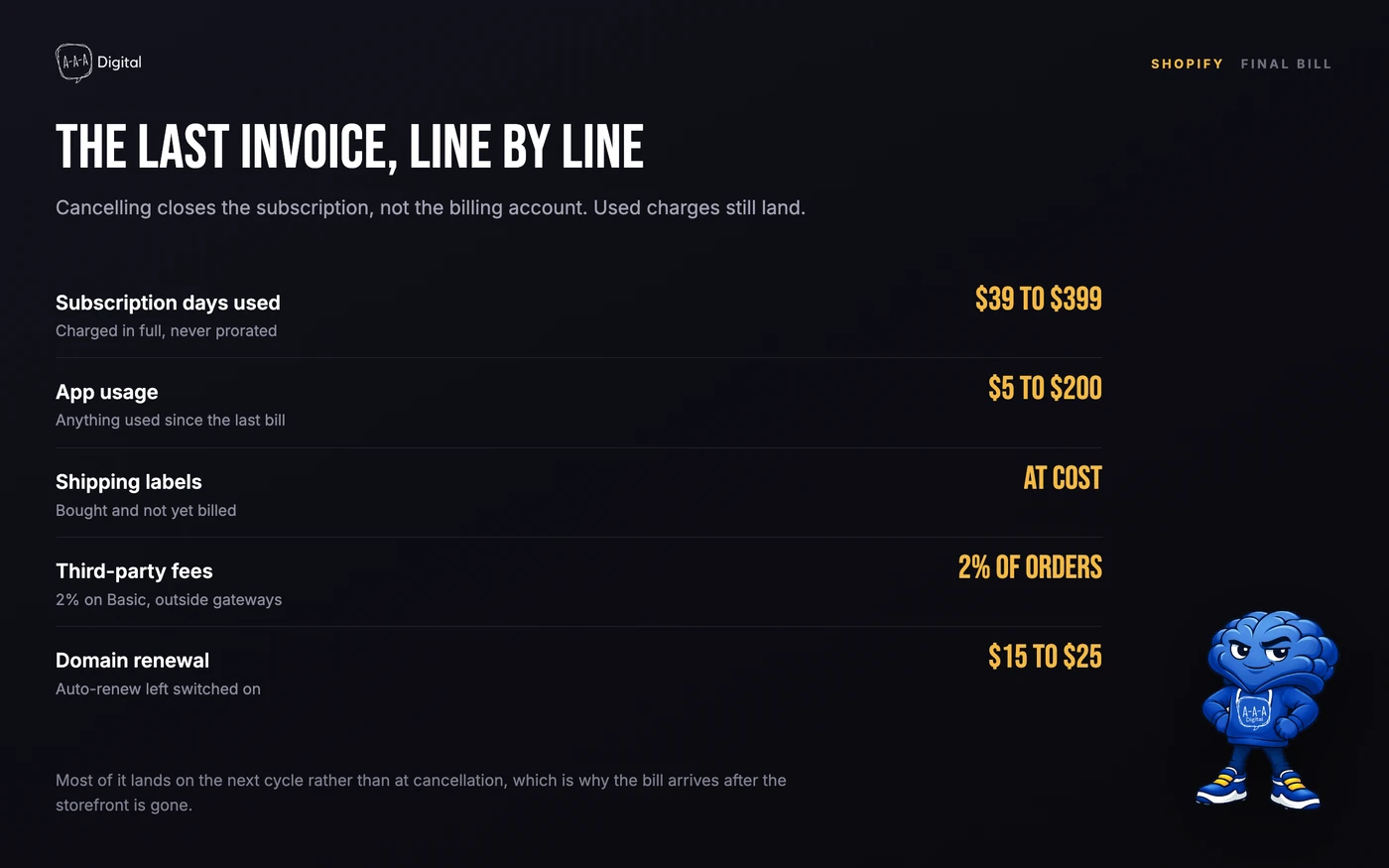
Cancelling does not close the billing account. It closes the subscription. Anything that was already used gets charged.
| Line | What triggers it | Typical amount |
|---|---|---|
| Subscription days used | Always, and never prorated | $39 to $399 |
| App usage since last bill | Apps with usage or overage billing | $5 to $200 |
| Shipping labels | Labels bought but not billed yet | Cost of the labels |
| Third-party transaction fees | Orders through an outside gateway | 2% of those orders on Basic |
| Chargeback fees | Disputes filed before or after you leave | About $15 each |
| Domain renewal | Auto-renew left on | $15 to $25 a year |
The subscription line is the one that gets argued about. Shopify does not prorate. Cancel on day two of a monthly cycle and you keep the store for the remaining 28 days, but none of that $39 comes back. On annual billing the same rule applies at a larger scale: $359 paid in January and cancelled in June refunds nothing.
There is one exception worth trying. If you were charged because you forgot to cancel before a trial converted, Support will sometimes reverse that first charge as a one-time courtesy. Ask in the first few days, be specific about the date, and do not file a chargeback with your bank. A chargeback on Shopify's own subscription charge usually gets the account flagged, and you need the account to read your old orders.
The percentage fees on your final orders are the other quiet cost. Our breakdown of what Shopify actually charges explains which of those are refundable and which are not.
How to pause instead of cancelling
Pause and Build was the middle option for years: $9 a month, storefront up, checkout off, admin open. Shopify has closed it to new subscriptions. Stores already on it keep it. Stores that are not cannot switch to it, and no amount of asking Support changes that.
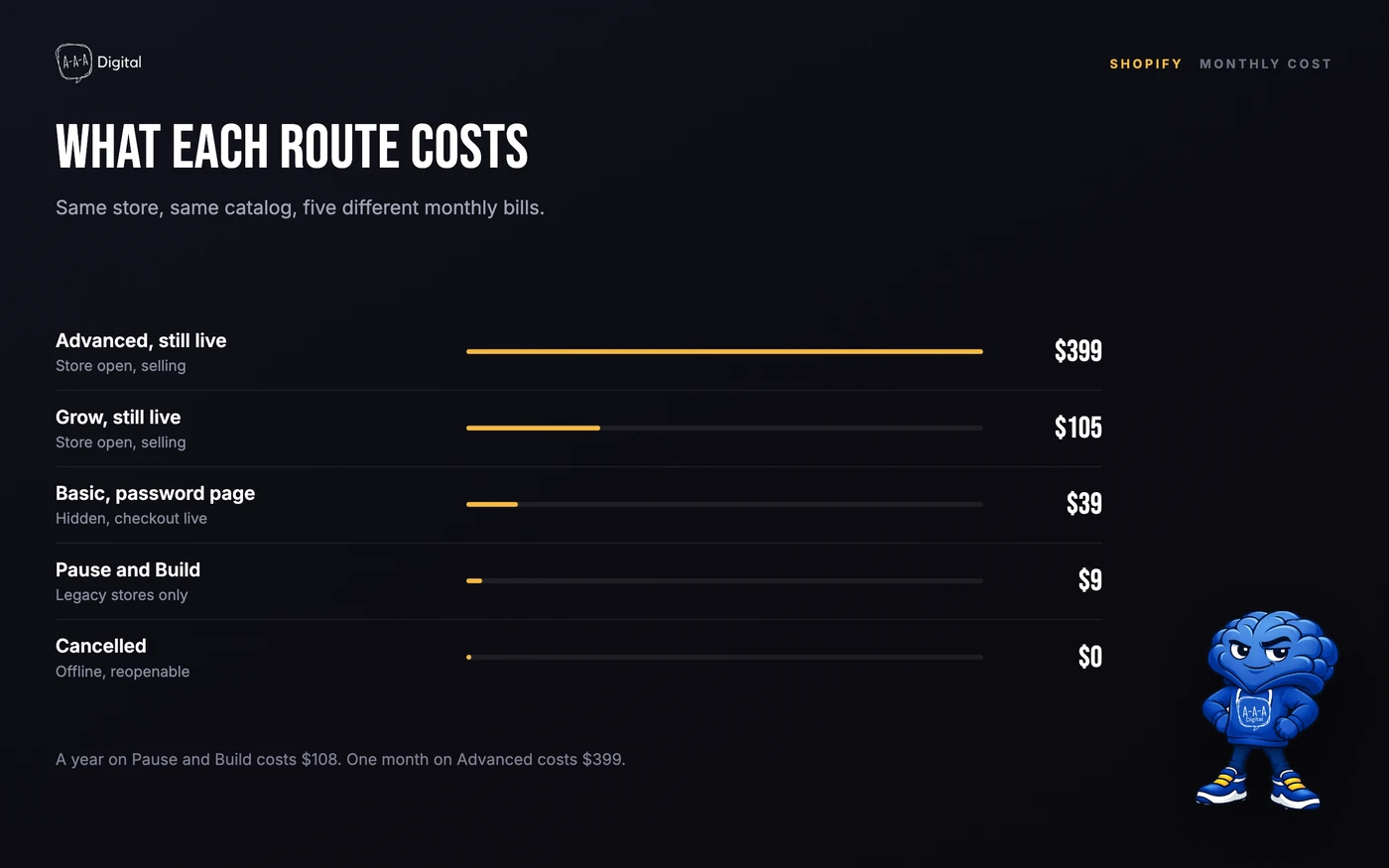
If you are on it, pause from Settings, Plan, Pause and Build. Apps stay installed and keep billing, so cancel the paid ones first, and keep the domain renewal in mind. When you want to sell again you pick a full plan, because the pause agreement does not convert back on its own.
If you are not on it, you have three honest options.
Password page. Turn on password protection under Online Store, Preferences. The storefront is hidden, checkout is live but unreachable, and you keep paying the plan. On Basic that is $39. If you are on Grow at $105 or Advanced at $399, downgrade first and save $66 to $360 a month. Our guide to coming soon pages on Shopify covers the setup, and our Shopify pricing breakdown shows where each tier stops paying for itself.
Cancel and reopen later. This is the real pause, and it is free. Your data sits for two years, and reactivating takes a login, a plan choice, and a card. The catch is that the storefront goes offline, so organic traffic and ad landing pages break while it is down. If you are pausing for a season rather than shutting down, a password page protects more value than the $39 a month it costs.
Cancelling a trial, and the pre-click checklist
Shopify's trial is three days free, then $1 a month for three months. That is a much shorter window than the fourteen-day trial people remember, and it is the reason "shopify free trial cancel" gets searched 1,600 times a month.
Cancel inside the three days and you are charged nothing. Cancel on day four and the $1 charge stands, which is not worth a support ticket. The important date is the end of month three, when the plan jumps to $39. If you started the trial to test an idea and lost interest, cancel now and note the date rather than trusting a calendar reminder you will ignore.
Trial cancellation lives in the same place: Settings, Plan, Cancel trial. There is no separate trial account to close, and uninstalling the app from your phone does nothing.
Before you click, six things to do, in this order.
- Export orders and customers as CSV from Orders and Customers. Two years of access is generous, but the export takes four minutes.
- Download payout and fee reports for your accountant. The 1099-K reports gross volume, not what you kept.
- Decide the domain: transfer it, park it, or let it lapse on purpose.
- List every app and check which ones bill outside Shopify. Cancel those directly.
- Screenshot your theme settings if you customized code. Themes survive, but app blocks and metafields do not always reconnect.
- If you are moving platforms, do the migration first. Our Shopify migration service handles catalog, orders, and the redirect map, which is the part that decides whether your traffic follows you.
Frequently Asked Questions
Does cancelling Shopify refund the current month?
No. Subscription charges are not prorated on monthly or annual plans. The store stays open until the end of the paid period, then deactivates. A first charge made by mistake right after a trial converts is sometimes reversed if you ask Support within a few days.
Can I cancel Shopify and keep my domain?
Yes. A domain is registered separately from the plan. It keeps renewing, and keeps charging you, until you turn off auto-renew or transfer it to another registrar. Transferring needs an authorization code and a 60-day gap since registration.
What happens to my apps when I cancel?
They are uninstalled from the store. Apps that bill through Shopify stop charging. Apps that bill outside Shopify, including most email platforms and some supplier tools, keep charging until you cancel the plan in their own dashboard.
Can I pause my Shopify store instead of cancelling?
Only if your store is already on Pause and Build. Shopify stopped offering that plan to new subscriptions, so newer stores cannot switch. Use a password-protected storefront, drop to Basic, or cancel and reactivate within two years.
How long do I have to reopen a cancelled store?
Two years, if you have not requested customer data erasure. Sign in as the owner, choose a plan, and add a payment method.
The plan charge is the smallest number in this decision. What you are really choosing is whether the storefront stays online, whether the domain keeps renewing, and whether your traffic has somewhere to land. If you are moving to another platform, the migration comes first and the cancellation comes last. For the fee side of the final bill, our Shopify ROI calculator turns your last three months of orders into the effective rate you were paying.
