Every week, a merchant discovers digital products and thinks the same thing: no inventory, no shipping, near-zero marginal cost. Perfect margins. Then they ship their first product with Shopify's native file delivery, and within a month a customer emails them a screenshot of their course PDF sitting on a piracy forum.
We've set up Shopify digital products for dozens of merchants across templates, courses, presets, and licensed assets. The pattern is always the same: the store itself takes an afternoon, but the delivery and protection layer is where most people cut corners. And that's where the headaches start.
In this guide, we'll walk through the full setup, product configuration, delivery apps, licensing, taxes on digital goods, and the exact anti-piracy workflow we use for clients. You'll leave knowing which parts are fine to DIY and which ones genuinely need an app or a developer.
Where Shopify Digital Products Shine (and Where They Fall Short)
Shopify powers millions of stores, and its checkout, tax handling, and discount engine work identically whether you sell a hoodie or a 40-page Notion template. That's the good news. Customers get a familiar buying experience, and you get Shopify's payment stack out of the box.
The shortcoming is delivery. Shopify's built-in digital downloads feature (via the free Digital Downloads app) generates a download link after purchase, and that link is permanent. Share it, and anyone can use it forever. There's no expiry, no download limit enforcement worth trusting, no license key, no IP tracking.
For a $9 preset pack, that's acceptable risk. For a $200 course or $500 license asset, it's not. This is the tradeoff we'll solve below.
Step 1: Create the Product Correctly
Start in Products > Add product. Two settings matter more than people realize.
First, uncheck "This is a physical product" in the Shipping section. If you leave it checked, customers get asked for a shipping address and you pay no shipping cost but create pointless checkout friction. Digital products should skip shipping entirely.
Second, set inventory policy to "Don't track inventory." Shopify will otherwise show your digital file as sold out after one purchase, which is a classic first-day bug we still see on stores we audit.
For variants (like license tiers), set each variant's SKU clearly: TEMPLATE-SINGLE, TEAM-10SEATS, and so on. You'll thank yourself when wiring up fulfillment apps later.
Pricing deserves a thought, too. Digital products face a psychological ceiling that physical products don't, because buyers can't hold the thing. In our experience, digital products underprice badly at launch, merchants anchor to "it's just a file." Price on the outcome the file delivers, not the file itself. A contract template that saves a freelancer $2,000 in legal fees can sell for $150, not $15.
Step 2: Choose a Delivery Method
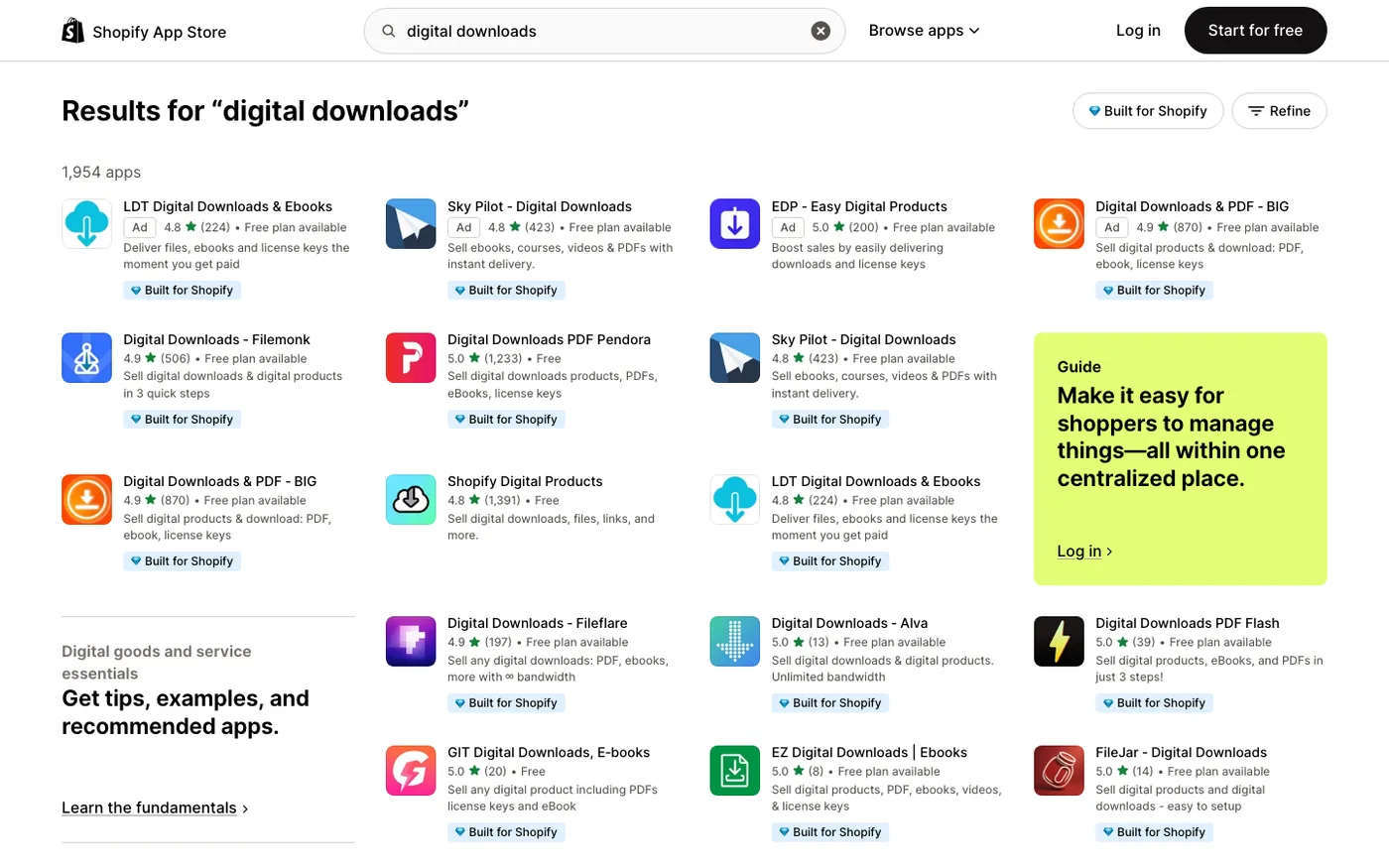
You have three realistic options, and we recommend them in this order depending on product value.
Option A: Shopify's free Digital Downloads app. Fine for products under $20. Setup takes ten minutes, and delivery is automatic. Accept that links don't expire and move on. Don't use it for anything you'd be upset to see shared publicly.
Option B: A dedicated delivery app. This is where most of our clients land. Apps like Sky Pilot, Fileflare, or SendOwl give you expiring download links, download limits, license keys, and PDF stamping (watermarking the buyer's email onto each page). Expect $10–$40/month depending on volume. This is the right tier for courses, higher-priced templates, and anything with a team license.
Option C: External hosting with Shopify as the checkout. Gumroad-style platforms, Teachable, or a gated members area for courses. Use this when the product is really a program, not a file, with drip content, quizzes, and community. The honest tradeoff: you split customer data and make email capture through Klaviyo messier. We push clients toward Option B unless the content genuinely needs a course platform.
One thing to skip: storing files in a password-protected page on the store itself. It feels clever and free, but Google indexes these pages more often than you'd think, and "password protected" is not a security model. We've seen full course libraries indexed via sitemap leaks. Not worth the $15/month you'd save.
Step 3: The Anti-Piracy Setup That Actually Matters
Total piracy prevention is impossible. Don't let anyone sell you that. But you can make casual sharing annoying enough that most people buy instead. Here's the workflow we implement:
Expiring links. Set download links to expire 24–72 hours after purchase. Legitimate customers redownload without friction; link sharers hit a dead end. Every serious delivery app supports this.
Download limits. Cap downloads at 3–5 per purchase. Support tickets for "I hit my limit" are rare, and the apps let you reset limits per customer in one click.
PDF stamping. If you sell PDFs, enable stamping. It prints the buyer's name and email on every page. When a copy shows up on a sharing site, you know exactly who leaked it. We tell clients: you won't send a lawyer after a leaker, but the stamp alone deters buyers from sharing casually, because they know they're traceable.
License keys for software and templates. If your product is a theme, plugin, or design system, issue a license key at delivery and validate it in your product. Apps like Lemon Squeezy (now Stripe's merchant of record offering) or Keygen handle this well.
No DRM theater. Don't put buyers through convoluted reader apps or account-wall gymnastics. Every layer of friction costs you real sales, and determined pirates bypass DRM in a weekend. Annoying legitimate customers to mildly inconvenience pirates is a losing trade. Keep protection lightweight and invisible.
Step 4: Taxes, Refunds, and the Policy Fine Print
Digital goods create tax problems physical goods mostly don't. In the EU, UK, and a growing list of US states, digital products are taxed based on the customer's location, not yours, and VAT rules for digital services (the "VOES" rules in the EU) require collecting and remitting at the buyer's local rate.
Shopify's tax settings handle much of this automatically through Settings > Taxes and duties, but you need to confirm digital goods are classified correctly per region. If you sell into the EU at any volume, register for the VAT OSS scheme; it's one registration that covers all 27 member states. Stripe and Shopify Payments will remit on your behalf for some regions but not all, so verify rather than assume. When a client's digital revenue crosses $10K/month, we bring in their accountant for this conversation. Before that, Shopify's defaults plus OSS registration cover most cases.
Refund policy is the other landmine. Because digital goods can't be "returned," you need an explicit policy: typically, no refunds after download, full refund before download. Write this into your refund policy page and reference it on the product page. Payment processors side with customers in disputes, and "I didn't know I couldn't refund" is not a winning defense. Clear pre-purchase disclosure dramatically reduces chargebacks. We see dispute rates drop when the policy sits next to the buy button instead of buried in the footer.
Step 5: Fulfillment Automation and the Customer Experience
Digital products live or die on the post-purchase email. Get these flows in place before launch:
Delivery email. Your app sends the download link. Make sure it's branded, includes the product name, and has a direct support contact. "Where's my download?" is the single most common ticket for digital stores, and 90% of those tickets happen because the delivery email landed in spam or was plain-text and looked fake. Send a test order to a Gmail, an Outlook, and an Apple Mail address before launch.
Klaviyo welcome flow. Digital buyers are your best future customers; they bought on trust without touching the product. Move them into a post-purchase flow that delivers usage tips, upsells the next product in the series, and asks for a review at day 10.
Abandoned checkout. Standard Shopify email, but keep it. Digital carts have some of the highest abandonment rates we track, often 75%+, because there's no urgency. A simple three-email recovery sequence recovers a meaningful slice.
Test the entire purchase journey yourself with a real $1 product and a real payment method. Every app, every email, every link. We do this on every client launch, and roughly one launch in five has a broken link or an unbranded email that would've generated a support storm on day one.
Frequently Asked Questions
Can I sell digital products on Shopify without an app?
Yes, for simple, low-priced files. Shopify's free Digital Downloads app handles delivery automatically. The catch: download links don't expire and there's no watermarking or license keys. Once your products pass about $20–$30 in price, a paid delivery app pays for itself quickly in reduced link-sharing and cleaner support.
Do I need Shopify Plus to sell digital products?
No. Every paid Shopify plan, including Basic, supports digital products through apps or built-in features. Plus is worth it only when you need B2B wholesale pricing on digital licenses or checkout customization, not for standard digital sales.
How do I stop people from sharing my digital downloads?
You can't stop it entirely, but you make it not worth the effort. Use expiring links, download limits, and PDF stamping so shared links die fast and leaked files trace back to the buyer. This catches the casual 90% of sharing. Determined pirates will bypass anything, so don't degrade the buying experience chasing them.
What payment gateways work best for digital products on Shopify?
Shopify Payments is the default and usually the best choice: instant payouts to your bank, competitive rates, and it handles the accelerated checkouts (Apple Pay, Google Pay, Shop Pay) that matter for impulse-buy digital products. PayPal as a secondary option reduces checkout abandonment slightly, though expect a small uptick in "item not received" disputes with digital goods.
Are digital products subject to sales tax or VAT?
Often yes, and it's more complicated than physical goods. In the EU and UK, digital products are taxed at the customer's location, requiring VAT registration (the OSS scheme simplifies this to one filing). Several US states also tax digital downloads. Shopify's tax settings automate collection in many regions, but confirm your specific setup with an accountant once revenue is meaningful.
Get Help With This
Digital products have the highest margins in ecommerce and the most avoidable leaks. If you'd rather have the delivery, licensing, and automation layer set up correctly the first time, our Shopify team builds and protects digital product stores, from product setup through anti-piracy workflows and post-purchase email flows.
