In March, a skincare client sent me a screenshot of their Shopify dashboard. Revenue was up 9% month over month. Traffic was flat. Ad spend was flat. No new products, no sitewide sale, no press mention. The only change was one screen switched on three weeks earlier: a one-click offer page that loads after payment clears and before the thank-you page appears.
Most upsell content stops at the same advice: install an app. That is like answering "how do I bake bread" with "buy an oven." The app is the easy part. What separates stores that add 3% to 8% to average order value from stores that add nothing is everything around it: which orders qualify, what sits on the page, offer order, and how revenue gets counted.
I've wired post-purchase upsells into 30+ Shopify stores over the past three years, from $20,000-a-month DTC brands to Plus stores clearing seven figures a month. This is the setup I would build again tomorrow.
How Shopify's One-Click Post-Purchase Upsell Actually Works
The mechanic is the whole advantage, so understand it before touching an app.
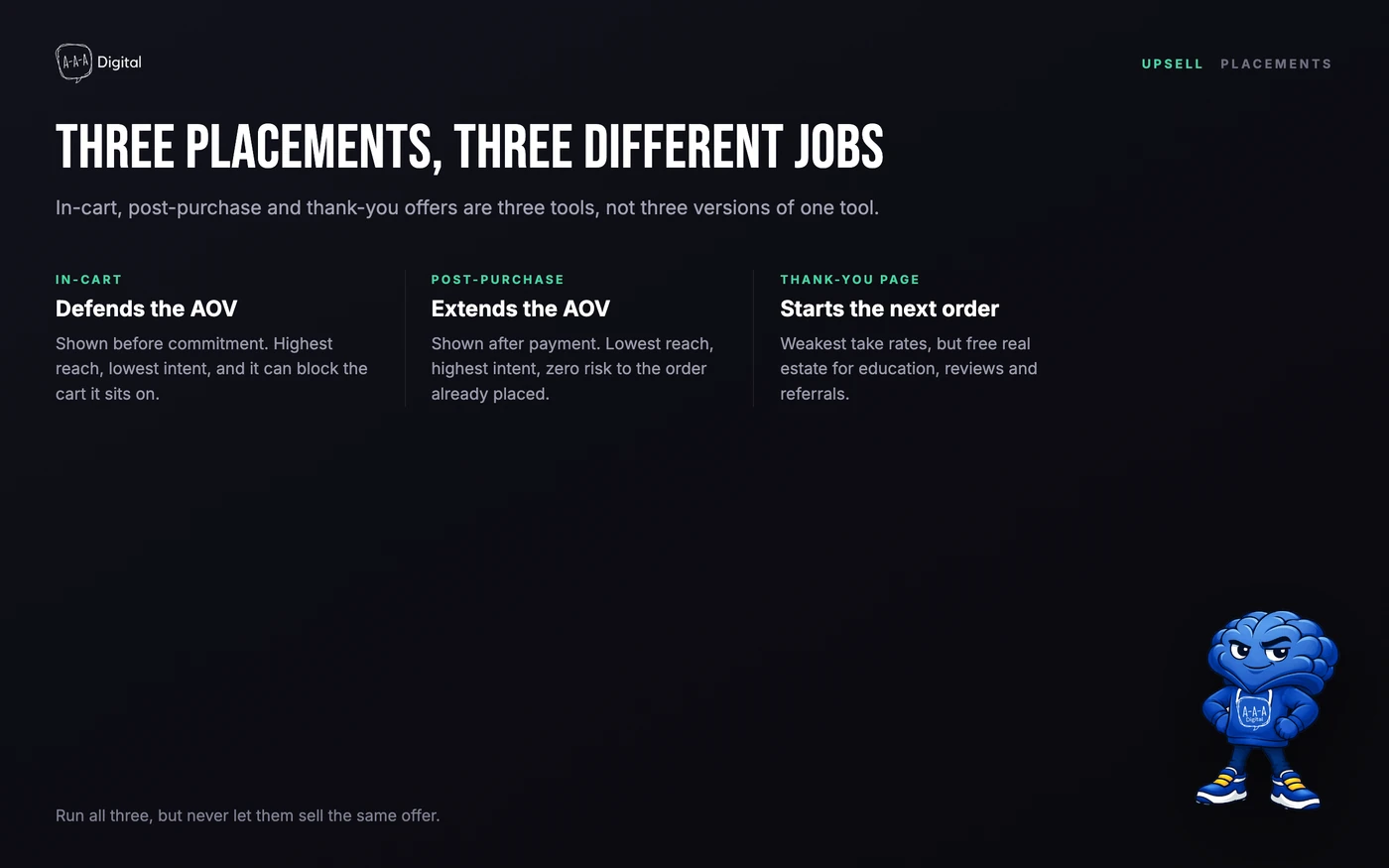
When a customer enters the payment step, your upsell app's extension runs a render check against the order: Is the card vaulted? Is the order over $0.50? Was it placed through the Online Store channel? Is the payment method eligible? If not, nothing happens and checkout proceeds normally.
If yes, the customer pays and the order is captured. The sale is done and cannot be lost to whatever happens next. Only then does Shopify load the post-purchase page, one screen between checkout and the thank-you page. The customer taps "Add to order" once and the vaulted card is charged again: no cart, no address form, no re-entering payment. Decline or close the tab, and they land on the order status page as they would have anyway. This is why the take rate is so lopsided: the second purchase removes every step of the first one except the decision itself.
The constraints that matter in practice:
- Wallet checkouts never see it. Anyone paying with Apple Pay, Google Pay, Amazon Pay, or a buy-now-pay-later service skips the post-purchase page entirely; Shop Pay does see it.
- Three offers maximum. A customer can accept up to three post-purchase offers per checkout; two screens is the most I've run profitably, and three feels like a toll booth.
- One app owns the page. Shopify lets you select a single post-purchase app in checkout settings. Install two and they fight over the slot.
- Some orders never qualify. Gift cards, local pickup and delivery, orders under $0.50, and orders with duties in a multi-currency checkout are all excluded.
- Fulfillment is held briefly. Shopify holds it while the offer shows and releases the hold at the order status page or within the hour, so a customer who closes the tab does not delay their own shipment.
The mistake I see most often: a merchant installed two upsell apps during a migration, both registered their post-purchase extension, and offers now alternate at random. Pick one app in Settings → Checkout and uninstall the other. Half of the "my upsell doesn't work" tickets I've handled trace back to that.
None of this touches the checkout steps themselves; customizing those is a Shopify Plus-gated job that works differently from everything above. Our Shopify checkout customization guide covers that surface.
In-Cart Upsells vs Post-Purchase Upsells vs Thank-You Page Upsells
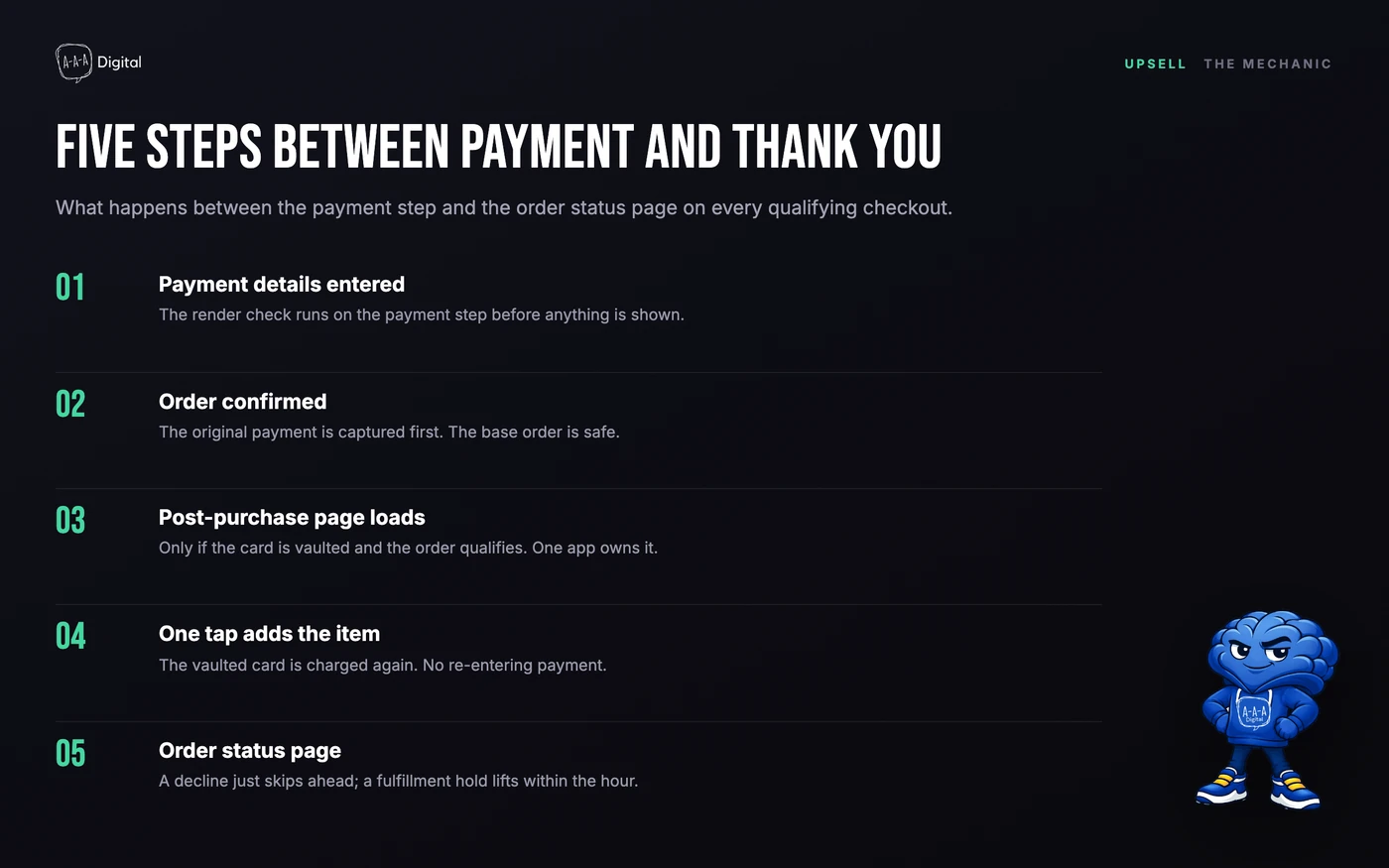
These three placements get conflated constantly, and each one does a different job.
In-cart upsells defend the AOV. They reach the widest audience, everyone who opens the cart, but at the worst possible moment: while the shopper is mid-task. Every pre-purchase interstitial risks the cart it sits on. A 2% take rate against a 1% drop in completed checkouts is a net loss, and it is the trade most popup-first stores make unmeasured.
Post-purchase upsells extend the AOV. They reach only people who already paid, which shrinks the audience but removes every risk. The customer has committed, the dopamine is fresh, and the ask is one tap. This is why, in our client work, the same offer at the same price converts 2 to 4 times better post-purchase than pre-purchase.
Thank-you page upsells start the next order. Take rates are the weakest of the three because the buying moment has passed, but the real estate is free. Use it for education, review requests, referrals, and a soft cross-sell. It is one piece of the wider post-purchase experience, so plan it inside that flow rather than as an afterthought.
The rule across all three: never sell the same offer in two places. Each placement gets its own offer and its own tracking.
Post-Purchase Upsell Math: Why It Beats Pre-Purchase Popups
Same store, same $39 offer: 4,000 orders a month, 12,000 monthly cart viewers.
| Metric | In-cart popup | Post-purchase page | Thank-you page |
|---|---|---|---|
| Audience per month | 12,000 cart viewers | 4,000 buyers | 4,000 buyers |
| Reported take rate | 1-2% | 4-8% | 1-3% |
| Upsell orders per month | 120-240 | 160-320 | 40-120 |
| Upsell revenue at $39 | $4,680-$9,360 | $6,240-$12,480 | $1,560-$4,680 |
| Risk to the base order | Blocks the cart | None, already captured | None, already captured |
These are reported figures from upsell app datasets across thousands of stores, not promises; niche, price point, and offer quality will move them. The direction is consistent in every dataset I've seen and matches our client work: post-purchase tops the range with zero risk to the underlying order.
Run the midpoint through AOV: a 6% take rate on a $39 accepted offer adds $2.34 per order, a 3.4% lift on a $68 AOV from one screen with no extra traffic or ad spend. Annualized over 4,000 monthly orders, that is roughly $112,000 a year from a single page.
This is why AOV work beats CAC work in most budgets: CAC is priced by an auction you do not control and drifts up, while AOV is priced by your own offers, and every dollar of it arrives with fulfillment already paid on the base order. The full argument, with channel-level numbers, is in our breakdown of customer acquisition cost in ecommerce.
If you want the sequencing, testing, and attribution handled as one project rather than a weekend experiment, that is core work in our Shopify CRO service.
Post-Purchase Offer Sequencing: Complement First, Refill Second, Upgrade Last
What goes on the page matters more than which app renders it. The sequence I default to, in order:
Screen one: the complement. The product that makes the purchase work better: the case for the phone, the brush for the cleaning kit, the guide that goes with the course. Price it low relative to the order, usually 20-40% of the original cart value. It is the most relevant offer you have because it completes the job the customer already hired you for.
Screen two: the consumable refill. For anything that runs out, offer a second unit at a modest discount or the subscription version. This ask needs the trust of the first order behind it, which is why it goes second.
Screen three, if you use it at all: the upgrade. The premium version, the larger size, the bundle. It asks the most of a customer who just paid, so it goes last, and on most stores I'd skip it entirely before I'd run it first.
Three rules on every build. One product per screen, one price, one button; a page that looks like a second checkout kills the take rate it was supposed to earn. Two screens maximum for most catalogs. The decline path is part of the offer: a clean "No thanks" straight to the order status page preserves goodwill a dark-pattern decline button spends.
The most common sequencing error I fix: the merchant's highest-margin product goes on screen one because margin felt like the goal. Margin is the goal of the store, not of this page. Relevance is the goal of this page, and the complement is always the most relevant offer you have.
Choosing which products fill each slot is its own discipline; our Shopify product recommendations guide covers selection logic, including purchase-pair data instead of guessing.
Best Post-Purchase Upsell Apps for Shopify: AfterSell, Zipify OCU, Recharge, and UpsellPlus
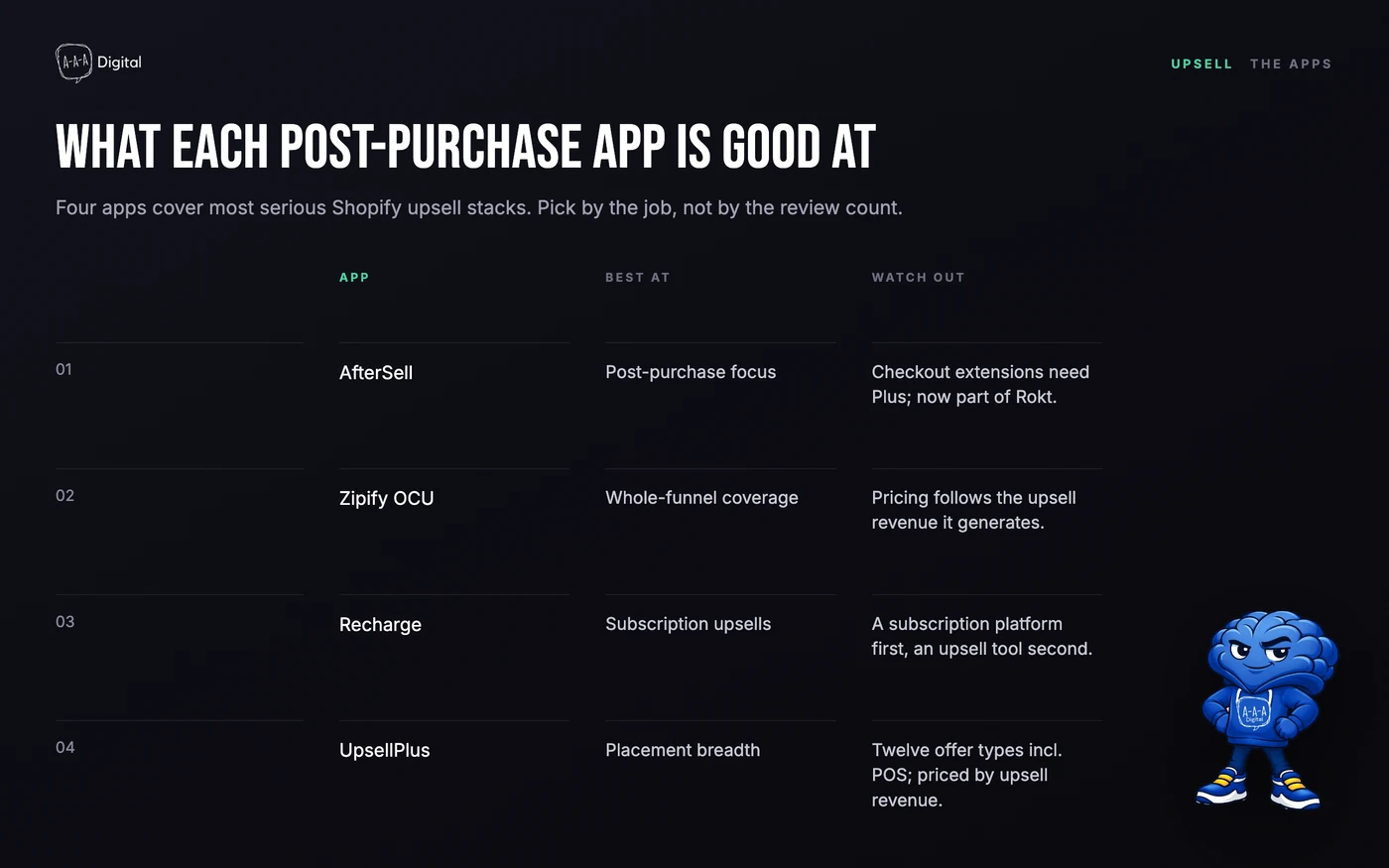
Four apps cover most serious Shopify upsell stacks. Each is genuinely good at something different.
AfterSell (now part of Rokt) is the post-purchase specialist. Its funnel builder is the cleanest of the group, A/B testing is built in, and its checkout extensions are Plus-only while the post-purchase and thank-you features run on every plan. If you want one job done well, this is the default.
Zipify OCU covers the whole funnel in one app: product page, cart, and post-purchase. Pricing follows the upsell revenue the app generates rather than your order count. OCU also handles subscription upsells through integrations with the standard subscription stack, a strong pick when subscriptions are in the plan.
Recharge is not an upsell app, and treating it like one is a category error. It is the subscription platform that runs subscriptions inside Shopify's native checkout, and what it gives you here is the plumbing to convert a one-time buyer into a subscriber without a second checkout.
UpsellPlus has the broadest placement coverage of the group, including Plus-only checkout offers and POS, plus real A/B testing, with pricing tied to upsell revenue. It is the pick when the offer strategy spans every surface and you want one dashboard.
On most client builds I start with AfterSell or OCU and add a second tool only when data shows the thank-you page being wasted. The app matters less than the offer; a mediocre app with a sharp complement beats the reverse every time.
Subscription Post-Purchase Upsells on Shopify (Recharge-Style)
These mechanics confuse people, so here they are, plainly. A post-purchase page can sell a subscription two ways: converting the just-purchased one-time item into a subscription, or adding a separate subscription product to the order. Both require a subscription platform (Recharge, Skio, Loop, or Stay.Ai) connected to your upsell app. The upsell app draws the page; the subscription platform owns the contract.
Two Shopify rules bite people regularly. First, one subscription per order: an offer cannot add a subscription to an order that already contains one, though a connected provider lifts this for its own flows. Second, orders without a shipping address (digital products, local pickup) cannot take a subscription add-on; there is nothing for the billing contract to attach to.
Placement matters more for subscriptions than for product upsells. On a skincare client last year, moving the subscription offer from screen one to screen two, behind the complement, roughly doubled its take rate. Screen one earns trust with a relevant product; screen two converts that trust into a commitment.
Post-Purchase Upsell Analytics: Why GA4 Under-Reports Your Upsells
Here is the part almost nobody warns you about, straight from Shopify's documentation: third-party analytics on the post-purchase page report only the initial purchase value. GA4, Meta, Pinterest all see the original order and miss the upsell revenue attached to it. A store doing $8,000 a month in accepted upsells sees close to $0 of it in GA4, concludes the page isn't working, and turns off the thing that was.
When a merchant tells me their upsell "isn't working," the first thing I check is whether it actually isn't working or GA4 simply can't see it. In my experience, the latter.
Three ways to measure honestly:
- Run the upsell app dashboard as the source of truth for upsell revenue, and treat it as directional; the vendor grades its own homework.
- Reconcile weekly against Shopify admin. The gap between GA4 orders and admin orders is your upsell revenue, roughly, and tracking it monthly shows the true trend.
- If you need it inside GA4 properly, send a separate event from the upsell app or push one from an order webhook via the Measurement Protocol, so accepted upsells land as their own revenue line.
None of this layers well on broken base tracking. If your GA4 setup on Shopify has gaps, fix those first and add the upsell events after.
FAQ
Do post-purchase upsells work on every Shopify plan?
Yes. The post-purchase page runs on Basic, Shopify, Advanced, and Plus. What is Plus-only is the checkout UI extension surface: offers embedded in the information, shipping, and payment steps. If an app pitches "checkout upsells" on a non-Plus plan, read carefully; it usually means cart-drawer or thank-you offers wearing a checkout costume.
What take rate should I expect from a one-click post-purchase offer?
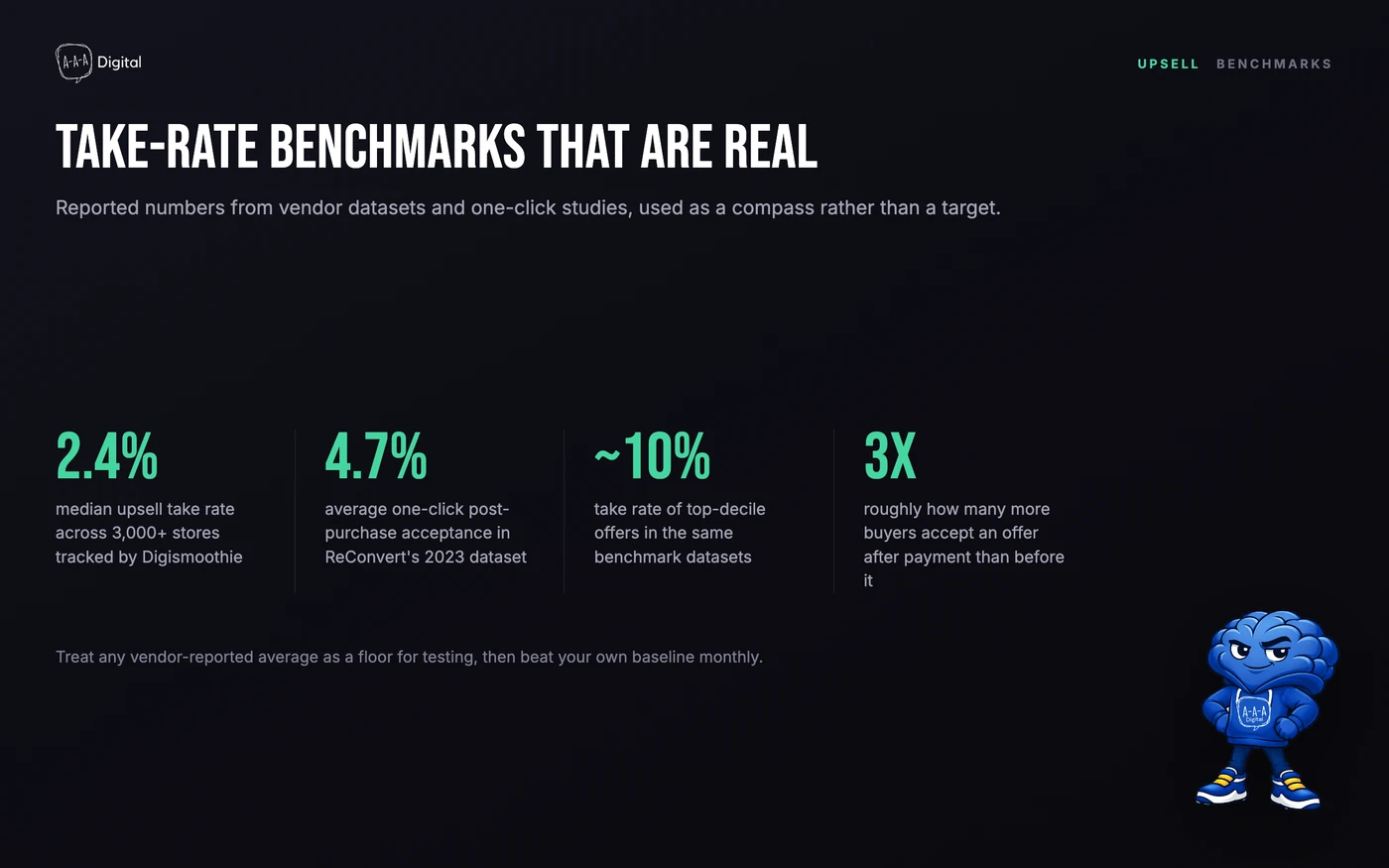
Reported medians sit around 2.4% across all upsell placements in Digismoothie's dataset of 3,000+ stores, with ReConvert's 2023 report putting average one-click post-purchase acceptance near 4.7% and top-decile offers approaching 10%. Treat these as a compass, not a target. A well-chosen complement offer should clear the median within its first month.
Can a post-purchase upsell add a subscription to an existing order?
Yes, but only with a subscription platform connected (Recharge, Skio, Loop, or Stay.Ai). Shopify also restricts you to one subscription per order, so the flow works best for converting one-time buyers rather than stacking onto orders that are already subscription-based. Orders without a shipping address, such as digital products or local pickup, cannot accept a subscription add-on at all.
Will a post-purchase upsell page delay fulfillment?
No. Shopify holds fulfillment during the post-purchase flow and releases it at the order status page, or within the hour if the tab closes mid-flow. Accepted items join the same order: one shipment, one tracking number, no extra pick-and-pack cost beyond the added item.
Get Help With This
You now know more about the post-purchase page than most Shopify merchants ever will: the mechanic that makes it safe, the sequencing that makes it convert, the apps that render it, and the analytics gap that hides its wins. The distance between knowing this and having it live on your store is about a week of focused work. If you would rather that week be ours than yours, talk to us about our Shopify CRO service and we will spec the offer sequence, wire the tracking, and report revenue you can actually verify.
