We get asked this by operators, not by people researching a hobby. The question is never "which platform is better". It is "which one do I regret in eighteen months".
That framing changes the answer. Wix and Shopify are both competent products, and they are built for different businesses. Wix sells you a website you can maintain yourself. Shopify sells you a retail system that assumes you will sell at volume, in more than one channel, and hire people to run it.
Pick the one that matches the business you will have, not the one that matches the invoice you want this month.
The short answer
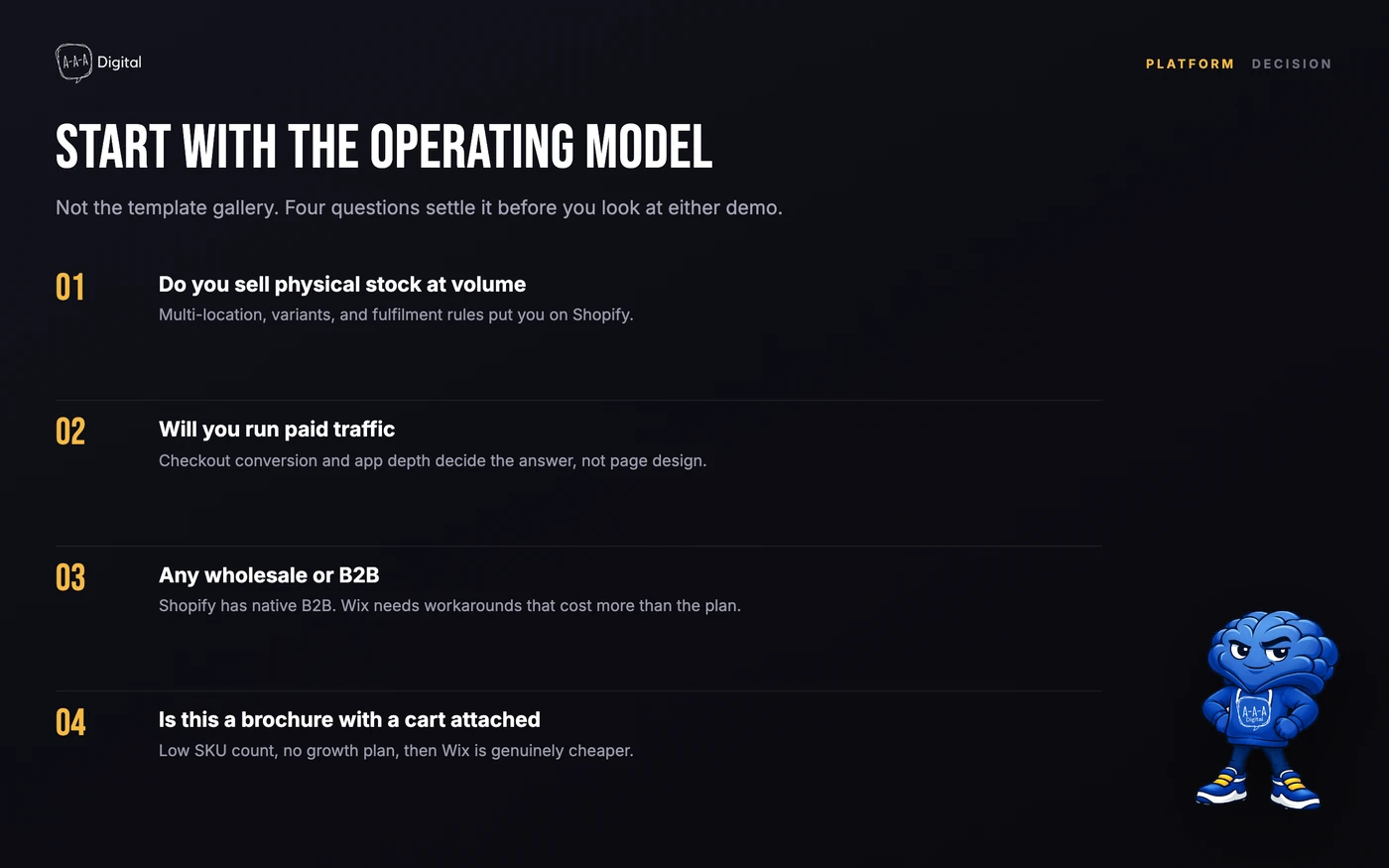
- Wix is right for a service business, a brochure site with a small shop attached, a catalog under roughly fifty products, or a founder who wants design control without a developer.
- Shopify is right when product is the business: hundreds of SKUs, paid traffic, wholesale, multiple markets, or a team that will need apps and data access.
- Neither is right if you have not decided what you are selling. That is a merchandising problem, and it follows you to any platform. Our post on AI store builders is a long version of that argument.
The comparison that decides it
| Shopify | Wix | |
|---|---|---|
| Monthly platform cost | Higher entry price, standard plans | Lower entry tiers, cheaper to start |
| Transaction costs | Standard processing; extra fee on third-party gateways | Wix Payments where available, or connect your own provider |
| Checkout | Native, one-page, wallets, Shop Pay, address autocomplete | Native, wallet support varies by region and provider |
| App ecosystem | Very large, includes ERPs, 3PLs, feeds, subscriptions | Smaller, improving; gaps force workarounds |
| Design control | Theme layer you can edit, plus apps and custom sections | Visual editor, strong for non-technical owners |
| SEO control | Titles, canonicals, redirects, structured data via theme and apps | Titles, canonicals, redirects, structured data tools |
| Page speed at 500+ SKUs | Constrained by theme and apps, but you control both | Less control over what the platform ships |
| B2B / wholesale | Native B2B: companies, price lists, terms | App-dependent, no equivalent native layer |
| Multi-currency | Shopify Markets: local currencies, domains, duties | Multi-currency available, fewer localization levers |
| Content and blog | Workable, not the strength | Better editing experience for non-technical writers |
| Ceiling | High; Plus for enterprise complexity | Adequate for small commerce, tight at scale |
| Migration out | Structured export, well-trodden path | Export is partial; URLs change |
The table is the summary. The sections below are where the decisions actually live.
Total cost at scale, not at signup
Wix's entry tiers cost less per month. That is true, and it is the entire basis of most comparisons you will read, including the ones written by people who have never run a store.
Shopify's standard plans cost more per month than Wix's entry tiers, but the gap narrows once you add Wix's business and payment features, the apps that close its gaps, and the developer time to build what the platform does not.
Two costs get left out of most comparisons.
Your time. A platform that saves you a small monthly fee and costs you six hours of workarounds is not cheaper. Price your own hour honestly.
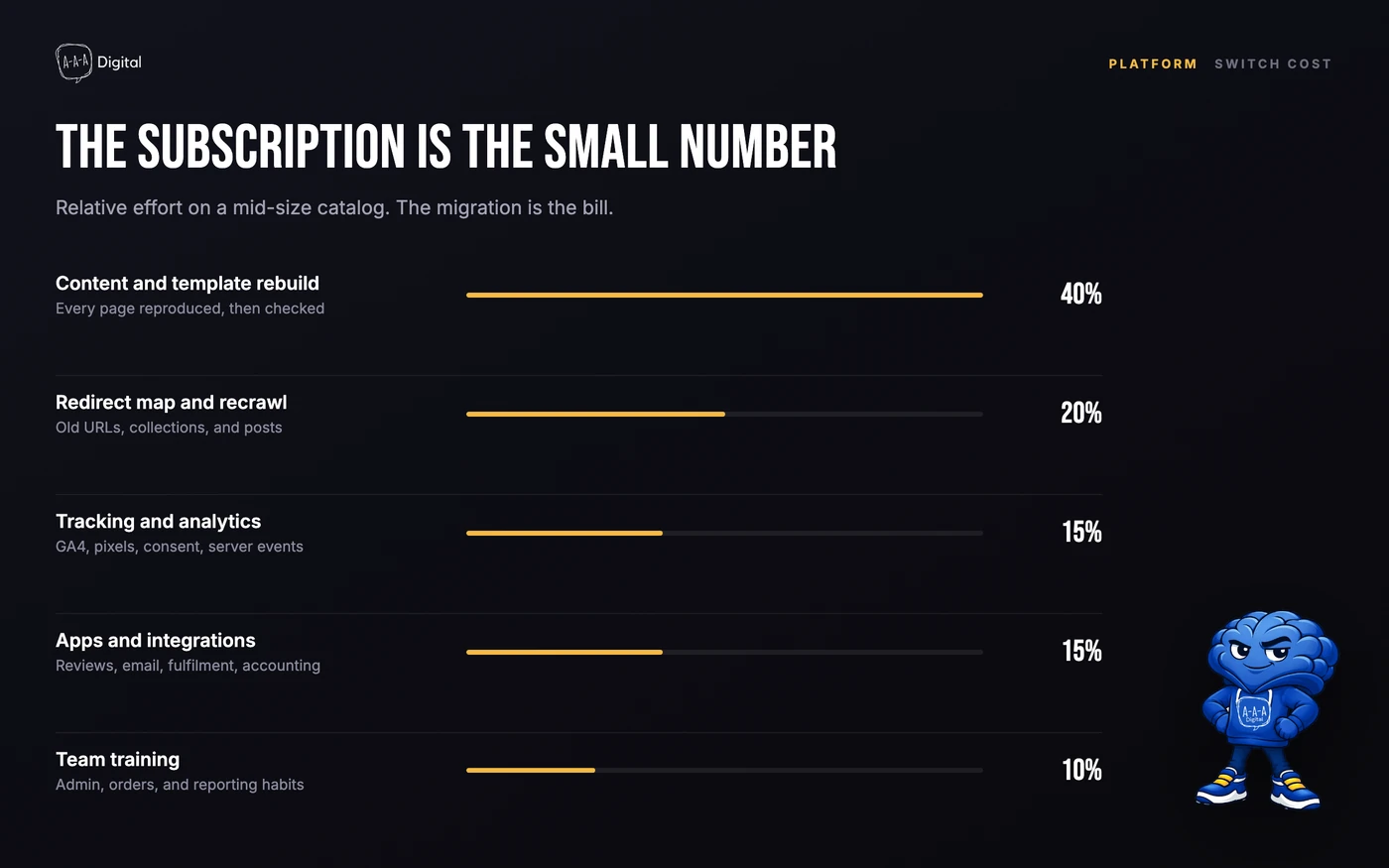
The rebuild. The expensive event is not the subscription. It is the replatform at 400 SKUs, six weeks before your best quarter. What a Shopify migration costs is the number to keep in mind while you compare subscription line items.
If you want the revenue side modeled, our Shopify ROI calculator turns a conversion-rate assumption into monthly revenue. Cost per month is the least interesting number in this decision.
Checkout and payments
Checkout is where Shopify's advantage is largest and least arguable.
Shopify owns its checkout. That means wallets, address autocomplete, fraud screening, and Shop Pay, which removes most of the form for a returning buyer. Our breakdown of how Shop Pay's one-tap checkout works explains the mechanism and the trade-offs. For stores buying mobile traffic, this is the single biggest structural difference between the two platforms.
Wix has a competent checkout with wallet support in many regions, and it has improved. It is still a website builder's checkout rather than the core product. If your business depends on conversion rate, that distinction matters more than the feature list suggests.
One warning for Shopify: if you use a gateway other than Shopify Payments, expect an extra fee, and check whether Shop Pay is available in your market at all. Shopify Payments is not offered everywhere.
App depth
Shopify's app ecosystem is much larger. That is not marketing, it is the main structural difference between a commerce platform and a site builder with commerce features.
If you need an ERP connection, a 3PL integration, a subscription engine with dunning, a feed manager, or a returns portal, Shopify probably has three options and a partner who has integrated it before. On Wix you are more likely to find one option, an API, or nothing.
The cost of that depth is maintenance. Every app is a script on the page and a dependency in your stack. Stores that install twenty apps end up slower than stores that install four, and the platform takes the blame for a decision the merchant made. Wix's smaller ecosystem is sometimes an advantage: fewer options, fewer ways to break the site, and a non-technical owner can keep it running alone.
SEO, URLs, and page speed
Both platforms can rank. Anyone telling you Wix cannot do SEO is selling something.
The differences are in control and in scale.
Shopify gives you canonical tags, redirects, editable title and meta fields, structured data through your theme, and the ability to change markup when you need to. Its limits are real: product and collection URLs follow a fixed pattern, the blog is basic, and duplicate collection URLs need managing.
Wix has caught up on the basics, including a redirect manager and structured data tools. Its limits are structural: less control over what the platform renders, and a heavier default front end that you cannot strip down the way you can a Shopify theme.
At catalog scale, that shows up as speed. In our testing, large Wix stores tend to ship more JavaScript than the page needs, and the owner has fewer levers to remove it. Shopify stores have the same problem for a different reason — apps — but the theme layer is yours to fix. If you are on Shopify, page speed work is mostly an app audit.
Wholesale and international selling
If you sell to businesses, Shopify is the answer and the conversation is short.
Shopify has native B2B: company accounts, catalogs and price lists, net terms, and a separate wholesale checkout. At the time of writing it is no longer Plus-only, but what each plan includes changes, so verify before you commit. Wix handles wholesale through apps and workarounds, which is fine for a handful of trade accounts and painful beyond that.
On international selling, Shopify Markets gives you local currencies, local domains, market-specific pricing, and duty handling. Wix supports selling in multiple currencies, but with fewer levers for per-market pricing and localization. If you sell into three countries, Wix is workable. If you sell into twelve, it is not.
Choose Shopify if
- Product is the business, and the catalog will grow past a few hundred SKUs.
- You are buying traffic and need checkout conversion, not just a nice storefront.
- You sell wholesale, or plan to.
- You sell in multiple currencies or plan to expand into new markets.
- You need a specific integration — ERP, 3PL, subscription billing, feed management.
- You will hire a team, and they will need roles, permissions, and data access.
Choose Wix if
- You run a service business and the website's job is to explain the offer and take bookings. Wix's native scheduling, events, and forms are better than stitching Shopify apps together for the same job.
- You have a brochure site with a small shop, under about fifty products, one market, and no paid traffic at scale.
- Budget is genuinely tight and the difference in monthly cost changes what you can spend on inventory.
- You want to edit the site yourself, including layout, without a developer or a theme update breaking it.
- Content is the product: a portfolio, a publication, a restaurant menu, where commerce is incidental.
- You are an agency building a small client site fast. Wix Studio exists for exactly that, and it is a reasonable tool.
That list is not a consolation prize. Half the businesses we talk to do not need Shopify, and we tell them so. A booking-based service business on Shopify is paying for a retail system it will never use. If you are pre-launch and weighing a quick build instead, read what AI store builders actually produce before you spend a weekend on one.
The hidden cost of switching later
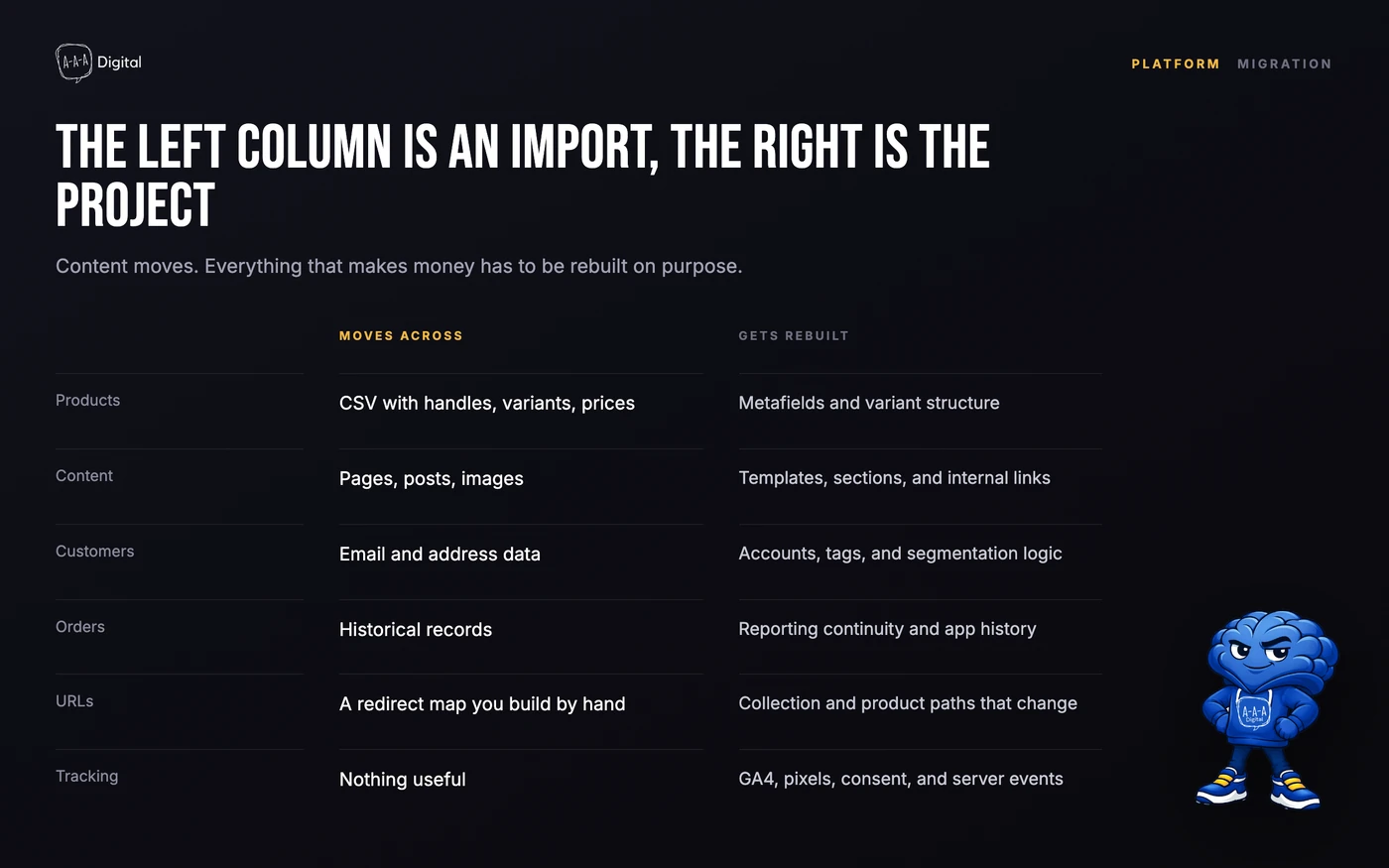
If you start on Wix and outgrow it, the migration is not a button. Here is what actually moves and what gets rebuilt.
URLs. Wix product pages and blog posts live under paths like /product-page/ and /post/. On Shopify they will not. Every indexed URL needs a redirect, and every redirect needs a destination that matches the old page's intent.
Content. Product data exports as CSV, imperfectly. Pages, sections, and layout do not export at all. They get rebuilt in a theme. A twenty-page site is a week of work before anyone touches SEO.
Customer accounts and order history. Customers can be imported. Passwords cannot, so buyers will have to reset. Order history comes across messily, and subscriptions usually have to be recreated.
Reviews and app data. Reviews collected in a Wix app often cannot be exported in a format another platform accepts. Losing three years of reviews costs conversion, and there is no clean fix.
Tracking and ad history. You can keep the same analytics property, but pixels, conversion events, and audience definitions get rebuilt. Expect a few weeks of degraded optimization while the ad platforms relearn. Budget for it in the quarter you switch, not after.
Backlinks. Every external link pointing at an old URL either redirects or dies. The redirect map is the difference between keeping that equity and donating it.
None of this is a reason to avoid Wix. It is a reason to decide with your eyes open, and to plan the migration before you need it rather than during your best month.
How to migrate without losing SEO
We have run this process enough times to know the order matters. The full version is in our Shopify migration guide; the short version:
- Crawl the current site and export every URL, including ones only in the sitemap and ones only in Analytics. Traffic data decides which pages get priority.
- Build a one-to-one redirect map. No blanket redirect to the homepage. A dead product page should go to the closest equivalent product or collection, not the front door.
- Rebuild content before launch, not after. Same titles, same H1s, same core copy where it ranks. Improving copy is fine; deleting it is not.
- Carry the technical layer across. Canonicals, structured data, internal links, image alt text, and meta descriptions.
- Keep Search Console and Analytics continuity. Verify the new property, submit the new sitemap, and keep the old property live for comparison.
- Launch the whole catalog, not a subset. Partial launches create soft-404s and duplicate paths that take months to clean up.
- Watch for 90 days. Compare clicks, impressions, and revenue by landing page weekly. Most migration damage is visible in week two and fixable in week three.
Our replatforming SEO checklist goes deeper on the redirect map and the pre-launch audit. If you would rather not run it yourself, that is the work we do for clients.
FAQ
Is Wix good enough for a small online store? Yes, for a small catalog in one market with modest traffic. The problems start when SKUs, markets, or integrations multiply.
Is Shopify better for SEO than Wix? Not automatically. Shopify gives you more control over markup and structure, which matters at scale and during a migration. Wix can rank fine for a small site with good content.
Can I move my Wix store to Shopify myself? Products and customers can be exported. Pages, design, reviews, and subscriptions need rebuilding, and the redirect map takes real care. DIY is possible for a small catalog; it is a bad idea mid-season.
Does Shopify charge transaction fees on top of payment processing? Shopify adds a fee when you use a gateway other than Shopify Payments, on top of that gateway's own processing cost. Rates change, so check the current pricing page for your region.
How long does a Wix to Shopify migration take? Two to four weeks for a small catalog with a clean redirect map, longer if the content needs rebuilding or you are carrying subscriptions and B2B accounts.
If you are on Wix and the catalog is starting to hurt, the useful conversation is not "which platform" but "what does switching cost and when should we do it". Book a free strategy call and we will map the switch before you commit to a date, or read how our Shopify migration service runs it end to end.
